 TrickExprt Android Apps, Games, Software & Tech Guides

Last updated: 22 November 2026
Retrolife Life Simulator download Android Pakistan players are looking for is simple: the game is free on Google Play, it works fully offline, it has no ads, and it needs no account. Install it, pick a country and a birth year between 1950 and 2010, and live a whole life one year at a time — through real history, with real news, real prices and real money from the era you are living in. Retrolife: Life Simulator launched on 9 November 2026, the 37th anniversary of the fall of the Berlin Wall, and it is made by solo developer Roman Koropets. This Retrolife Life Simulator download Android Pakistan guide covers everything before you install it: what the game is, its features, how to play, the best choices for a good life, system requirements, and the questions new players ask most.
About Retrolife: Life Simulator
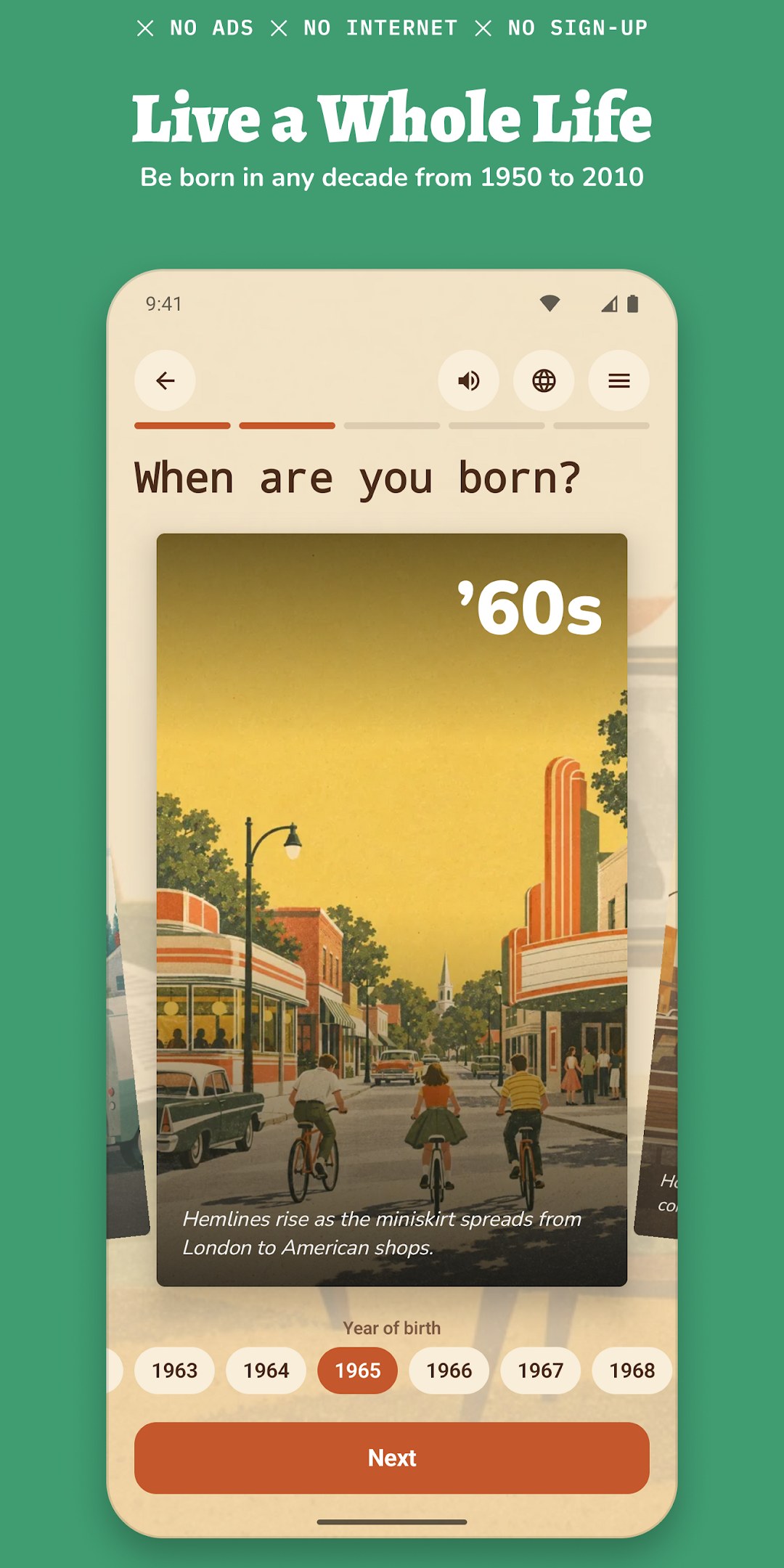
Retrolife: Life Simulator is a text-based life simulator set in real history. That one sentence is what makes it different from almost every other life game on Google Play. Most life simulators put you in a made-up world with made-up money and made-up events. Retrolife puts you in the real 1950s, 60s, 70s, 80s and 90s of four real places: the USA, West Germany, East Germany and the Soviet Union (later Russia). You are born in any year from 1950 to 2010, and you live your life one year at a time, from your first day to your last. Every year is a turn. Every turn brings the real news of that year, with an illustration, and every choice you make is yours.
The release date was chosen on purpose. The game came out on 9 November 2026, exactly 37 years after the Berlin Wall fell on the night of 9 November 1989. In the game, that night plays out differently depending on where you live and how old you are: a teenager in East Berlin can sneak out to the border or stay home and watch it on television, an adult has to be at work at six in the morning, and a child in the West watches the grown-ups cheer at the screen. That is the whole idea of Retrolife in one scene — the same history, a different life.
A Retrolife Life Simulator download Android Pakistan players install today gets a complete game, not a demo. Every country and every decade can be played without paying. There are no ads, no account to create, and the game works completely offline, without Wi-Fi or mobile data. Premium exists, but it is a one-time purchase of $5.99 in the US — not a subscription — and it only adds conveniences: no waiting between years, a choice of family wealth and character, rewinding a year, and using the look of any decade. The full life is free. The same facts are on the developer’s official press kit, which also says its pictures and texts are free to use in articles about Retrolife.
Quick facts
| Detail | Verified information |
|---|---|
| Game | Retrolife: Life Simulator |
| Developer | Roman Koropets (solo developer) |
| Price | Free; Premium is a one-time purchase ($5.99 in the US), no subscription |
| Ads | None — no ads, no account needed |
| Internet | Not needed — plays fully offline |
| Google Play rating | 4.6 stars from 573 ratings (live Play Store listing, checked 22 Nov 2026) |
| Google Play installs | 10,000+ (third-party tracker figure, 17 Nov 2026) |
| Content | 1,700+ life events, 39 careers |
| Countries | USA, West Germany, East Germany, Soviet Union (later Russia) |
| Birth years | 1950–2010; life continues into the 2060s |
| Languages | English, German, Russian, Spanish, Portuguese, French, Indonesian |
| Age guidance | 13+ (official press kit); listing notes romance, minor crime, alcohol and tobacco |
| Released on Google Play and App Store | 9 November 2026 |
| Latest version | 1.1.1, updated 17 November 2026 (third-party tracker) |
| Download size | Not stated on the listing excerpt we checked — a text game, so expect a small install; check the listing on your phone |
Key Features of Retrolife: Life Simulator
A real life in real decades
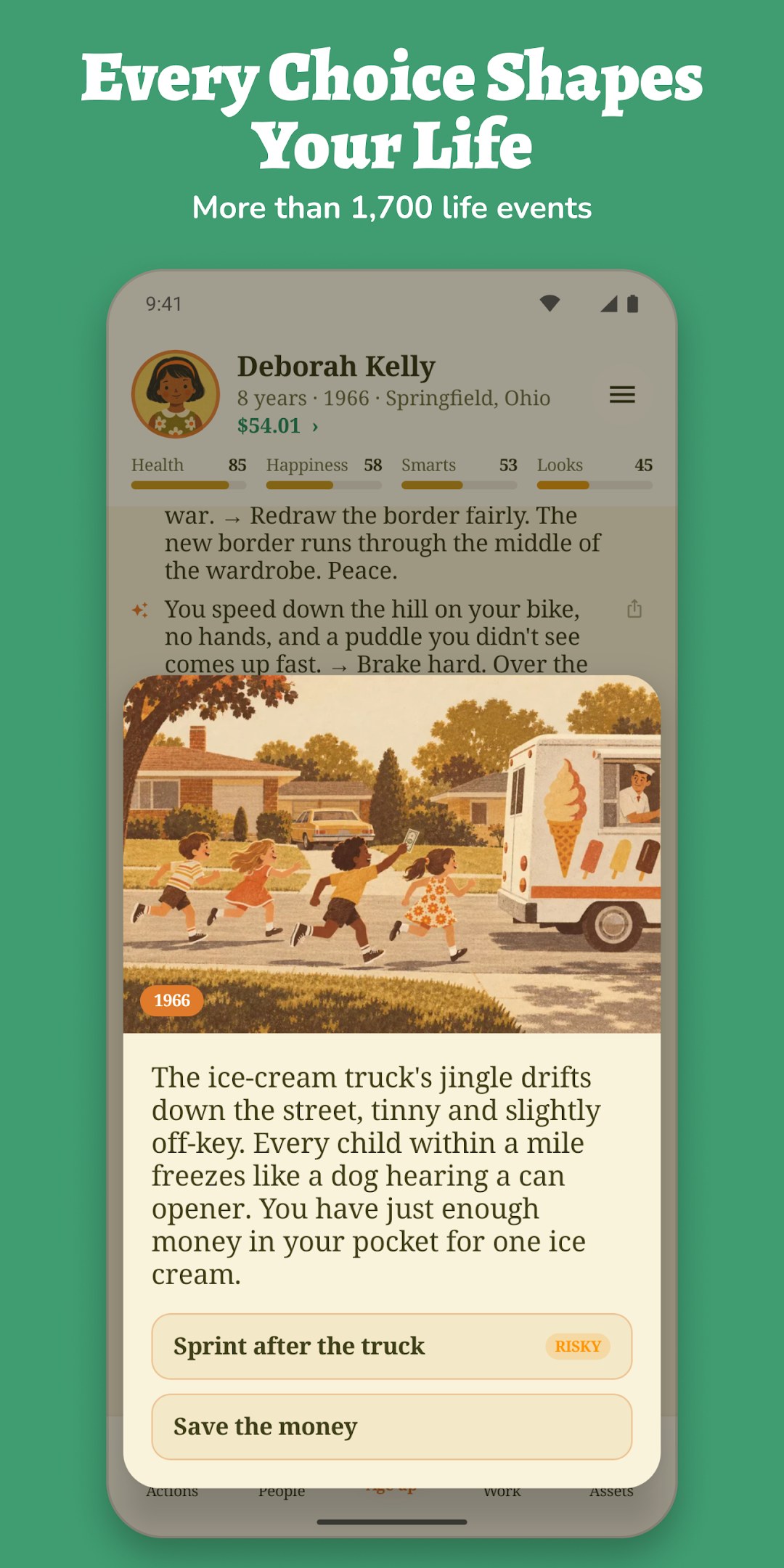
Every year in Retrolife opens with real news and an illustration from that year, and everyday life reflects your country and era. School, work, prices, housing and even the money in your pocket change with the decade. A child born in the USA in 1965 lives a very different life from a child born in the USSR in the same year, and both are different again from someone born in East Germany in 1985. The game has 22 Game Center achievements on iPhone, and the same life-sim structure on Android.
1,700+ life events and 39 careers
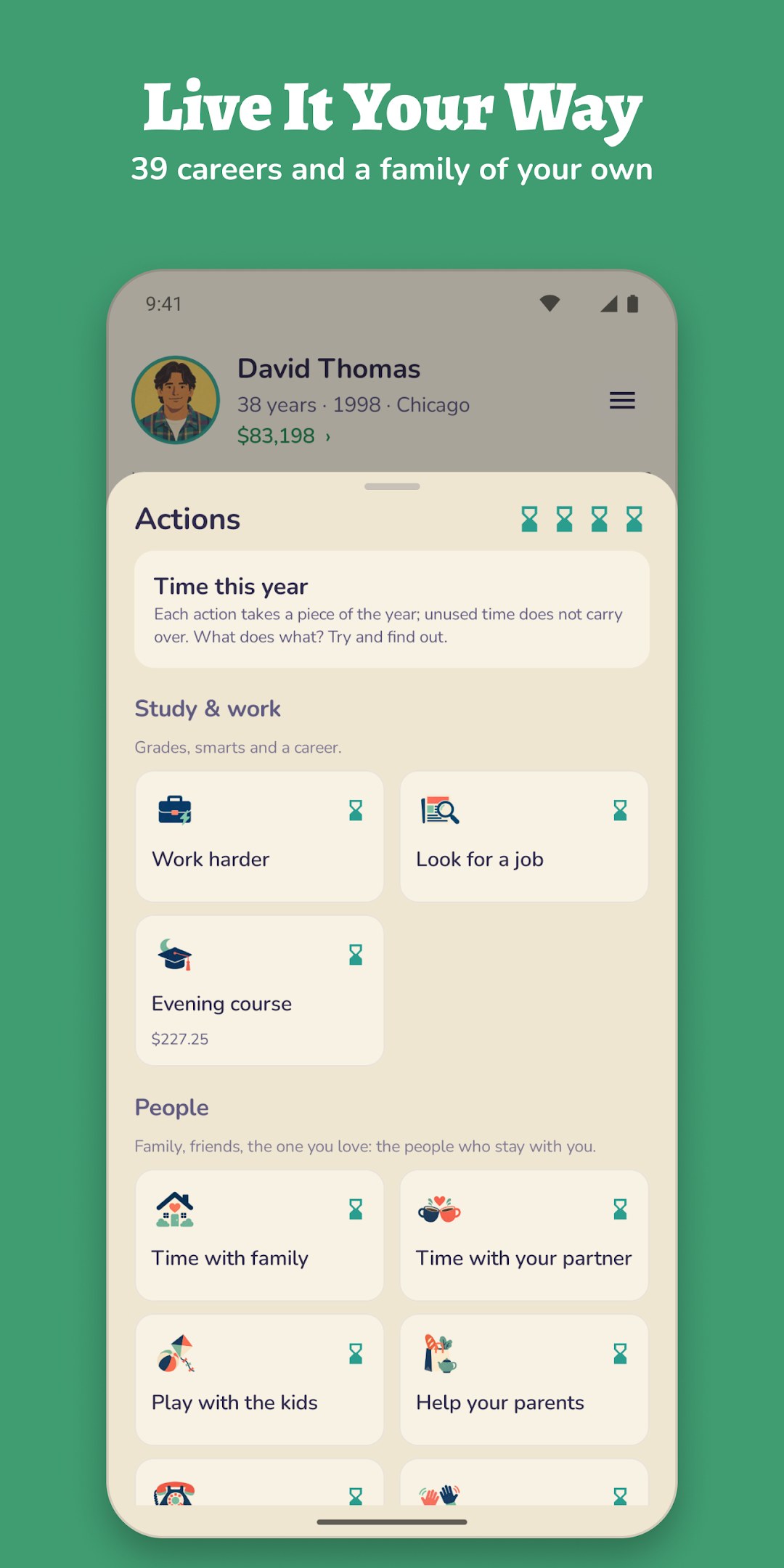
The official listing promises more than 1,700 life events and 39 careers. Each event puts a real decision in front of you, and each decision changes your health, your money and the people close to you. You go to school, serve in the army or do alternative service, study at college or a trade school, start working, fall in love, raise children and retire. Each of the 39 careers has its own ladder to climb, step by step, from the first job to the last. Buy a home with a mortgage, or join a housing cooperative in the USSR — the housing system itself changes with the country.
Family tree and dynasty
When a life ends, an heir carries on the family line. You play one generation after another, grow your family tree and watch your dynasty move through the decades, from grandparents born in the 1950s to grandchildren who grow up in the future. Every finished life leaves a yearbook in the family album. There is also an era passport with a stamp for every life you live to the end, a tear-off calendar with a page for every day you play, and postcards to share your story.
Three difficulty levels
Choose Easy, Normal or Harsh difficulty before you start a life. On Easy, work pays better and setbacks hurt less. On Harsh, illness and money losses hit harder and there are no rewinds. The difficulty you pick changes how forgiving the game is when bad luck strikes — and in a game about a whole life, bad luck always strikes sooner or later.
Random life and Life of the Day
You can start a Random life, where country, year and fate are picked for you, or try Today’s start — the same start for every player that day, so you can compare your life with friends. You can also set a life goal, take on the challenge of the week, and follow your ups and downs on the life chart. A life code lets you share a life with a friend so they can start the same life and compare.
Retro risograph art and decade music
Retrolife looks different from other life games. It uses retro risograph-style art — grainy, print-like illustrations that change with the country and the decade — and music for every decade. The whole presentation is built to feel like the era you are living in.
Offline, no ads, no account
This is the feature that matters most for players in Pakistan. The game needs no internet after you install it, shows no ads at all, and never asks you to create an account. You can play it on the bus, on a flight, during load-shedding, or before sleep, with mobile data switched off. For a story game you play in short sessions over days and weeks, that matters more than graphics ever will.
How to Play Retrolife Life Simulator on Android
If you are new to life simulator games, here is how to play Retrolife Life Simulator in one short version: start a life, read the year, make your choice, and move to the next year. That is the whole loop, and it is also the whole game. Each year is one turn. The game shows you the news of that year, then an event from your character’s life, then two or more choices. You pick one. Your health, money, happiness and relationships shift. Then the next year begins.
Start a life
First, choose how to begin. A Random life picks your country, birth year and starting family for you — the best option for your first run, because it teaches you the game without any decisions up front. A custom life lets you pick the country and birth year yourself: the USA, West Germany, East Germany or the USSR, born any year from 1950 to 2010. Today’s start gives every player the same starting life for that day. Pick a difficulty — Easy for your first life, Normal once you know the systems, Harsh when you want a real challenge — and set a life goal if you want one.
Childhood and school
The early years are mostly about your family and school. You cannot earn money yet, but the choices you make as a child and teenager shape the adult you become: studying hard opens the door to college and the better-paying of the 39 careers, while skipping school closes it. Pay attention to the events in these years, because the game remembers them. A childhood choice can still matter forty years later.
Army, college or trade school
As a teenager you face the first big fork in the road. Depending on your country, you may serve in the army or do alternative service. Then comes the choice between college, trade school, or going straight to work. College costs time and, in some countries and eras, money — but it unlocks the higher rungs of the career ladder. Trade school is faster and gets you earning sooner. Going straight to work earns money immediately but caps how far you can climb. There is no single right answer; the right answer depends on the life you want and the country you are living in.
Work and the career ladder
Each of the 39 careers has a ladder: you start at the bottom and climb step by step, from the first job to the last. Promotions depend on your choices, your education and, frankly, some luck — just like real life. Your salary is paid in the money of the year: dollars in the USA, Deutsche Marks in West Germany, East German marks in the East, rubles in the USSR, and euros later on. Watching your pay change currency when the era changes is one of the small details that makes Retrolife feel real.
Love, family and the dynasty
Falling in love, getting married and raising children are choices, not requirements. A partner changes your household income and your daily life; children change your expenses and your priorities. When your character’s life ends, an heir takes over and the family line continues into a new decade.
Money, homes and retirement
Money in Retrolife is about the long run. You earn a salary, pay for a home — a mortgage in the West, a housing cooperative in the USSR — and watch prices change with the era. Saving early matters, because the same event that is a small problem at 30 can be a disaster at 60.
Retrolife Life Simulator Download Android Pakistan: Step-by-Step Install Guide
This is the only safe way to get the game: the official Google Play Store. A Retrolife Life Simulator download Android Pakistan players do from Google Play is free, receives updates, and is the version the developer supports. Follow these steps.
Step 1: Check your connection and storage
Connect to Wi-Fi if you can, and make sure your phone has some free storage. The listing does not state an exact download size in the excerpt we checked, but this is a text game with illustrations, not a 3D game — expect a small install, far smaller than a battle royale or a racing game. Freeing up a few hundred megabytes is more than enough.
Step 2: Open the Google Play Store
On your Android phone, open the Google Play Store app and sign in with your Google account if you are not signed in already. If the Play Store is not opening or downloads are stuck, our guide on how to fix Google Play download pending errors covers the most common fixes.
Step 3: Search for Retrolife: Life Simulator
Type “Retrolife: Life Simulator” in the search bar. Check the listing carefully before installing: the developer should be Roman Koropets, the description should say “Real life simulator with life choices: career, family, dynasty. Offline, no ads.”, and the rating should be around 4.6 stars. If a listing shows a different developer, do not install it — a similarly named copy is not the real game.
Step 4: Tap Install
Tap Install and wait for the download to finish. Because the game is small and text-based, the install is quick on a normal connection. Do not switch off the phone or clear the Play Store during the download.
Step 5: Open the game and start your first life
After the Retrolife Life Simulator download Android Pakistan players complete, open the game from your home screen or the Play Store. There is no account to create and no long resource download inside the game. Pick a difficulty, choose a Random life for your first run or pick a country and birth year yourself, and your first year begins. The game saves your progress on your phone, so you can close it and continue the same life later.
Step 6: Play offline from then on
Once installed, Retrolife needs no internet at all. You can switch off mobile data and Wi-Fi and keep playing. That also means the game never interrupts you with ads and never asks you to log in — the whole life is on your phone.
If the game refuses to open after installation, the problem is usually a corrupted download or a system issue rather than the game itself. Uninstall it, restart your phone, and install it again from Google Play. Our guide on how to fix apps crashing on Android covers the most common fixes step by step.
Retrolife Life Simulator Best Choices Guide
There is no single winning path in Retrolife — that is the point of a life simulator. But the game’s own systems reward a few habits, and these are the best choices most players settle on after a few lives. Treat this as guidance from how the game works, not as official advice from the developer.
Study hard early, earn more later
Education is the highest-return choice in the early game. Studying hard at school opens college, and college opens the higher rungs of the 39 careers. A player who skips school earns money sooner but hits a ceiling that no amount of hard work later removes. If your life goal is wealth, school first is almost always the right call.
Pick a career ladder, then climb it
Do not change jobs every year. Each career has a ladder, and promotions come from staying in one career and moving up step by step. Jumping between careers resets your progress. Look at the salary in the money of the year, pick a ladder with room to grow, and stay on it. The difference between an entry-level job and the top of the same ladder is the difference between surviving and building wealth.
Save before you spend
A house is the biggest purchase in most lives. In the West, that means a mortgage; in the USSR, a housing cooperative. Buying too early, when your salary is still low, leaves you with nothing for the emergencies the game throws at you — illness, a broken car in later eras, a family crisis. Save first, buy when the payments are comfortable, and keep a cushion for bad years.
Balance health, money and relationships
Retrolife punishes one-sided lives. A character who only chases money and ignores health will not live long enough to enjoy it; a character who only chases happiness and ignores money will struggle when the bills come. The events that hurt most are the ones that hit the stat you neglected. Keep all three — health, money and people — in reasonable shape, and a bad year stays a bad year instead of becoming a ruined life.
Use Harsh difficulty only when you are ready
On Harsh, illness and money losses hit harder and there are no rewinds. That is a good challenge for your fifth life, not your first. Learn the game on Easy, where work pays better and setbacks hurt less, then move to Normal.
Let the heir continue the story
When a life ends, do not just start over from zero. Continue as the heir. The dynasty system is where Retrolife becomes more than a single life: your children inherit your money, your home and your family name, and they grow up in a later decade with a head start you earned. A family that starts poor in the 1950s can be comfortable by the 1990s if each generation builds on the last.
Retrolife Life Simulator Tips and Tricks for Pakistan Players
Play in short sessions
Retrolife is designed for short sessions — on the bus, on a flight, before sleep. One or two in-game years at a time is enough. Because the game is fully offline and saves on your phone, you never lose progress when you close it mid-life.
Read the year’s news before you choose
Each year opens with real news from that year. It is not decoration: the news tells you what world you are living in. A financial crisis year is a bad year to make a big purchase; a boom year is a good year to push for a promotion. Players who skip the news miss the context that makes the choices meaningful.
Try all four countries
Your first life should probably be Random, but your second, third and fourth lives should be the other countries. The USA, West Germany, East Germany and the USSR are genuinely different games: different money, different housing, different army service, different turning points. The Berlin Wall means something completely different in East Berlin than it does in Ohio.
Try a different birth decade each life
A life born in 1950 lives through the 60s, 70s and 80s as an adult. A life born in 1995 grows up with the internet and lives into the 2060s. The game covers 1950 to the 2060s, so a birth year is really a choice of which history you want to live through.
Use Life of the Day to compare with friends
Today’s start gives every player the same life for that day. Start it, live it, and compare your ending with a friend who played the same start. The life code system does the same thing for any life: share the code, your friend starts the same life, and you compare who lived it better.
Retrolife Life Simulator Download: System Requirements for Android
Retrolife is a text game with illustrations, so its demands are low. The listing excerpt we checked does not state a minimum Android version or a RAM figure, so the table below mixes the one verified fact — that it is a lightweight offline text game — with our guidance for a smooth experience. Treat the “recommended” column as our advice, not an official requirement.
| Requirement | What we know | Recommended for smooth play |
|---|---|---|
| Android version | Not stated on the listing excerpt | Android 8 or newer |
| RAM | Not stated | 2 GB or more (any modern phone) |
| Storage | Not stated; a text game with illustrations | A few hundred MB free |
| Internet | Not needed after install | None — plays fully offline |
| Account | None needed | No sign-in required |
Practical advice: because the game is offline and ad-free, it runs well on budget phones and older devices that struggle with heavy 3D games. If your phone can run the Play Store, it can almost certainly run Retrolife. If you want other light games for a low-end phone, see our list of the 15 best games under 50 MB for Android.
What’s New in Retrolife (2026)
The latest version we could verify is 1.1.1, updated on 17 November 2026, when the game also passed 10,000 installs on Google Play according to third-party store trackers. That is only eight days after launch — a fast start for a solo developer’s text game. The game launched on 9 November 2026, so version 1.1.1 is an early update, not a months-later patch.
We did not find detailed public patch notes for version 1.1.1 in the sources we checked — the official listing, the press kit and the launch coverage describe the game rather than listing per-version changes. If you want the current patch notes, check the “What’s new” section on the official Play Store listing, because updates arrive regularly in the first weeks after launch and the version on your phone may already be newer than 1.1.1 by the time you read this.
Retrolife Life Simulator Download — Frequently Asked Questions
How do I do a Retrolife Life Simulator download Android Pakistan players can use?
Open the Google Play Store on your Android phone, search for “Retrolife: Life Simulator”, check that the developer is Roman Koropets, and tap Install. The game is free, and it works fully offline after installation, so you do not need mobile data to play it — only to download it. Do not use any other website to get the game; the Play Store link in the download section below is the only official Android source in this guide.
Is Retrolife Life Simulator free to download on Android?
Yes. The Retrolife Life Simulator download Android Pakistan guide recommends is free on Google Play. Every country and every decade can be played without paying, and there are no ads. Premium is a one-time purchase of $5.99 in the US — not a subscription — and it adds conveniences only: no waiting between years, a choice of family wealth and character, rewinding a year three times per life, and using the look of any era. You can finish whole lives without ever paying.
Does Retrolife Life Simulator work offline?
Yes, completely. The game plays offline without Wi-Fi or mobile data, needs no account, and shows no ads. You only need the internet once, to download it from Google Play. After that, you can play on the bus, on a flight, or during load-shedding.
Is Retrolife like BitLife?
It is the same kind of game — a text-based life simulator where you make choices year by year from birth to death — but the setting is different. BitLife uses a made-up modern world; Retrolife uses real history. Your character lives through real decades in the USA, West Germany, East Germany or the USSR, with real news, real prices and era money like Deutsche Marks and rubles. If you like BitLife, Retrolife will feel familiar in the first five minutes and different after that.
What do I get with Premium?
Premium is a one-time purchase, not a subscription. According to the official listing and press kit, it removes the wait between years, lets you choose your family wealth and character, lets you rewind one year three times per life, and lets you use the look of any decade from the 1950s to the 2060s as the game’s visual style. It does not unlock countries or decades — those are free for everyone.
Which countries and birth years can I play?
Four countries: the USA, West Germany, East Germany and the Soviet Union (later Russia). You can be born in any year from 1950 to 2010, and your life continues past 2026 into future eras up to the 2060s. The same historical moment plays out differently depending on your country and your age — the fall of the Berlin Wall is the most famous example.
Is Retrolife safe for teenagers?
The official press kit lists the age guidance as 13+. The Play Store description says the game is for teens and adults, and notes that it contains romance, minor crime, alcohol and tobacco — but no real brands. It is a reading game about adult life, not a game designed for young children. Parents should know that the game deals with grown-up topics, even though it has no graphic content.
Download Retrolife Life Simulator on Android
This Retrolife Life Simulator download Android Pakistan link goes only to the official Google Play version — free, safe, offline, and always up to date:
Download Retrolife: Life Simulator on Google Play
After your Retrolife Life Simulator download Android Pakistan install is done, open the game, start a Random life for your first run, and read each year’s news before you choose. If you are new to life simulators, play on Easy first — work pays better and setbacks hurt less while you learn how a whole life adds up.
If you enjoy Android games, you may also like our guides on how to play GTA 5 on Android and how to fix Roblox not opening on Android.
More Android Games on TrickExprt
If you like life simulators and story games, these guides in the same Android Games series may also help:
- UnGodly Download: Play on Android (2026) — a new November 2026 release in the same games series.
- Lil’ Guardsman Download: Play on Android (2026) — a new November 2026 release in the same games series.
- Booster Pack Heroes Download: Play on Android (2026) — a new November 2026 release in the same games series.
- Pawmoku: Cats vs Dogs Download: Play on Android (2026) — a new November 2026 release in the same games series.
Sources
- Google Play Store — Retrolife: Life Simulator listing (Roman Koropets), checked 22 Nov 2026: rating 4.6 from 573 ratings, free, “Real life simulator with life choices: career, family, dynasty. Offline, no ads.”, package com.koropets.retrolife. https://play.google.com/store/apps/details?id=com.koropets.retrolife
- Droid Gamers — “Text-Based Retrolife: Life Simulator Lets You Relive the World As It Was During the 20th Century”, 10 Nov 2026: released 9 November 2026, free to play, no ads, works offline, 39 careers, 1,600+ life events. https://www.droidgamers.com/news/retrolife-life-simulator/
- Retrolife official press kit — release 9 November 2026 on the App Store and Google Play, 1,700+ life events, 39 careers, Premium one-time $5.99 (US), no ads, no account, works offline, age 13+, developer Roman Koropets (solo developer). https://www.retrolife.games/press/
- GamingOnPhone — “All Mobile Games (Android and iOS) releasing in November 2026”: Retrolife: Life Simulator, November 9, 2026, Google Play Store / App Store. https://gamingonphone.com/news/all-mobile-games-android-and-ios-releasing-in-november-2026/
- SportsDunia — “Upcoming Mobile Games Releasing in November 2026 (Android & iOS)”: Retrolife: Life Simulator, November 9. https://www.sportsdunia.com/gaming/upcoming-mobile-games-releasing-in-november-2026
- AppBrain — Retrolife: Life Simulator store statistics: version 1.1.1, last update 17 November 2026, 10,000+ installs. https://www.appbrain.com/app/retrolife-life-simulator/com.koropets.retrolife