 Trick Exprt TrickExprt – Tech Tips,Software Guides
Google Flow AI Video Generator for Android in 2026: Complete Guide
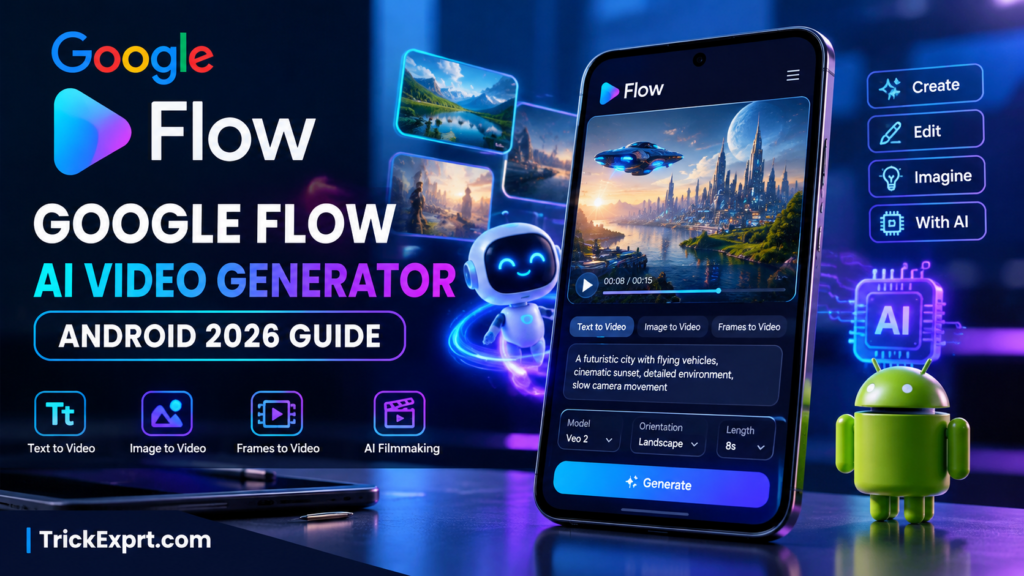
Want to create cinematic AI videos on your Android phone without learning complicated video editing software? Google Flow AI Video Generator makes it possible to turn written prompts, images, and creative ideas into AI-generated video clips.
Google Flow is an AI filmmaking tool powered by Google’s generative AI models. It is designed to help creators develop scenes, build visual stories, animate images, and experiment with different video concepts. In 2026, it is an option worth exploring for YouTube creators, social media users, bloggers, and beginners interested in AI video creation.
In this complete guide, you will learn how to use Google Flow AI Video Generator on Android, its main features, how to create videos from text and images, its free access options, system requirements, limitations, and official access links.
Quick Overview of Google Flow AI Video Generator
| Feature | Details |
|---|---|
| Tool name | Google Flow |
| Developer | |
| Platform | Android and web |
| Main purpose | AI video creation and filmmaking |
| Text-to-video | Available with supported models |
| Image-to-video | Available with supported workflows |
| Story creation | Create and develop scenes |
| Free access | Limited credits and feature availability |
| Internet | Required for cloud-based AI generation |
| Android requirement | Android 12 or above; minimum 2 GB RAM |
| Official website | labs.google/fx/tools/flow |
Feature availability, generation limits, and credit requirements can change. Check the official Flow interface before starting a project.
What Is Google Flow AI Video Generator?
Google Flow is an AI filmmaking platform that helps users create video clips and develop scenes using text instructions, images, reference materials, and other supported inputs.
Instead of recording every scene yourself, you can describe the scene you want to create and let the AI generate a visual result. You can also use supported image-based workflows to animate still images or develop scenes from reference frames.
For example, you could describe a futuristic city at sunset, a cinematic mountain landscape, a product advertisement, or a fantasy scene. Google Flow can use your instructions to generate a video, depending on the selected model and available features.
Google Flow is especially useful for people who want to experiment with AI filmmaking without investing in professional cameras or complicated editing software.
Official website: https://labs.google/fx/tools/flow
Key Features of Google Flow AI Video Generator in 2026
1. Text-to-Video AI Generation
Text-to-video is one of the most useful features for beginners.
You describe a scene in words, select a supported video generation model, and submit your prompt. The AI then attempts to create a video based on your description.
For example, you could enter:
“A cinematic aerial shot of a beautiful green village surrounded by mountains at sunrise, soft golden sunlight, realistic trees, gentle camera movement, highly detailed environment.”
The generated result will depend on your prompt, model, and available settings.
2. Image-to-Video Creation
Google Flow supports workflows that use images to help create video clips.
This feature is useful when you already have a picture and want to turn it into a moving scene. You might animate a landscape, create movement in a fantasy illustration, or develop a visual concept for a short film.
The exact image inputs and animation options depend on the selected generation workflow.
3. Frames-to-Video
Supported models can create video clips using a starting frame or a combination of starting and ending frames.
This approach gives you more control over how a scene begins and, where supported, how it ends.
It can be useful for cinematic transitions, product demonstrations, visual storytelling, and short animated sequences.
4. Ingredients and Reference Images
Google Flow supports reference-based workflows that help guide video generation.
Depending on the selected model, you can use reference images or other supported inputs to guide the visual appearance of a scene. This can be useful when developing a series of related clips for a story.
However, exact character consistency and scene continuity are not guaranteed in every generation.
5. AI Filmmaking and Scene Creation
Google Flow is designed for more than isolated video clips. Its filmmaking workflow can help creators develop scenes and organize visual storytelling projects.
You can experiment with different shots, build connected scenes, and refine your creative ideas.
This makes it useful for short films, concept videos, cinematic sequences, and creative projects.
6. Multiple Video Settings
Depending on the selected model, Google Flow may offer settings such as:
- Portrait or landscape orientation.
- Different video generation models.
- Different clip lengths.
- Multiple outputs.
- Reference inputs and frame-based generation.
Available options and credit costs vary by model. Always review the settings displayed before generating a clip.
How to Download and Use Google Flow on Android
If you want to use Google Flow on an Android phone, follow these steps.
Step 1: Check Your Android Device
Google’s Android guidance lists the following minimum requirements for the Google Flow app:
- Android 12 or above.
- At least 2 GB of RAM.
Meeting these requirements does not guarantee that every feature will work equally well on every device.
Step 2: Open the Official Google Flow Website
Visit the official website:
Sign in with your Google Account and follow the instructions shown for your account and region.
You can also consult Google’s official Android guide:
Step 3: Install the Official Android App
Where available, use Google’s official Google Flow app listing or the download option provided through Google’s official Flow help pages.
Check that the developer and listing are legitimate before installing anything. Avoid unofficial APK files and websites claiming to provide unlocked or unlimited versions of Google Flow.
If the app is unavailable on your device, check Google’s official website for supported access options.
Step 4: Start a New Project
Open the Google Flow app and sign in.
Tap an existing project or select + New to start a new one.
The available interface and project options may differ depending on your account and app version.
Step 5: Enter Your AI Video Prompt
Describe the scene you want to create.
A useful prompt should explain:
- Subject: What should appear in the video?
- Action: What should happen?
- Environment: Where does the scene take place?
- Lighting: What should the lighting look like?
- Camera movement: Should the camera pan, zoom, or move through the scene?
- Visual style: Should the result look realistic, cinematic, animated, or stylized?
Specific instructions can help the model understand your intended result.
Step 6: Select Video Generation
In the generation interface, select the generation type and choose Video.
Depending on the available model, you may be able to select orientation, output count, video length, and other settings.
Add reference images or frames if your selected workflow supports them.
Step 7: Generate Your Video
Review your prompt and generation settings, then tap the generation button.
Wait for the result. Processing time can vary depending on the model, demand, and complexity of the task.
If the result does not match your idea, refine the prompt and try again if you have enough credits.
Step 8: Review and Save Your Result
Preview the generated clip to check its visual quality and whether it matches your instructions.
Use the available options to save, download, or continue working with your result.
If you are creating content for YouTube Shorts or Instagram Reels, consider using a portrait-oriented workflow when supported.
Best Google Flow AI Video Prompts for Android
Good prompts can make a significant difference in AI video creation. Here are some examples you can adapt for your projects.
Prompt 1: Cinematic Nature Video
“A cinematic wide-angle shot of a peaceful mountain valley at sunrise, soft golden light shining through light morning mist, a river flowing between green hills, realistic natural textures, slow aerial camera movement, beautiful atmosphere, detailed landscape, cinematic color grading.”
Prompt 2: AI Village Story
“A cinematic rural village in the Punjab countryside during winter, a small traditional brick house, light morning fog, green fields in the distance, a young boy walking along a village path wearing warm traditional clothing, natural body movement, realistic environment, gentle camera tracking, warm cinematic lighting.”
Prompt 3: Futuristic City
“A futuristic city at night with glowing skyscrapers, flying vehicles moving between buildings, colorful neon lights reflecting on wet streets, cinematic aerial camera movement, realistic atmospheric effects, highly detailed science-fiction environment, dramatic lighting.”
Prompt 4: Product Advertisement
“A premium cinematic product advertisement featuring a modern smartphone placed on a reflective dark surface, elegant studio lighting, slow rotating camera movement, realistic glass and metal textures, subtle blue highlights, clean luxury aesthetic, sharp product details.”
Prompt 5: YouTube Shorts Background
“A cinematic vertical video of ocean waves crashing against dramatic coastal cliffs at sunset, golden sunlight reflecting on the water, slow-motion waves, smooth camera movement, realistic water details, peaceful atmosphere, high visual quality.”
Tip: English prompts are a useful starting point for many AI video tools. Google recommends English prompts for the best results, although Flow supports multiple languages and results may vary by language and prompt complexity.
Is Google Flow AI Video Generator Free in 2026?
Google Flow offers limited free access, but it is important to understand how its credit system works.
Google’s current Flow information lists 50 daily Flow credits for users without a paid subscription. However, video generation may be unavailable to non-subscribers during peak demand periods. Paid plans can include additional monthly credits and other benefits.
The number of credits required depends on the model and generation settings.
Before starting a project, check:
- How many credits your selected model requires.
- Whether your account can currently generate videos.
- Which features are available without a paid subscription.
- Whether additional credits or a subscription are necessary.
- Whether the tool is available in your country.
Free access should not be confused with unlimited video generation. Limits and plan details may change over time.
Official information: https://labs.google/fx/tools/flow
Google Flow AI Video Generator: Free vs Paid Access
| Feature | Free Access | Paid Plans |
|---|---|---|
| AI credits | Limited daily credits | Additional monthly credits, depending on plan |
| Video generation | Subject to availability and limits | Higher allowances, depending on plan |
| AI models | Access depends on current offering | Additional access may be available |
| Advanced capabilities | Limited by current plan | Varies by subscription |
| Unlimited generation | Not guaranteed | Not guaranteed |
Check the current plan comparison before subscribing because credit allowances, model access, and features can change.
Google Flow AI Video Generator: Pros and Cons
Pros
- Creates video clips from text prompts.
- Supports image-based and frame-based video workflows.
- Offers tools for cinematic storytelling.
- Provides a mobile app for supported Android devices.
- Includes limited free access options.
- Helps creators experiment with visual ideas without filming every scene.
Cons
- Video generation uses credits.
- Free video generation can be restricted during peak hours.
- Availability depends on your country and account eligibility.
- AI results may contain visual errors or unexpected movement.
- Consistent characters and scenes can require repeated refinement.
- Some features may require a paid plan.
Google Flow vs Traditional Android Video Editing Apps
Traditional editing apps focus on editing footage you already have. Google Flow focuses on AI-assisted generation and filmmaking.
| Capability | Google Flow | Traditional Video Editor |
|---|---|---|
| Generate scenes from text | Supported models | Usually requires existing footage or separate AI tools |
| Animate images | Supported workflows | Depends on app features |
| Trim and arrange recorded footage | Workflow-dependent | Usually a core feature |
| Detailed timeline editing | Not its main focus | Often available |
| AI filmmaking | Core purpose | Varies by app |
| Best use | Generating creative scenes | Assembling and polishing videos |
A practical workflow is to generate scenes in Google Flow, then use a dedicated video editor if you need detailed trimming, subtitles, transitions, or a complete multi-clip timeline.
Is Google Flow Better Than Other AI Video Generators?
That depends on your requirements.
Google Flow is worth considering if you want AI-generated scenes, image-based generation, and tools designed around filmmaking.
Other AI video tools may be more suitable if you need a particular animation style, a simple social media template, or an editor with a more extensive mobile timeline.
Compare tools based on output quality, credit costs, supported video lengths, available models, and your intended use rather than relying on marketing claims alone.
Common Google Flow Problems on Android and How to Fix Them
Google Flow Is Not Available in My Country
Check the official list of supported countries and territories. Availability of Google AI subscriptions does not automatically mean every Flow feature is available in the same location.
Official availability guide: https://support.google.com/flow/answer/16353544
Google Flow Is Not Generating Videos
Check your remaining credits, selected model, account eligibility, internet connection, and current service restrictions. Free video generation may be temporarily unavailable during peak demand.
Google Flow Is Not Working on My Phone
Confirm that your Android version meets the minimum requirement. Update the app if an update is available, restart your device, and check that your internet connection is stable.
Google Flow Is Asking for a Subscription
Some features and generation options may require a paid plan or additional credits. Review the current plan details and available free options before purchasing a subscription.
My AI Video Does Not Match the Prompt
Make your prompt more specific. Describe one clear action, a defined environment, the desired lighting, and a simple camera movement. Avoid including too many unrelated actions in a short clip.
Frequently Asked Questions (FAQs)
1. Can I use Google Flow AI Video Generator on Android?
Yes. Google provides a Flow app for supported Android devices. Availability depends on the supported region, device requirements, and account eligibility.
2. Is Google Flow free to use?
Google Flow offers limited free access with daily credits. Video generation can be restricted during peak hours, and some features or additional credits may require payment.
3. Can Google Flow generate videos from text?
Yes. Supported models allow users to describe a scene in a text prompt and generate a video clip.
4. Can I turn images into videos with Google Flow?
Yes. Google Flow supports image-based video workflows, although the available options depend on the selected model and feature.
5. What is the minimum Android version for Google Flow?
Google’s Android guidance lists Android 12 or above and a minimum of 2 GB RAM for the Flow app.
6. Do I need an internet connection to use Google Flow?
Yes. Its cloud-based AI generation features require an internet connection to process prompts and generate content.
7. Can I use Google Flow to make YouTube Shorts?
Yes. You can create suitable clips for short-form videos and use a portrait-oriented generation option when available. You may need a separate editor to assemble multiple clips and add captions.
8. Can Google Flow create realistic AI videos?
Google Flow uses generative models designed to create video content, including cinematic scenes. Results vary, and generated videos may contain visual inconsistencies.
9. Is Google Flow available in the UAE?
The UAE appears on Google’s supported-country list for Flow. However, access still depends on your account, age eligibility, current feature availability, and applicable plan requirements.
10. Where can I access Google Flow safely?
Use Google’s official website at https://labs.google/fx/tools/flow and its official Help Center. Avoid unofficial APK downloads claiming to unlock paid features.
Final Verdict: Is Google Flow Worth Trying in 2026?
Google Flow AI Video Generator is a useful option for Android users who want to explore AI filmmaking, create video clips from text prompts, animate images, and develop cinematic scenes.
Its biggest advantage is the ability to turn creative ideas into visual content without requiring traditional filming for every scene. However, credit limits, regional availability, and model-specific features are important considerations.
If you are a YouTube creator, blogger, or beginner interested in AI-generated videos, start with the available free access, test a few prompts, and check the output quality before committing to a paid subscription.
Ready to try it? Visit the official Google Flow website, explore its current features, and start experimenting with your first AI video.
Website: https://labs.google/fx/tools/flow