 TrickExprt Android Apps, Games, Software & Tech Guides

Last updated: 22 November 2026
Quick answer: The WhatsApp new features November 2026 update is the biggest WhatsApp refresh in months: group chats now hold up to 1,500 members, you can share a chat theme with everyone in a conversation, Android gets a first-party cloud backup with 2 GB of free storage on WhatsApp’s own servers, and the Android app gets a new floating bottom navigation bar. The WhatsApp new features November 2026 rollout started on 19 November 2026 and is reaching Android and iPhone in stages, so if you do not see an update yet, update WhatsApp from the Play Store or App Store and check again in a day or two.
November has been a busy month for WhatsApp. Instead of one headline change, the WhatsApp new features November 2026 update touches almost every part of the app — groups, themes, backups, navigation, reactions, the camera, and Status. Some of the changes are already rolling out, some are still in beta, and two are still in development and not live yet. This guide lists all ten, in plain words, with the dates each one started rolling out, who gets it first, and what to do on your own phone. Everything in this article comes from the verified facts listed in the Sources section at the end — nothing here is guessed, and anything that is still in development is labelled clearly as not live yet.

The 10 WhatsApp New Features November 2026 Brings, at a Glance
If you only have a minute, this table is the whole WhatsApp new features November 2026 update. The sections below explain each item in detail.
| # | Update | Who gets it | Status |
|---|---|---|---|
| 1 | Group chats up to 1,500 members (up from 1,024) | Android and iOS | Rolling out from 19 Nov 2026 |
| 2 | Shared chat themes | Android from 20 Nov 2026; iOS from 21 Nov 2026 | Rolling out |
| 3 | First-party cloud backup, 2 GB free (Android) | Android beta 2.26.46.4 | Beta |
| 4 | First-party backup provider as an iCloud alternative | iOS | Rolling out from 17 Nov 2026 |
| 5 | Floating bottom navigation bar | Android beta 2.26.45.5 | Beta |
| 6 | Sticker reactions (up to 20 per message) | Android beta | Beta |
| 7 | Zaps / Instants — ephemeral camera | Android and iOS (beta reports) | Beta |
| 8 | Status collages, photo stickers and music | Android and iOS | Rolling out |
| 9 | Smart message text actions | Android and iOS | Rolling out |
| 10 | Username picker (iOS) and Location option in Status composer | iOS | In development — NOT live yet |
Two things to keep in mind before you go looking for these WhatsApp new features November 2026. First, WhatsApp rolls features out in stages, so two phones on the same version can get the same feature on different days — that is normal, not a fault with your phone. Second, beta features only reach people on the beta version of the app; everyone else waits for the stable release. If a feature below says “beta”, that is why you may not see it yet.
1. Group Chats Now Hold Up to 1,500 Members
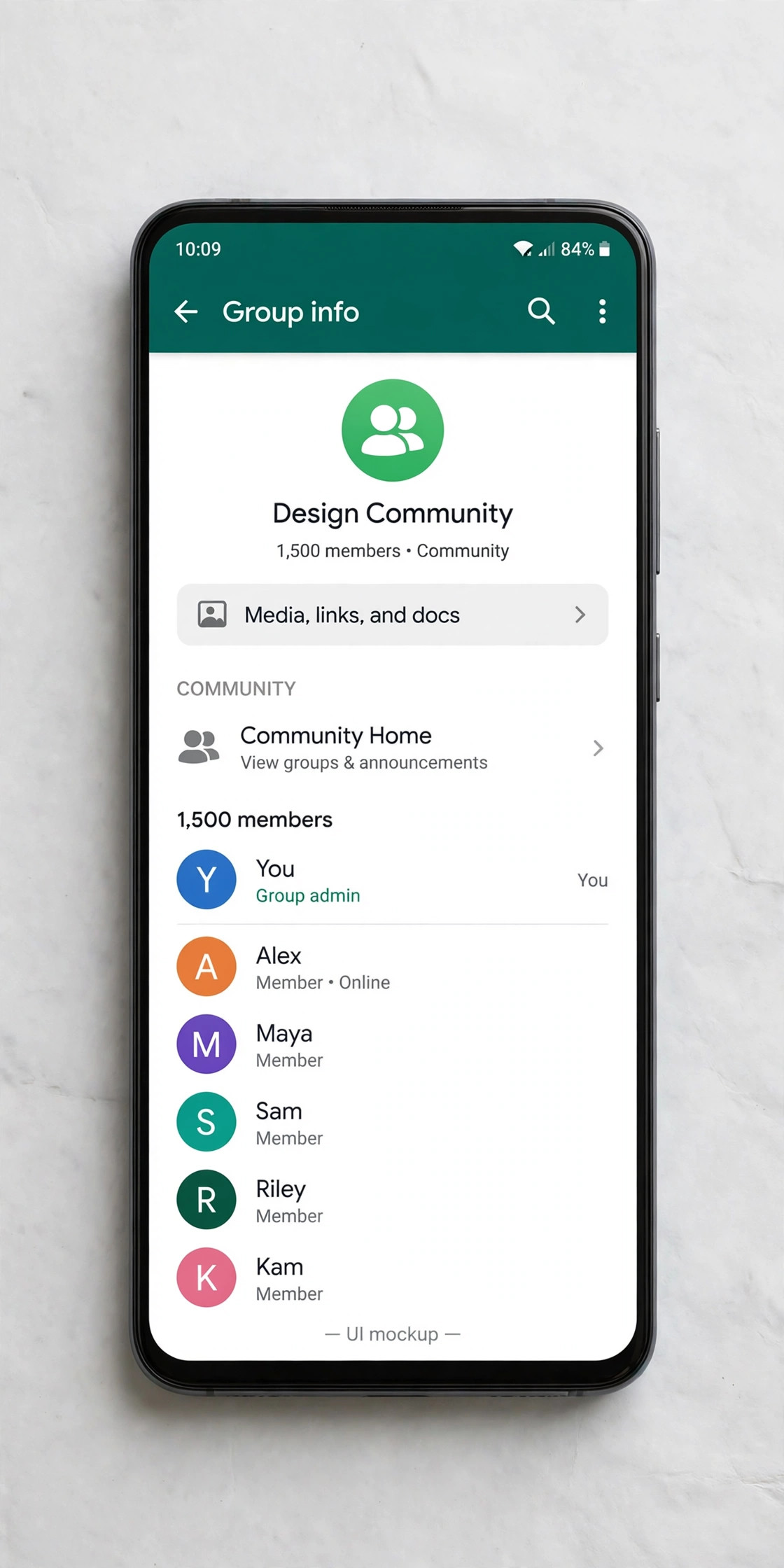
The headline change in the WhatsApp new features November 2026 update is the simplest one to explain: group chats now support up to 1,500 members, up from the previous limit of 1,024. The new limit started rolling out on 19 November 2026 on both Android and iOS.
That is 476 extra seats per group — roughly 46% more room. For most family and friends groups, which rarely pass a few dozen members, the change means nothing in practice. Where it matters is the big groups: school and university batches, housing societies, office teams, coaching classes, gaming clans, and community groups in India, Pakistan and the UAE, where groups regularly hit the old 1,024 ceiling and admins had to split people across a second group. A single group of 1,500 keeps the whole community in one place, with one announcement thread and one set of admins.
There is no setting to switch on for this WhatsApp new features November 2026 change. Once the rollout reaches your account, the new limit applies automatically — when you add members to a group, the app simply lets you go past 1,024 up to 1,500. If you are an admin of a large group and the app still stops you at 1,024, the rollout has not reached you yet; update WhatsApp and wait. Admins of big groups should still be careful: a 1,500-member group is harder to moderate than a small one, so use the admin tools — approve new members, restrict who can send messages in announcement-style groups, and keep a second admin in place so one person is not doing all the work.
2. Shared Chat Themes — One Look for the Whole Conversation
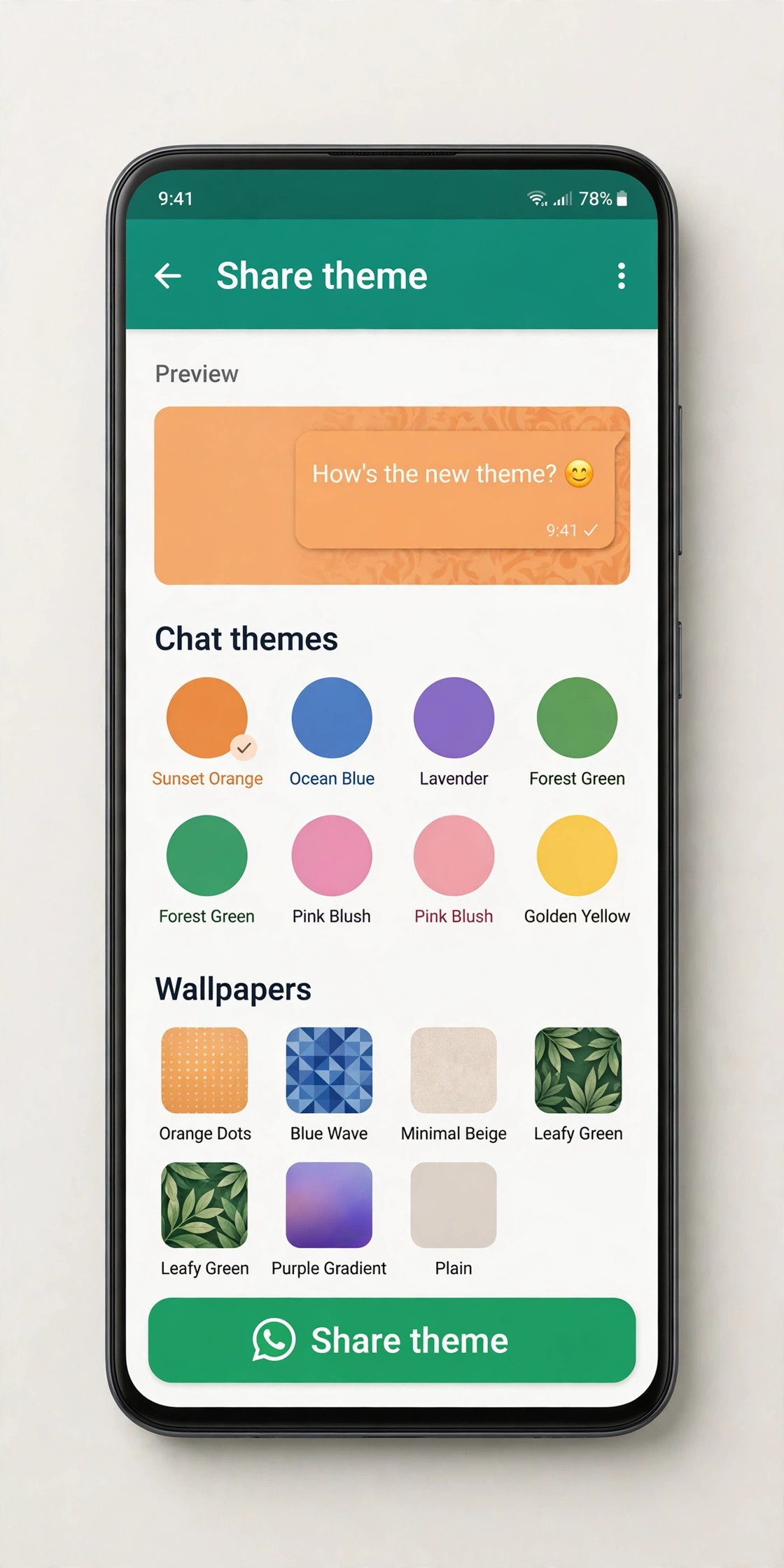
Chat themes are not new, but sharing them is. With the WhatsApp new features November 2026 update, you can share a chat theme with everyone in a conversation — so the theme and wallpaper you pick can be synced and shared with the other person or the whole group, instead of living only on your own phone.
Shared chat themes, one of the biggest WhatsApp new features November 2026, started rolling out on Android on 20 November 2026 and on iOS on 21 November 2026. In practice this means a couple, a family group or a friends group can agree on one look — a warm colour, a shared wallpaper — and everyone sees the same chat. It is a small, fun change, but it is the kind of thing people notice immediately because the chat screen is where you spend most of your time in the app.
To try this WhatsApp new features November 2026 addition once it reaches you, open a chat, open the chat settings, and look for the theme option — the shared theme is applied from there and offered to everyone in the conversation. If the option is not there yet, your account is still waiting for the rollout. And if you share a phone with family or use WhatsApp for work, remember that a shared theme changes how the chat looks for the other people too — pick something everyone can live with, and keep the text readable. A busy wallpaper behind small text is the fastest way to make a chat harder to read.
3. First-Party Cloud Backup on Android — 2 GB Free on WhatsApp’s Own Servers
This is the most practical change in the WhatsApp new features November 2026 update, and the one that will save real money for some users. WhatsApp is introducing its own backup storage on Android: a first-party cloud backup, currently in beta version 2.26.46.4, with 2 GB of free storage on WhatsApp’s own servers, as an alternative to Google Drive.
Until now, Android users backed up their chats to Google Drive, which meant the backup ate into the same Google storage that holds your Gmail and Google Photos. If your Google storage was full, your WhatsApp backup could fail — and a failed backup is how people lose years of chats when they switch phones. The new option moves the backup onto WhatsApp’s own servers instead, with 2 GB free. Two gigabytes covers chat history and photos for most people; heavy video collectors will still need to think about size, but for the average user it removes the most common reason backups fail.
A few honest limits on this WhatsApp new features November 2026 backup option. First, this is in beta (version 2.26.46.4), so it is not on every Android phone yet — beta testers get it first, and the stable release follows. Second, the verified fact about this WhatsApp new features November 2026 backup is the 2 GB free tier on WhatsApp’s own servers; anything beyond that — whether there will be paid tiers, and what they cost — has not been verified, so this article does not claim it. Third, this is a new backup option, not a replacement that deletes your old backups: your existing Google Drive backup is not affected by the new option appearing. One more limit worth knowing: a backup stored on WhatsApp’s servers cannot be used to restore your chats on a different platform — if you switch from Android to iPhone or vice versa, use the built-in chat transfer feature instead.
This is also worth saying clearly because it is easy to confuse with a different problem: this section is about the new backup option, not about fixing a backup that is stuck. If your current backup is stuck or failing, that is a troubleshooting problem with its own fixes — storage space, connection, and account checks — and it is separate from the new feature described here.
4. First-Party Backup on iOS — an Alternative to iCloud
iPhone users get the same idea on their side in the WhatsApp new features November 2026 update. On iOS, a first-party backup provider is rolling out from 17 November 2026 as an alternative to iCloud. That means iPhone users will be able to back up their WhatsApp chats to WhatsApp’s own backup service instead of relying only on iCloud.
The problem this WhatsApp new features November 2026 backup solves is familiar to anyone with a 5 GB free iCloud plan: the free iCloud tier fills up fast, and once it is full, WhatsApp backups fail quietly in the background. An alternative backup provider gives iPhone users a second place to keep their chats safe. WABetaInfo reports the iOS free tier is also 2 GB of storage on WhatsApp’s own servers, with 100 GB for WhatsApp Plus subscribers — the same 2 GB free tier as on Android. Backups stored on WhatsApp’s servers are end-to-end encrypted by default, protected by a passkey or a 64-digit encryption key.
If you are on iPhone, the practical advice is the same as it has always been: check that your backup is actually running. Open WhatsApp, go to Settings, then Chats, then Chat Backup, and look at the date of the last successful backup. A backup dated weeks ago is a warning, whichever provider you use. When the new first-party option appears on your phone, you will be able to choose it from the same backup screen.
5. New Floating Bottom Navigation Bar on Android
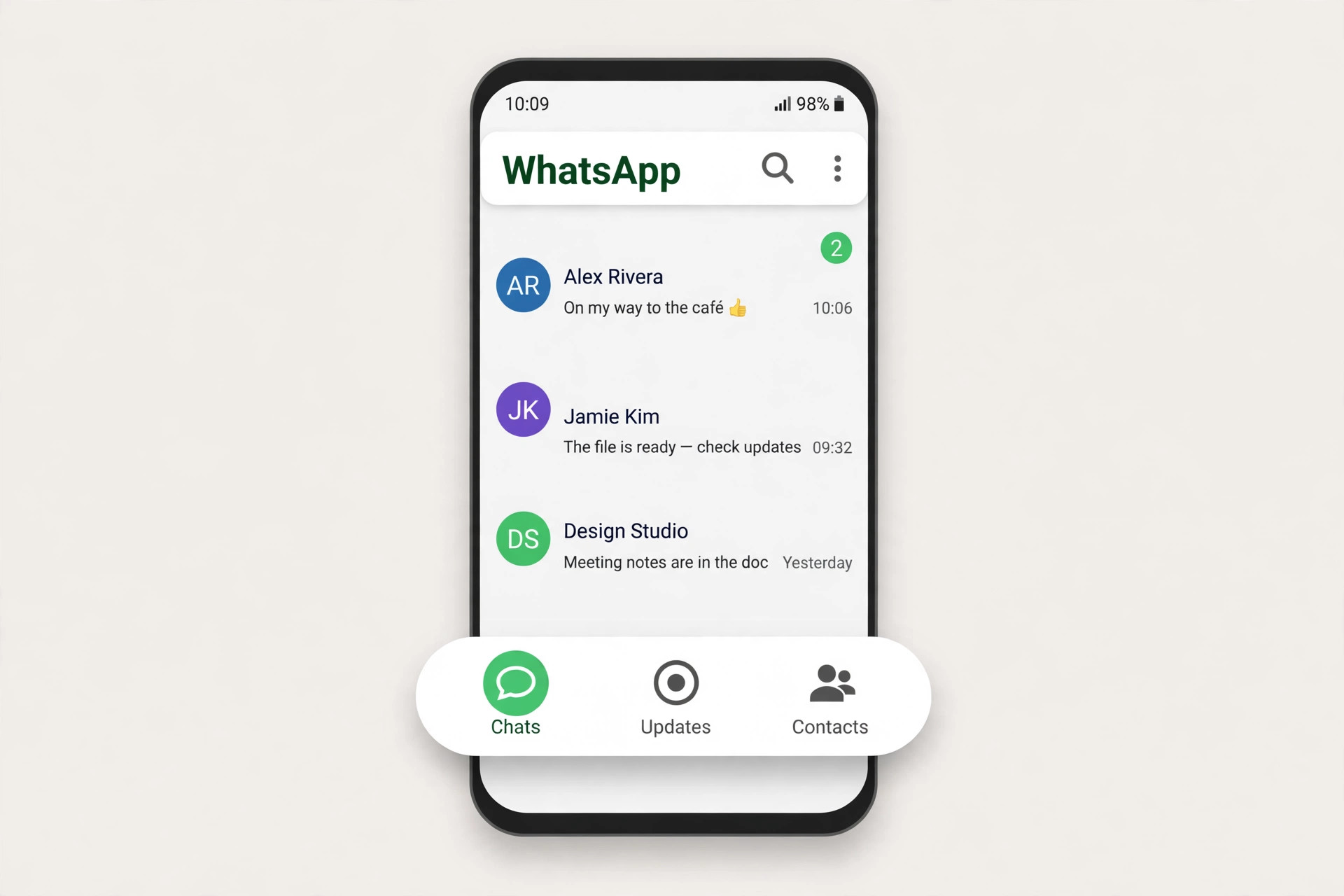
The Android app is getting its most visible redesign in the WhatsApp new features November 2026 update: a new floating bottom navigation bar, currently in beta version 2.26.45.5. Instead of sitting flush against the bottom edge of the screen, the bar detaches from the edge and floats, and while you scroll it shrinks into a compact pill so it takes up less space.
Two more details come with the redesign. The highlight on the active tab changes to a circular outline, so it is clearer at a glance which section you are in. And there is a dedicated Contacts tab, which replaces the Communities shortcut in the bar — with sorting by alphabetical order, birthdays, and recent activity, so finding a person to message gets faster.
This WhatsApp new features November 2026 redesign is a beta feature, so most Android users will not see it yet, and the design may still change before the stable release — beta interfaces are often adjusted after testing. If you do get it and you hate it at first, give it a few days: bottom-bar redesigns always feel strange for the first day and normal by the third. The practical benefit is real, though — a bar that shrinks while you scroll gives your chat list more room, and a Contacts tab with birthday sorting is genuinely useful for people who message dozens of contacts a day.
6. Sticker Reactions — React with Your Own Stickers
Reactions are getting more personal in the WhatsApp new features November 2026 update. WhatsApp is adding sticker reactions for messages and media in the Android beta: you can react with stickers from your own collection, instead of only the standard emoji reactions. Up to 20 reactions are allowed per message, and both animated and static stickers work.
For anyone who has built up a sticker collection — the good-morning stickers, the cricket celebration stickers, the reaction stickers your friends send — this turns that collection into a reaction tool. A funny sticker as a reaction says more than a thumbs-up, and it is faster than typing a reply in a busy group. The 20-reaction limit per message also matters for big groups: it stops a single message collecting an endless pile of reactions that push the chat down the screen.
Because this WhatsApp new features November 2026 feature is in the Android beta, iPhone users will need to wait for their turn, and the exact release date for everyone has not been verified. If you are on the Android beta and you see a sticker option when you long-press a message to react, that is this feature. Everyone else will get it when it moves to the stable release.
7. Zaps / Instants — a New Ephemeral Camera
Zaps — also called Instants — are a new ephemeral camera feature in the WhatsApp new features November 2026 update, similar in spirit to Instagram’s quick camera moments. A lightning-bolt shortcut opens a camera-only view, and photos and videos taken there are called Zaps. The key rule: no gallery uploads are allowed. You can only share something you capture in the moment, through that camera view.
The idea is spontaneity. Because you cannot pick an old photo from your gallery, a Zap is proof you are sharing something right now — a quick view of where you are, what you are doing, what is in front of you. That is the same logic behind other ephemeral camera features: the photo matters because it is fresh, not because it is polished.
This WhatsApp new features November 2026 camera is still in beta, and the verified facts do not include a stable release date, so do not go looking for the lightning-bolt shortcut and worry if it is not there. It is also worth noting what Zaps are not: they are not a replacement for normal photo sharing, and they are not the same as Status — your gallery, your normal camera, and Status all still work exactly as before. Zaps are an extra option for in-the-moment sharing, nothing more.
8. Status Gets Collages, Photo Stickers and Music
Status is getting its most creative update in a while as part of the WhatsApp new features November 2026 rollout. The new Status tools include collages, photo stickers, and music for Status updates — three ways to make a Status post richer without leaving WhatsApp.
Collages let you combine several photos into one Status frame, which is ideal for a day out, a family gathering, or a match — several moments in a single post instead of five separate ones. Photo stickers let you cut a photo out and place it as a sticker on top of another image or background. And music lets you add a soundtrack to a Status update, so a photo or short clip carries a song with it.
These are the kind of features that look small in a changelog and get used every day. If you post Status updates for friends and family, try the collage first — it is the most immediately useful of the three, because it solves the real problem of having too many good photos from one event and not wanting to flood everyone’s Status feed. As with the rest of the WhatsApp new features November 2026, Status features roll out in stages, so if your Status composer does not show them yet, update WhatsApp and check again.
9. Smart Message Text Actions — Tap a Number, Date or Address
The ninth of the WhatsApp new features November 2026 is easy to miss because it does not add a button or a new screen — it makes the text you already receive more useful. WhatsApp is adding smart message text actions that detect phone numbers, dates, addresses and email addresses inside a message and suggest shortcuts for them.
In practice, that means a phone number in a chat becomes something you can act on directly — call it, save it — instead of copying it out by hand. A date can suggest adding an event to your calendar. An address can suggest opening it in maps. An email address can suggest composing a message to it. The idea is to remove the copy-paste step that everyone does dozens of times a week: read the detail, leave WhatsApp, open another app, paste it in.
This WhatsApp new features November 2026 addition is a quiet quality-of-life change, and it is the one most likely to save you time without you ever noticing it working. It is rolling out as part of the November update, so it should appear on both Android and iOS as the rollout reaches your account. If you are the person in your family who gets asked to “save this number” or “note down this address” from a WhatsApp message, this one is for you.
10. In Development — Not Live Yet
The last two items in this list of WhatsApp new features November 2026 are important, but they need a clear label: they are in development and not live yet. Do not update your phone looking for them, and do not trust any video or post that claims to show you how to switch them on.
Username picker on iOS (in development). WhatsApp is working on a username picker for iOS, which would let people choose a username instead of sharing only a phone number. No release date for this WhatsApp new features November 2026 item has been verified, and no details of exactly how it will work have been confirmed in the verified facts for this article. It is a feature to watch, not a feature to use yet.
Dedicated Location option in the Status composer (in development). WhatsApp is also working on a dedicated Location option inside the Status composer for a future WhatsApp new features November 2026 release, so you could add a location to a Status update directly from the composer. Again, this is in development — it is not live, and no rollout date has been verified.
Why list features that are not live? Because “in development” is the honest status, and it stops you wasting time hunting for a setting that does not exist yet. When either of these ships, this WhatsApp new features November 2026 article’s update note will say so. Until then, treat them as coming soon, not as missing from your phone.
How to Get the WhatsApp New Features November 2026 Update on Your Phone
Most of the WhatsApp new features November 2026 need nothing more than an up-to-date app and a little patience, because rollouts happen on WhatsApp’s side as well as yours. Work through these steps in order:
Step 1: Update WhatsApp. On Android, open the Google Play Store, search for WhatsApp, and tap Update if one is available. On iPhone, open the App Store, search for WhatsApp, and tap Update. If there is no Update button, you are already on the newest version available to you — the rest is waiting for the rollout.
Step 2: Restart the app. Close WhatsApp completely and open it again. Rollout flags sometimes only apply when the app restarts, and this costs ten seconds.
Step 3: Check the specific feature. For groups, open a group and tap the group name to see the member limit. For themes, open a chat and look for the theme option in the chat settings. For the new navigation bar, just look at the bottom of the screen. If the WhatsApp new features November 2026 item you want is not there, it has not reached your account yet.
Step 4: Do not install modified WhatsApp versions. If a website or video promises to unlock these WhatsApp new features November 2026 early with a modified app — GBWhatsApp, WhatsApp Plus, or anything similar — ignore it. Modified versions are not made by WhatsApp, they can get your number banned, and they are a common source of malware. The scam pattern is the same one our guide to the Yalla Ludo scam and fake coins describes — a free offer that ends with a stolen account. A banned number is a much worse problem than waiting a few days for a rollout.
Step 5: If you want beta features early, join the beta properly. On Android, the official beta programme is through the Play Store listing for WhatsApp, where you can join if places are open. That is the only safe way to get beta features like the floating bar and sticker reactions early — and beta versions can be less stable, so only join if you are comfortable with that.
And one general point for anyone whose WhatsApp is misbehaving rather than merely missing a new feature: if the app crashes on open or refuses to start, that is a different problem with different fixes. Our guide on how to fix Roblox not opening on Android follows the same troubleshooting logic — clear the cache, check storage, reinstall — that applies to any misbehaving app, including WhatsApp. Similarly, if you are setting up a new phone to get these features, our guide on how to play GTA 5 on Android is a useful reminder to only download apps from official stores, never from random APK sites. And if you use AI tools on your phone, our guide to the Google Gemini AI app on Android shows how to get the official app safely — the same official-store rule applies to WhatsApp itself.
Which of the WhatsApp New Features November 2026 Updates Matter Most?
Not all ten WhatsApp new features November 2026 matter equally, and it is worth saying so plainly. Ranked by how much they change daily use:
Most useful for everyone in the WhatsApp new features November 2026 update: the 1,500-member groups and the shared chat themes. Groups affect millions of people directly, and themes change the screen you look at most. The smart text actions belong here too — small, but used constantly.
Most useful for people who back up: the first-party cloud backup in the WhatsApp new features November 2026 update on Android and the iCloud alternative on iOS. If your Google Drive or iCloud has ever been full, these two are the most valuable changes in the whole update.
Most fun among the WhatsApp new features November 2026: Status collages, photo stickers and music, plus sticker reactions and Zaps. These are the features you will actually play with — and the ones your friends will notice first.
Most interesting for the future: the username picker and the Location option in Status — but both are still in development, so they are the least useful today.
Most visible, most divisive: the floating bottom navigation bar. Some people will love the cleaner look; some will miss the old bar for a week. Either way, it is the change you will see every time you open the app.
For readers in India, Pakistan and Dubai, two of these land differently than they do elsewhere. Large groups are a bigger part of daily life here — family groups, school batches, community groups — so the 1,500-member limit solves a real, everyday frustration. And backup storage matters more where phones are often bought with less storage and free cloud tiers fill up fast, so the 2 GB free backup on WhatsApp’s own servers is worth checking the moment it arrives.
WhatsApp New Features November 2026: Frequently Asked Questions
When did the WhatsApp new features November 2026 update start rolling out?
The WhatsApp new features November 2026 rollout began in mid-November 2026: the iOS first-party backup option from 17 November, the 1,500-member groups from 19 November, shared chat themes on Android from 20 November and on iOS from 21 November. Beta features such as the floating bottom bar (Android beta 2.26.45.5) and the first-party Android backup (beta 2.26.46.4) are reaching beta users first, and the stable release follows. Rollouts happen in stages, so exact arrival on your phone varies.
Why can’t I see the new features on my phone?
Usually because the WhatsApp new features November 2026 rollout has not reached your account yet, or because the feature is still in beta and you are on the stable version. Update WhatsApp from the Play Store or App Store, restart the app, and check again in a day or two. Do not install modified WhatsApp versions to get features early — they can get your number banned.
Is the 2 GB free WhatsApp backup really free?
Yes — the verified fact is 2 GB of free storage on WhatsApp’s own servers for the new first-party backup on Android and on iOS, as an alternative to Google Drive or iCloud. What has not been verified is whether there will be paid tiers above 2 GB and what they would cost, so this article does not claim anything about that.
Do shared chat themes change the theme for everyone in the chat?
Yes, that is the point of this WhatsApp new features November 2026 addition: a shared theme is synced and shared with everyone in the conversation, rather than applying only on your own phone. If you share a theme, the other people in the chat will see it too.
Are Zaps the same as Status?
No. Zaps (also called Instants) are photos and videos taken through a lightning-bolt camera shortcut, and gallery uploads are not allowed — you can only share what you capture in the moment. Status is a separate feature with its own composer, and it is getting its own updates in this release: collages, photo stickers and music.
Is the username picker available yet?
No. The username picker on iOS is in development and not live yet. The same applies to the dedicated Location option in the Status composer. Neither has a verified release date, and this article will be updated when either one ships.
Conclusion
The WhatsApp new features November 2026 update is a wide one: 1,500-member groups, shared chat themes, a first-party backup with 2 GB free on Android and an iCloud alternative on iOS, a floating bottom navigation bar, sticker reactions, Zaps, better Status tools, and smart text actions — with a username picker and a Status Location option still in development. Of the WhatsApp new features November 2026, the ones worth acting on today are the groups, the themes, and the backup options; the beta features are worth waiting for; and the in-development features are worth knowing about but not hunting for.
Update WhatsApp, restart it, and check the features that matter to you. If one has not arrived yet, wait — rollouts reach everyone in stages, and a few days of patience is better than a modified app and a banned number. For more guides like this one, visit the TrickExprt homepage.
Sources
- WABetaInfo — WhatsApp beta news and feature reports (group limit, shared themes, backup, navigation bar, sticker reactions, Zaps, Status, username picker): https://wabetainfo.com/
- WABetaInfo — WhatsApp introduces cloud backup storage on Android and iOS: first-party backup with 2 GB free on WhatsApp’s own servers, 100 GB for WhatsApp Plus subscribers.
- TechBytes — “WhatsApp introduces a new bottom navigation bar on Android”: https://www.techbytes.app/posts/whatsapp-introduces-a-new-bottom-navigation-bar-on-android/