 TrickExprt Android Apps, Games, Software & Tech Guides
Last updated: 22 November 2026
Quick answer: The Instagram new features November 2026 rollout is the biggest single-month update Instagram has shipped in a while, and the headline change is simple: you can now edit a Story for 15 minutes after posting it, without losing views, likes or replies. Alongside that, Instagram added one-tap saving of songs to Apple Music, a cleaner photo-dump and Story design toolkit, a transparent location sticker, a tool that lets creators block or credit stolen Reels, Amazon affiliate links in Reels and feed posts, a standalone Direct messaging app being tested in two countries, and AI age checks rolling out worldwide. This guide walks through all 8 of the Instagram new features November 2026 brings, with the exact dates, who gets what, and how to try each one.
If you open Instagram every day — and most people in India, Pakistan and the UAE do — November has quietly changed how the app works. Some of these changes fix small daily annoyances, like a typo in a Story you only spot after posting. Others matter more to creators: stolen Reels can now be blocked or credited, and shopping links can now earn money directly inside Reels. And one change, the standalone Direct app, could eventually split Instagram’s messages away from the main app entirely.
One honest warning before the details: the Instagram new features November 2026 roll out gradually, so not every account gets everything on the same day. If a feature below is missing on your phone, it is probably still on its way to you — update the app, wait a few days, and check again. Availability may vary by account, country and device.
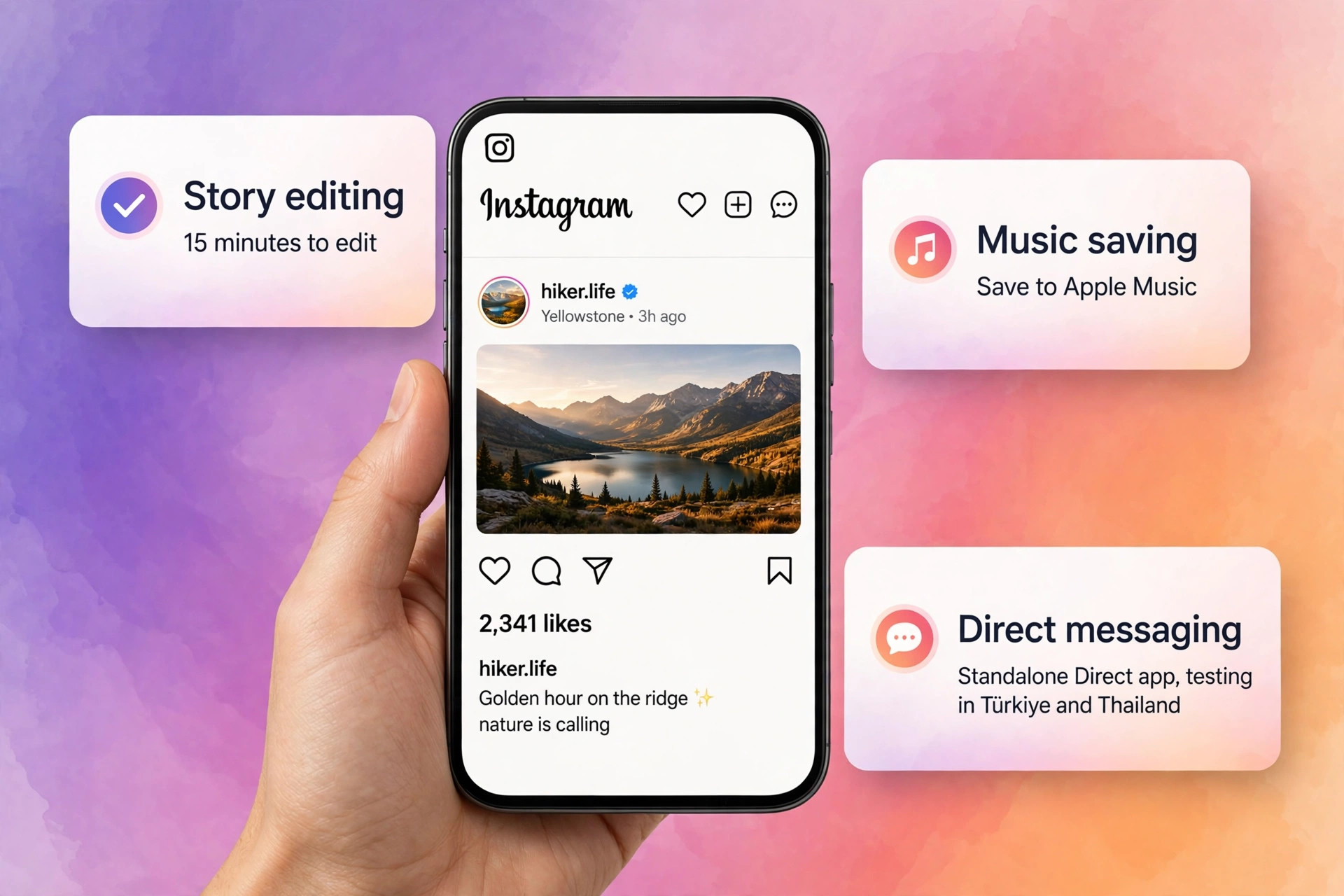
Instagram New Features November 2026 at a Glance
Here is the whole month in one table, so you can see what matters to you before reading the detail:
| # | Update | Status | Who it is for |
|---|---|---|---|
| 1 | Edit a Story for 15 minutes after posting | Live for everyone, 18 Nov 2026 | Everyone who posts Stories |
| 2 | Save songs to Apple Music | Live, 20 Nov 2026 | Apple Music users |
| 3 | Multi-select photo dumps, background picker, refreshed stickers | Rolling out from 18 Nov 2026 | Everyone who posts photos and Stories |
| 4 | Transparent location sticker | Rolling out from 18 Nov 2026 | Story creators |
| 5 | Block or credit stolen Reels | Live, 20 Nov 2026 | Reel creators |
| 6 | Amazon affiliate links in Reels and feed posts | Live, 20 Nov 2026 | Creators who earn from shopping links |
| 7 | Standalone Direct messaging app | Testing in Türkiye and Thailand from 17 Nov 2026 | Test users only, for now |
| 8 | AI age checks, worldwide rollout | Rolling out worldwide from 13 Nov 2026 | Teens, and parents of teens |
Story editing, the photo-dump and sticker upgrades and the transparent location sticker arrived on 18 November 2026, announced by Instagram head Adam Mosseri. Apple Music saving went live on 20 November 2026. The next two — Reels protection and affiliate links — followed on 20 November 2026. The Direct app test and the AI age checks were already under way earlier in the month. Taken together, that is the full set of Instagram new features November 2026 delivered. (A full month-by-month round-up of the changes is tracked at Geekout / Matt Navarra.)
1. Edit a Story for 15 Minutes After Posting
Of all the Instagram new features November 2026, this is the update most people will actually use, and it fixes one of Instagram’s oldest frustrations. Until now, a Story was final the moment you posted it. Spot a spelling mistake, pick the wrong song, or place a sticker badly, and your only choices were to live with it or delete the Story and post it again — losing every view, like and reply it had already collected.
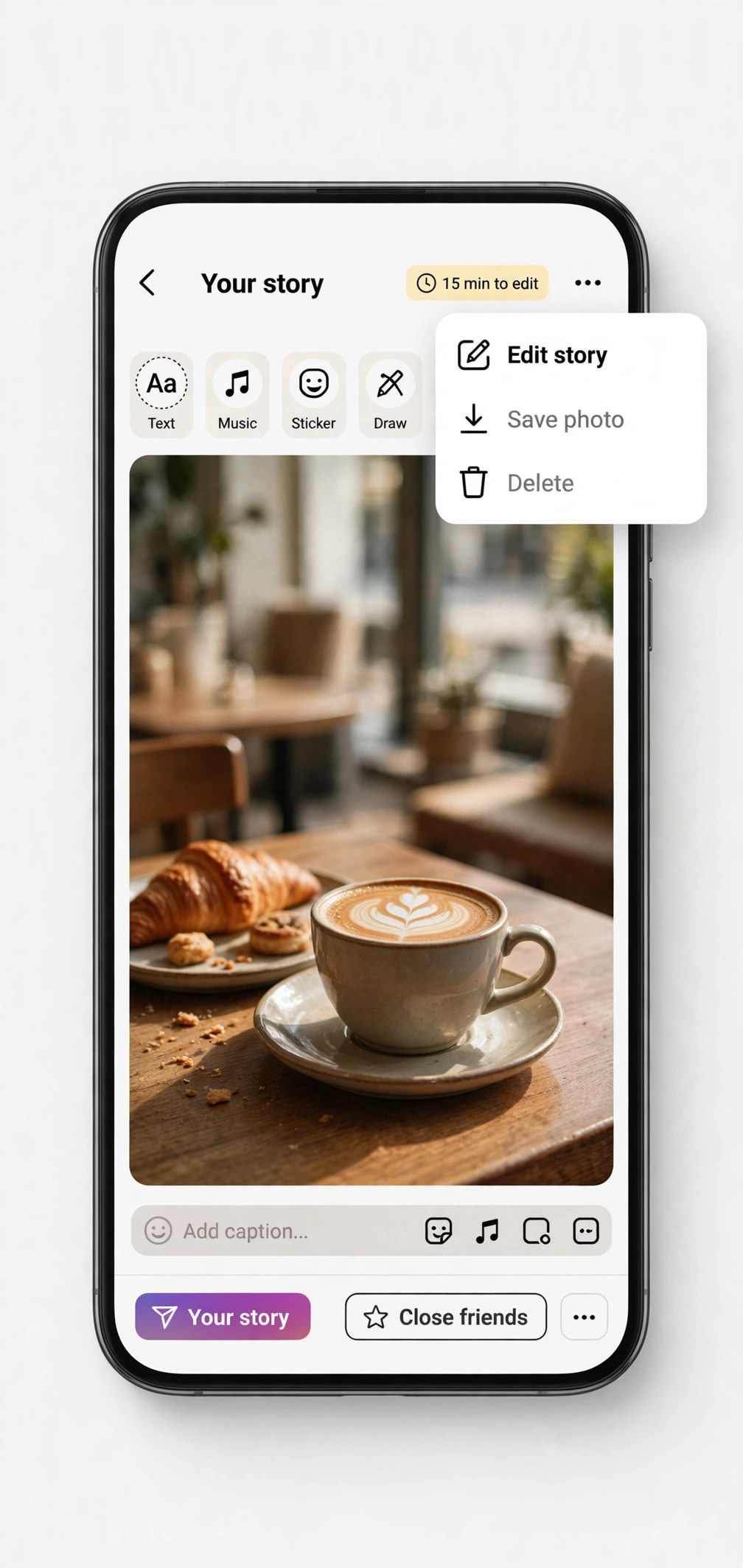
From 18 November 2026, that is no longer true. The Instagram new features November 2026 update lets you edit a Story for 15 minutes after posting it. You can change the text, swap the music, move or change stickers, and fix your drawings — and the Story keeps its views, likes and replies. Nothing is reset.
How to do it:
Step 1: Open your own Story, the one you just posted.
Step 2: Tap the three-dot menu (•••) on the Story.
Step 3: Tap Edit story.
Step 4: Make your changes — fix the text, change the music, adjust a sticker or a drawing — then save.
Viewers will see an “Edited” label on the Story, so the change is transparent rather than secret. That is a fair trade: you get to fix mistakes, and the people watching know the Story was changed after posting.
A few practical notes. The window is 15 minutes, not unlimited — after that, the edit option is gone, and the old delete-and-repost route is your only fix. So if you post Stories often, it is worth a quick re-read in the first few minutes, while you can still fix things. And the feature is live for everyone from 18 November 2026, according to the announcement by Adam Mosseri — if you do not see “Edit story” in the three-dot menu, update Instagram from the Play Store or App Store first, then check again.
For creators who post several Stories a day, this is a genuine quality-of-life change. A typo in a Story used to mean either embarrassment or lost engagement; now it means a ten-second fix. It also helps anyone posting in a second language, or posting quickly from an event — the two situations where typos are most likely.
2. Save Songs to Apple Music in One Tap
The second of the Instagram new features November 2026 is for music lovers, and it is a small change that removes a daily friction. You hear a song in a post or a Story, you like it — and until now, getting it into your own music library meant remembering the name, opening Apple Music, and searching for it yourself. Most of the time, that never happened.
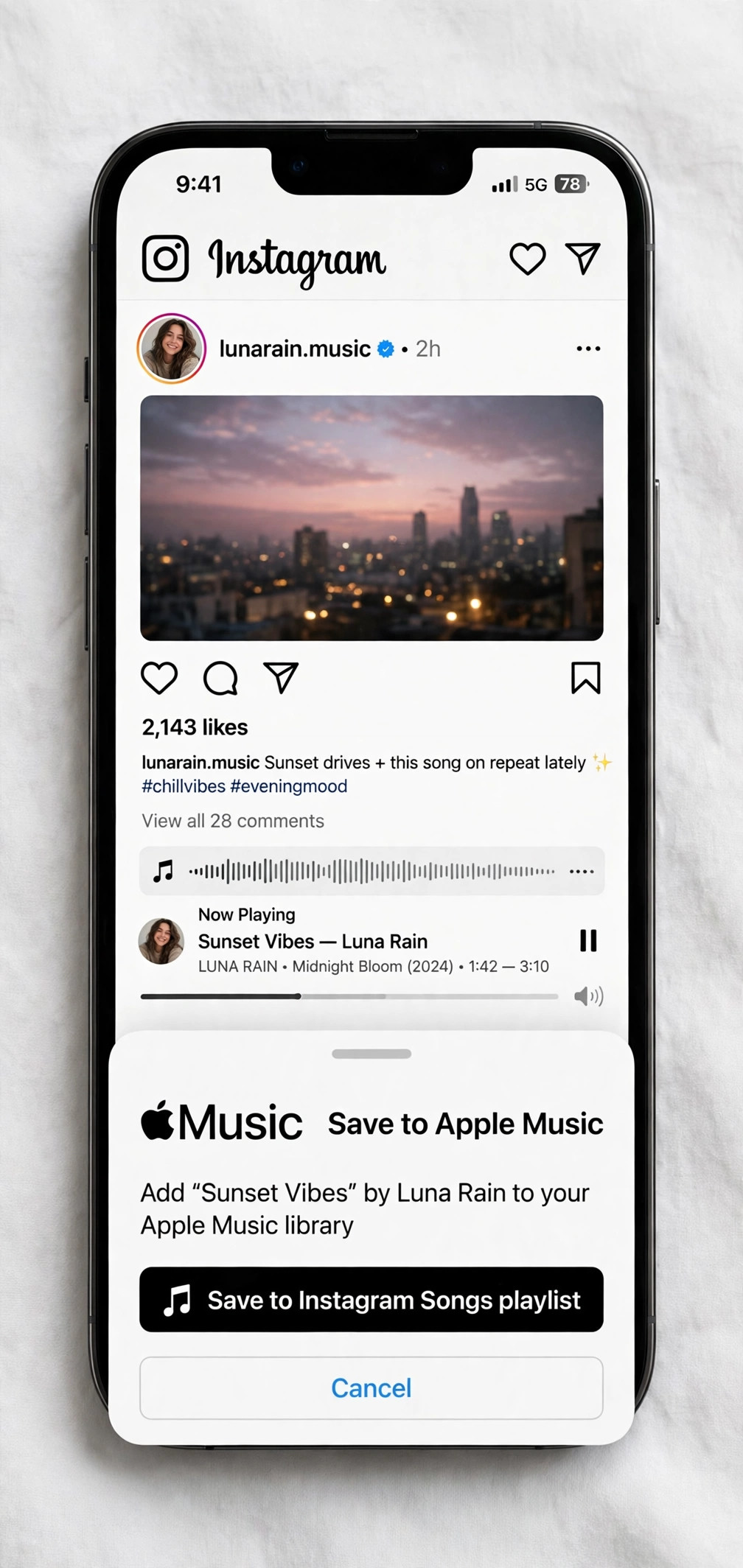
Now, as part of the Instagram new features November 2026 update, if you use Apple Music, you can link your Apple Music account to Instagram once, and then save songs you hear in posts and Stories straight to Apple Music. The saved songs go into a playlist called “Instagram Songs” in the Music app’s Library, so they are easy to find later — not scattered through your library, and not lost because you forgot the track name.
How it works, in short: link Apple Music once in Instagram, then whenever you hear a song you like in a post or a Story, save it, and it lands in the “Instagram Songs” playlist. That is the whole flow — one setup, then one tap each time.
Spotify users will recognise the idea, because they got the same shortcut two years earlier. Apple Music users were the ones waiting, and November 2026 is when their turn came. If you use both services, the feature does not change anything for Spotify — that shortcut already existed. It simply brings Apple Music up to the same level.
One thing to be clear about: this is about saving songs you discover on Instagram, not about downloading music for free or moving songs between services. The song saves to your Apple Music library, inside the “Instagram Songs” playlist, under your own Apple Music account. If you do not have Apple Music linked, you will need to link it first — the save option only appears once the accounts are connected.
3. Better Photo Dumps, Backgrounds and Stickers
The third group of Instagram new features November 2026 is really three small upgrades rolled into one, all for people who post photo dumps and Stories. They have been rolling out from 18 November 2026, so you may already have some of them.
Multi-select for photo dumps. Posting a photo dump — a carousel of ten or twenty photos from a trip, a wedding or a weekend — used to mean selecting photos one by one. Multi-select makes that faster: pick several photos at once and add them to the post together. It is a small change, but anyone who posts dumps regularly will feel it immediately.
A background picker for photos. Horizontal, square and 4:3 photos can now sit on a background you choose, instead of Instagram cropping them or filling the space with a default. The picker offers blur, solid colours and gradients, so a wide landscape photo or an old square photo can fill a Story or post frame neatly, with a background that matches the photo rather than fighting it.
Refreshed stickers. Instagram’s stickers have been refreshed with new fonts, colours and shapes. Stickers are one of those things you only notice when they look dated, and the refresh is meant to make Stories feel current again — new type styles, new colour options, and new shapes to play with.
None of these three Instagram new features November 2026 is dramatic on its own. Together, though, they change how a photo dump or a Story looks: faster to build, cleaner to frame, and with fresher-looking stickers on top. If you post photo dumps from trips around Dubai, family events in Pakistan, or weekends in India, this is the part of the Instagram new features November 2026 update you will notice most in daily use.
4. A Transparent Location Sticker
The fourth of the Instagram new features November 2026 is the smallest on the list, and also the easiest to miss — a new transparent style for the location sticker in Stories.
The new style has a transparent background, with the location name and its coordinates shown inside a thin white outline. It is designed to sit on top of a photo without covering it up: the old location stickers were solid blocks that hid part of the image underneath, while the transparent version lets the photo show through.
Why does that matter? Location stickers are how people say “I was here” — a café, a beach, a city, a landmark. A sticker that blocks the photo underneath works against the photo itself. The transparent style keeps the location visible and the photo intact, which is the whole point of posting the photo in the first place.
It is rolling out from 18 November 2026 as part of the Instagram new features November 2026 update, alongside the other Story upgrades above. If you do not see the transparent style yet, check the sticker tray in a Story — it appears as a style option for the location sticker, not as a separate sticker.
5. Block or Credit Stolen Reels
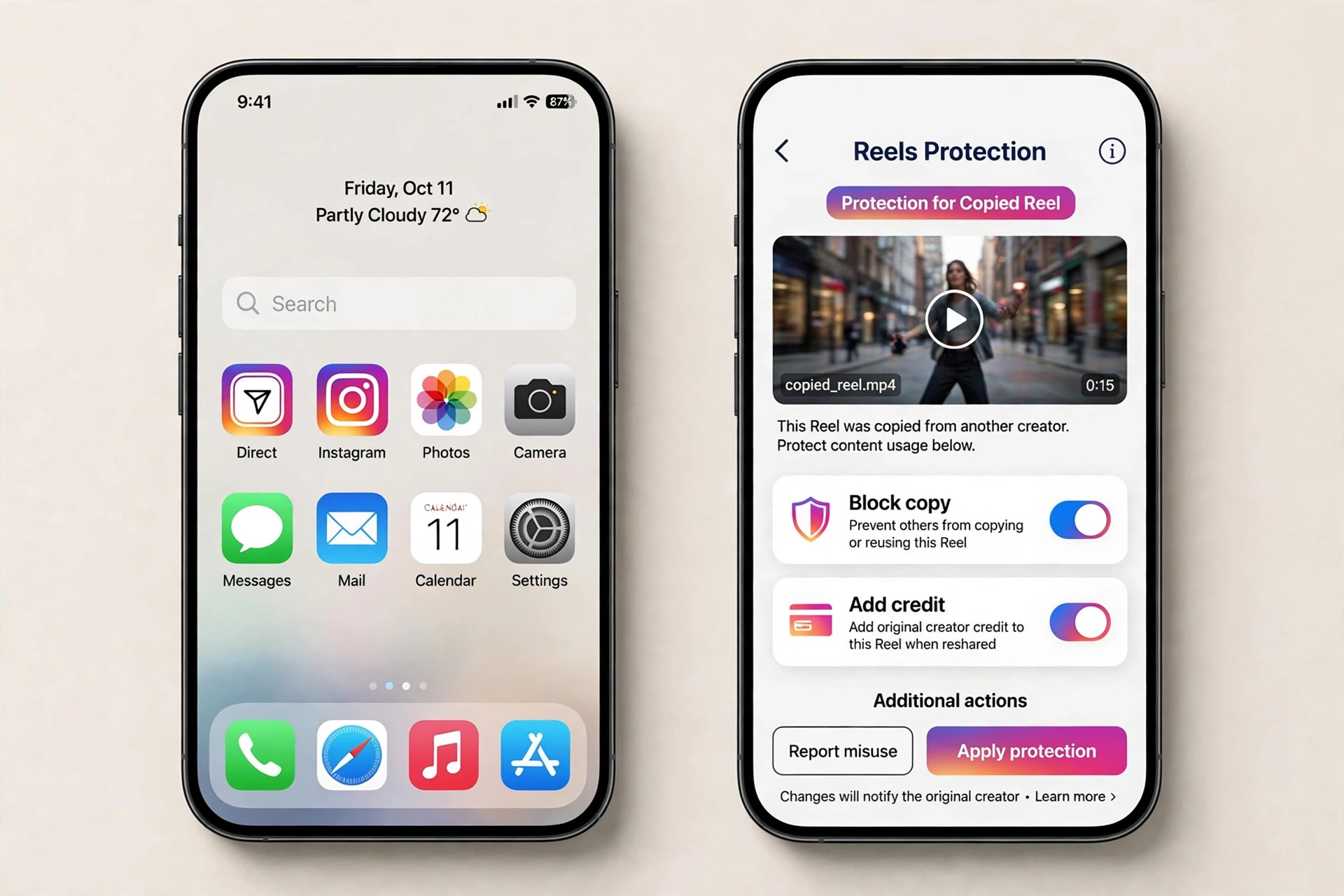
For creators, the most important of the Instagram new features November 2026 may be this one. From 20 November 2026, Instagram has a new tool that lets creators track copies of their Reels — including copies that have been edited with AI — and then decide what happens to them: block them, or add a credit.
Reel theft is a real problem for creators. Someone downloads your Reel, reposts it — sometimes with an AI edit to change the look slightly — and collects the views that should have been yours. Until now, your options were limited: report the copy and hope, or ignore it. The new tool changes that, because it finds the copies for you and gives you a choice for each one.
The two choices are straightforward:
- Block the copy. The copied Reel is blocked, so it stops reaching viewers.
- Add a credit. The copy stays up, but with a credit pointing back to you as the original creator.
That second option matters, because not every repost is hostile — sometimes a fan account or a reaction page shares a Reel, and a credit is a fair outcome that still sends viewers back to you. The tool lets the original creator decide, rather than leaving it to a report queue.
Two honest limits. First, the verified facts do not say exactly where in the app the tool lives, or how quickly copies are found after they are posted — those details were not part of the verified announcement, so this guide does not invent them. Second, the tool covers copies of your Reels, including AI-edited ones; it is not a general copyright system for every kind of content. If you make Reels, check your creator tools after 20 November 2026 to see whether the Instagram new features November 2026 protection tool has reached your account — rollouts are gradual, so it may arrive a few days after the launch date.
If you are building a channel around short video — and many TrickExprt readers are — this tool pairs naturally with making your own original videos rather than reposting other people’s work. Our guides to the best AI video generator apps and how to create videos using AI cover tools that help you produce original clips, which is exactly the kind of content this protection tool is built to defend.
6. Amazon Affiliate Links in Reels and Feed Posts
The sixth of the Instagram new features November 2026 is about earning money, and it went live on 20 November 2026. Creators can now add Amazon affiliate links to Reels and feed posts.
Before this, affiliate links on Instagram were awkward: the main place for a link was the bio, or a sticker in a Story. A product shown in a Reel had no direct link to buy it. Now the link can sit with the Reel or the post itself, so a viewer who likes a product in the video can tap through to Amazon from that same post.
Three more brands joined as affiliate partners at the same time — Shein, Lowe’s and Halara — so the programme is wider than Amazon alone. And LTK links now work in Reels too, which matters for fashion and lifestyle creators who already use LTK (formerly LikeToKnow.it) for their shopping links.
A note of honesty here, because money claims attract hype: the verified facts say the links are live and the brands have joined. They do not say what commission rate any creator will earn, or who is eligible for the programme, or how payouts work. Those details were not verified, so this guide does not state them. If you plan to use these Instagram new features November 2026 affiliate links, read Instagram’s own affiliate terms inside the app before you post your first linked Reel — eligibility and rates are set by Instagram and the brands, not by this article.
For readers in India, Pakistan and the UAE, one practical point: affiliate programmes and the stores they link to vary by country, so check that Amazon — or Shein, Lowe’s or Halara — actually serves your country and pays affiliates there before you build content around it. A link that earns nothing in your country is just a decoration.
7. A Standalone Direct Messaging App — in Testing
The seventh of the Instagram new features November 2026 is the one that could change Instagram the most in the long run — and it is also the one almost nobody can use yet. Meta is testing a standalone, DMs-only app called “Direct”, in Türkiye and Thailand, from 17 November 2026. It was first spotted on 13 November 2026.
“Direct” is a messaging app that contains only Instagram’s direct messages — no feed, no Reels, no Stories, just chats. The idea is familiar: Meta did something similar years ago with a standalone Direct app, then folded messaging back into Instagram. This is a fresh test of the same idea, in two countries, to see whether people prefer their messages in a separate app.
What does that mean for you, if you are not in Türkiye or Thailand? Right now, nothing changes for the Instagram new features November 2026 rollout — your messages stay inside Instagram, exactly as before. The test is limited to those two countries, and there is no verified date for a wider rollout, or any promise that the app will launch everywhere. Meta tests the Instagram new features November 2026 in small markets first and only expands the ones that work, so “Direct” may or may not ever reach India, Pakistan or the UAE.
Still, it is worth knowing about, because if it does expand, it will change where your Instagram conversations live. Keep an eye on it, but do not go looking for a “Direct” app to download unless you are in one of the test countries — outside the test, it is not available, and any app claiming to be it is not the real thing. That last point matters: whenever a new app is announced, copycat apps appear in app stores. Only download “Direct” from an official Meta listing, if and when it reaches your country. The copycat-app trick is the same one our guide to the Yalla Ludo scam and fake coins describes — a familiar name on an unofficial app that steals accounts.
8. AI Age Checks Rolling Out Worldwide
The eighth of the Instagram new features November 2026 is not a feature you will “try” in the usual sense — it is a safety change, and it affects teens. From 13 November 2026, AI age checks are rolling out worldwide as part of the Instagram new features November 2026 update. The system looks for teens who signed up with an adult birthday, and moves them into Teen Accounts.
Teen Accounts have stricter defaults than adult accounts: tighter privacy, limits on who can message them, and content controls. The AI check is Instagram’s way of catching accounts where the birthday on file does not match the person’s real age, so that the Teen Account protections apply to the people they were built for.
If you are a parent, this is the Instagram new features November 2026 update to know about: a teen who entered an adult birthday to get around the age limits should now be moved into a Teen Account automatically, with the stricter settings that come with it. If you are a teen, the practical effect is that the account’s settings may change to the Teen Account defaults. Either way, the change is automatic — there is nothing to tap, and no setting to turn it on. It rolls out worldwide, but as with every Instagram rollout, the exact day it reaches a given account will vary.
One thing this guide will not do is describe how the AI decides someone’s age, or how accurate it is — those details were not part of the verified facts, so they are not stated here. What is verified is the rollout itself, the date, and the outcome: teens with adult birthdays move into Teen Accounts.
Instagram New Features November 2026 — What Is Still Coming
Beyond the 8 Instagram new features November 2026 updates above, a few more things were verified as coming or already appearing, and they are worth a brief mention — labelled by status, so you can tell what is live from what is still on the way.
30-slide carousels — coming. As part of the Instagram new features November 2026 pipeline, Instagram is preparing carousels with up to 30 slides, up from the current limit. That matters for photo dumps, step-by-step guides and story-style carousels, where the current cap forces you to split a set across two posts. No verified launch date was given, so treat this as coming, not live.
Effect Builder — Story effects from text prompts. A new Effect Builder lets you create Story effects from text prompts — describe the effect you want, and the tool builds it. It is free, and available in the US for users aged 18 and over. The verified facts do not say when it reaches other countries, so readers outside the US should treat this as not yet available to them.
Edits app updates. Instagram’s Edits app — its video editing app for Reels — is getting updates including speed curves, auto audio mixing and text animation, plus a macOS desktop version. If you edit Reels on a computer rather than a phone, the macOS version is the part to watch. Again, no verified date was given for these, so check the Edits app itself for what has arrived.
Search your saved posts — iOS. You can now search your saved posts on iOS, which finally makes a large saved collection usable: instead of scrolling through hundreds of saved posts to find one recipe, tutorial or Reel, search for it. This was verified as available on iOS; no verified statement was made about Android, so Android users should check their own app rather than assuming it is there.
None of these four is counted among the 8 headline Instagram new features November 2026 updates above, because their status is different — coming, limited by country or platform, or both. They are included here so the guide is complete, not so the count looks bigger than it is.
Instagram New Features November 2026: How to Get Them on Your Phone
If any of the Instagram new features November 2026 above is missing on your phone, work through this checklist before assuming it is not coming to you:
Step 1: Update Instagram. Open the Play Store (Android) or App Store (iPhone), search for Instagram, and tap Update if one is offered. Several of the Instagram new features November 2026 arrived in the November app updates, and an old version will not show them.
Step 2: Restart the app. Close Instagram completely and open it again. Some features appear only after a fresh launch.
Step 3: Wait a few days. Rollouts are gradual — Instagram switches features on account by account, not all at once. An Instagram new features November 2026 feature that is live for everyone on 18 November may still take days to reach your account, and that is normal, not a fault with your phone.
Step 4: Check the right place. Story editing lives in the three-dot menu on your own Story. Apple Music saving needs the accounts linked first. The Reels protection tool sits in creator tools. If you look in the wrong menu, you will conclude a feature is missing when it is simply somewhere else.
Step 5: Do not install anything unofficial. No APK, modded Instagram, or third-party app will unlock these Instagram new features November 2026 early. Unofficial Instagram versions are a common source of account bans and malware, and they cannot add a server-side feature Instagram has not switched on for your account. If a video promises an early unlock, it is not telling the truth.
And a practical tip for creators: the Instagram new features November 2026 that matter most to you — Story editing, Reels protection and affiliate links — are all worth testing on a real post, not just reading about. Post a Story, edit it within 15 minutes, and confirm the “Edited” label and that the views stayed. That one test tells you more than any article can.
Which of the Instagram New Features November 2026 Matter Most?
Not all 8 of the Instagram new features November 2026 matter equally to everyone, so here is an honest ranking by who you are:
- If you post Stories daily: Story editing is the big one, followed by the background picker and refreshed stickers. Together they make Stories faster to fix and better to look at.
- If you make Reels: the stolen-Reels tool and affiliate links matter most — one protects your work, the other can earn from it. If you want to make more original Reels, see our guide on how to play GTA 5 on Android for an example of a gaming guide built around video, and the AI video guides linked above for the tools to create with.
- If you mostly watch and listen: Apple Music saving and the saved-posts search (on iOS) are the two that change daily use. Everything else is background.
- If you are a parent: the AI age checks are the Instagram new features November 2026 update to know about, and the only one in this list that is about safety rather than features.
- If you run a shop or a brand: affiliate links are the commercial Instagram new features November 2026 update, and the Direct app test is the one to watch for the future — if messaging splits into its own app, customer chats will live there.
That is the whole month, ranked by use rather than by announcement order. Pick the two or three that fit how you actually use Instagram, try those first, and let the rest arrive when they arrive.
Frequently Asked Questions
When did the Instagram new features November 2026 rollout start?
The main batch arrived on 18 November 2026 — Story editing, Apple Music saving, the photo-dump and sticker upgrades, and the transparent location sticker. AI age checks started rolling out worldwide on 13 November, the Direct app test started on 17 November, and Reels protection plus affiliate links went live on 20 November 2026.
Can I really edit a Story after posting it?
Yes — for 15 minutes after posting, from 18 November 2026, for everyone. Open your Story, tap the three-dot menu, choose “Edit story”, and change text, music, stickers or drawings. Views, likes and replies are kept, and viewers see an “Edited” label.
Why can’t I see the Instagram new features November 2026 on my phone?
Rollouts are gradual, so availability may vary by account, country and device. Update Instagram from your app store, restart the app, and wait a few days. The Direct app is only testing in Türkiye and Thailand, and Effect Builder is US-only for users 18 and over, so those two will not appear elsewhere yet.
How do I save an Instagram song to Apple Music?
Link your Apple Music account to Instagram once, then save songs you hear in posts and Stories — they go to an “Instagram Songs” playlist in the Music app’s Library. Spotify users already had the same shortcut for two years.
Can I stop someone stealing my Reels now?
From 20 November 2026, the new tool lets creators track copies of their Reels, including AI-edited ones, and then block them or add a credit. Check your creator tools to see whether it has reached your account.
Can I earn money from affiliate links on Instagram?
From 20 November 2026, as part of the Instagram new features November 2026 update, Amazon affiliate links can be added to Reels and feed posts, with Shein, Lowe’s and Halara joining as affiliate brands, and LTK links now working in Reels too. Commission rates, eligibility and payouts were not part of the verified facts — check Instagram’s own affiliate terms in the app before relying on them.
Is the Direct app available in India, Pakistan or the UAE?
No — not as verified in the Instagram new features November 2026 rollout. It is only being tested in Türkiye and Thailand from 17 November 2026, and there is no verified date for a wider rollout. Do not download copycat apps claiming to be it.
What is the “Instagram Songs” playlist?
It is the playlist in the Apple Music app’s Library where songs you save from Instagram go. Link Apple Music once, save a song from a post or Story, and it appears there.
Conclusion
The Instagram new features November 2026 update is a practical one, not a flashy one. Its best change among the Instagram new features November 2026 — 15-minute Story editing — fixes a mistake everyone has made. Its most important change for creators — blocking or crediting stolen Reels — protects work that was previously easy to steal. Its most commercial change — affiliate links in Reels — turns a product shown in a video into something a viewer can buy from that same post. And its most far-reaching test — the standalone Direct app — may or may not change where Instagram messages live in future.
Try the Instagram new features November 2026 that fit how you use Instagram, update the app first, and give gradual rollouts a few days before deciding something is missing. Start with Story editing: post a Story, fix one thing in it within 15 minutes, and watch the views stay put. That single test shows what this whole Instagram new features November 2026 update is about — Instagram finally letting you fix things after you post.
For more guides like this, visit the TrickExprt homepage.
Sources
- Geekout / Matt Navarra — Instagram updates (November 2026 features, dates and rollout details): https://geekout.mattnavarra.com/instagram-updates
- Smartprix — “Instagram Adds Four New Features for Stories and Apple Music” (Story editing, Apple Music saving, photo-dump and sticker updates): https://www.smartprix.com/bytes/instagram-adds-four-new-features-for-stories-and-apple-music/