 TrickExprt Android Apps, Games, Software & Tech Guides
Last updated: 22 November 2026
Quick answer: Android 17 QPR3 Beta 4, released on 12 November 2026, fixes the worst bugs of the Android 17 QPR3 beta — severe system lag, Pixel Launcher crashes, unexpected device restarts, and Bluetooth battery drain. If your Pixel has felt slow, stuttery or unstable on the QPR3 beta, Android 17 QPR3 Beta 4 is the update that addresses those problems directly: Google’s own release notes list memory leaks in system_server as the cause of the lag, the launcher crashes and the restarts, and a separate fix for excessive Bluetooth background activity that was draining the battery faster than normal. The build number is DP11.261030.003, and it is available now for Pixel 6a through Pixel 11 Pro Fold — but remember, this is still a beta, so do not install it on your only daily phone without a backup.
If you have been running the QPR3 beta since October, you probably know exactly what this article is about. The phone that was fast on stable Android 17 suddenly stuttered when you opened the app drawer. The launcher crashed back to the home screen in the middle of something. The phone restarted itself for no clear reason. And the battery, which used to last the day, started dropping noticeably faster — with Bluetooth quietly doing far more work in the background than it should. None of that was your phone getting old. It was beta software, and Android 17 QPR3 Beta 4 is Google’s fix for it.
This guide gives you the full, honest picture: every fix in Android 17 QPR3 Beta 4, which phones can install it, how to get it, what the earlier QPR3 betas already fixed, when regular (non-beta) users should expect these fixes, and the warning you need to hear before you join any beta programme. Everything here comes from Google’s official release notes and the two reports linked at the end — no invented numbers, no promised dates, no guesswork.
What Is Android 17 QPR3 Beta 4?
Android 17 QPR3 Beta 4 is the fourth beta release of the third Quarterly Platform Release (QPR) for Android 17. A QPR is not a brand-new Android version: it is a quarterly update that bundles bug fixes and smaller improvements on top of the stable Android 17 release. Google tests each QPR in a public beta programme on Pixel phones first, and the fixes that survive beta testing reach everyone else later through a Feature Drop — the quarterly stable update that lands on regular Pixel phones.
Android 17 QPR3 Beta 4 arrived on 12 November 2026, two weeks after Beta 3 (29 October 2026) and a little over three weeks after Beta 2 (20 October 2026). That steady two-to-three-week rhythm is normal for a QPR cycle: each beta fixes what testers reported in the previous one, and the final beta is usually the closest thing to the stable release. Android 17 QPR3 Beta 4 is that late-cycle, polish-focused build — it contains no new headline features. Its entire job is fixing things that were broken.
Here are the build details, exactly as released:
| Detail | Android 17 QPR3 Beta 4 |
|---|---|
| Release date | 12 November 2026 |
| Build number | DP11.261030.003 |
| Security patch level | 2026-10-05 |
| Google Play services | 26.41.31 |
| Eligible devices | Pixel 6a through Pixel 11 Pro Fold, plus the Android Emulator |
| Not eligible | Pixel 6 and Pixel 6 Pro (not in the beta programme) |
The security patch level — 2026-10-05 — is worth a second look, because it catches people out. Android 17 QPR3 Beta 4 was released in November, but its security patch is dated October. That is normal for a QPR beta: the patch level reflects the security bulletin the build was compiled against, not the release date, and it does not mean the update is a month out of date. The build number is the part to check on your own phone: if Settings shows DP11.261030.003, you are on Android 17 QPR3 Beta 4.
One more thing the table makes clear: Pixel 6 and Pixel 6 Pro owners are not in this beta programme at all. If you own one of those two phones, Android 17 QPR3 Beta 4 is not coming to you through the beta channel, and no amount of tapping “Check for update” will change that. The fixes in Android 17 QPR3 Beta 4 should still reach those phones later, if and when the fixes ship in a stable Feature Drop — but through the beta programme itself, they are out.
Which Phones Get Android 17 QPR3 Beta 4?
The eligible list is simple: every Pixel from the Pixel 6a onwards, up to and including the Pixel 11 Pro Fold, plus the Android Emulator for developers testing apps. That covers the Pixel 6a, Pixel 7, Pixel 7 Pro, Pixel 7a, Pixel 8, Pixel 8 Pro, Pixel 8a, Pixel 9, Pixel 9 Pro, Pixel 9 Pro XL, Pixel 9 Pro Fold, Pixel 9a, Pixel 10, Pixel 10 Pro, Pixel 10 Pro XL, Pixel 10 Pro Fold, Pixel 10a, Pixel 11, Pixel 11 Pro, Pixel 11 Pro XL and Pixel 11 Pro Fold.
If your phone is on that list and already enrolled in the Android Beta Programme, Android 17 QPR3 Beta 4 should arrive as an over-the-air update — Settings → System → System update → Check for update. If your phone is on the list but not enrolled, you need to enrol it first (steps below), and the update will be offered after enrolment. If your phone is a Pixel 6 or Pixel 6 Pro, it is not eligible for this beta, full stop.
A note for readers in India, Pakistan and the UAE, where many people buy Pixels imported from other markets: eligibility depends on the phone model, not on where you bought it or which SIM you use. A Pixel 8 bought in Dubai or imported into Pakistan is eligible in exactly the same way as one bought in the US. The beta programme is tied to the device, not the country — though, as always with beta software, check that your banking and payment apps still work after updating, because some of them refuse to run on beta builds.
What Android 17 QPR3 Beta 4 Actually Fixes
This is the core of the update. Google’s official QPR3 release notes for Android 17 QPR3 Beta 4 list four fixes, and they are all worth understanding properly — because each one matches a real symptom beta testers were reporting.
1. System lag, Pixel Launcher crashes and unexpected restarts — fixed
This is the big one, and it is really three symptoms with one cause. Google’s release notes say Android 17 QPR3 Beta 4 fixes memory leaks in system_server — the core Android process that manages the system services your phone depends on — and that those leaks were causing severe UI lag, Pixel Launcher crashes, and unexpected device restarts. The issue is tracked under tracker number 440977407, with four related reports linked to it.
A memory leak means a process slowly uses more and more memory without giving it back. Over hours of use, system_server would grow until the phone had no breathing room left. That is exactly what the symptoms looked like: the interface getting slower and stuttery the longer the phone had been running, animations dropping frames, the launcher — the app that draws your home screen and app drawer — crashing and dumping you back to a blank home screen, and in the worst cases the whole device restarting itself. Restarting the phone temporarily cleared it, because a restart empties the leaked memory — and then the leak started building again.
If your Pixel on the QPR3 beta felt fine after a restart and then got progressively worse through the day, that pattern fits this bug precisely. Android 17 QPR3 Beta 4 plugs the leak at the source, so the slowdown should not build up any more. That is a much better fix than the workarounds people were using — restarting daily, or switching to a third-party launcher to dodge the Pixel Launcher crashes — because it removes the cause instead of dodging the symptom.
2. Bluetooth battery drain — fixed
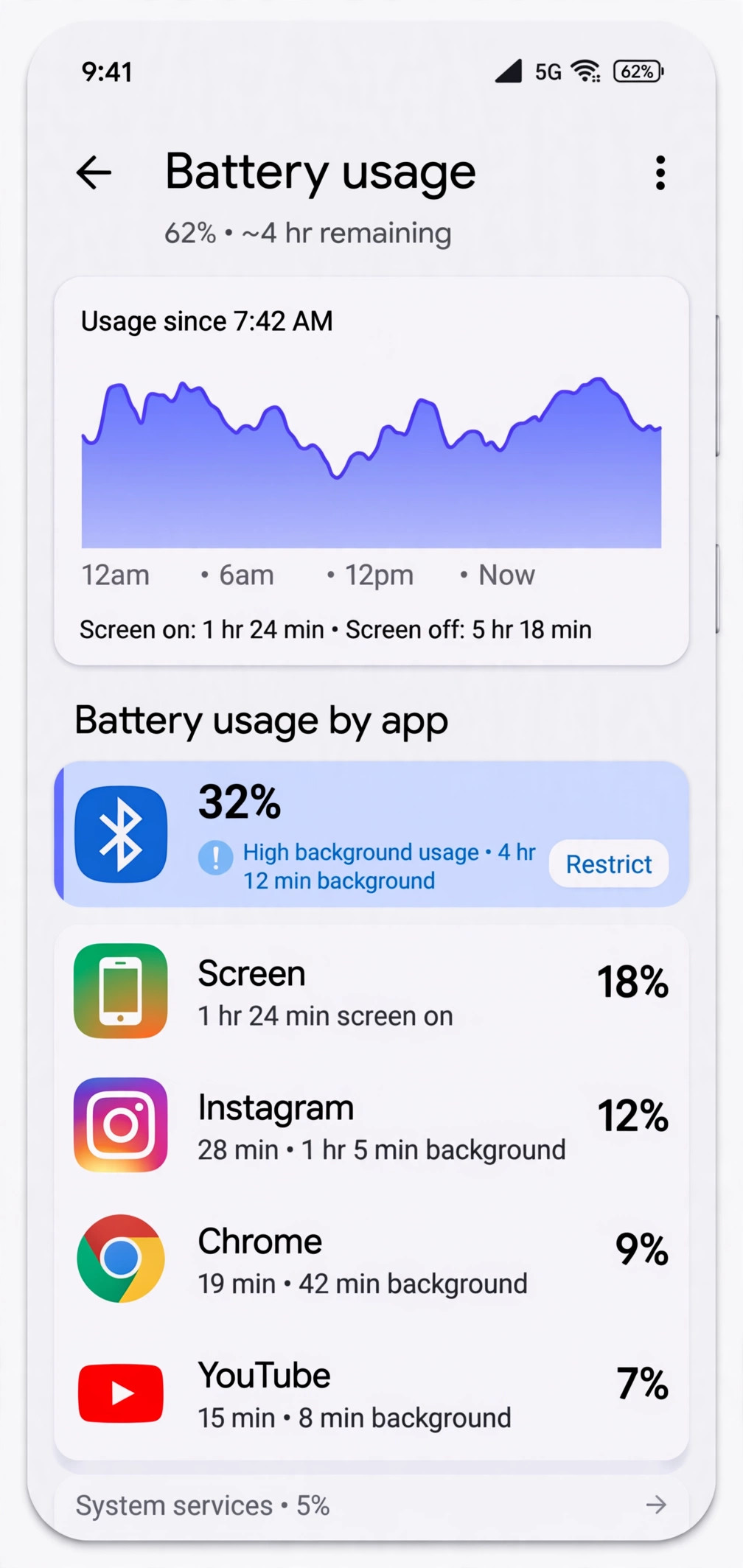
The second headline fix in Android 17 QPR3 Beta 4 is for excessive Bluetooth background activity that was draining the battery faster than normal. In plain words: something in the beta was keeping Bluetooth far busier than it needed to be while the phone sat idle, and that background work was eating battery in the background even when you were not using any Bluetooth device.
This is the kind of bug that is easy to misread. When a phone’s battery starts dropping faster than usual, most people blame the battery itself, or the screen, or a single heavy app. But if your battery started draining faster only after joining the QPR3 beta — and especially if the drain continued while the phone was idle, with the screen off — Bluetooth background activity is a very plausible culprit, and it is the one Google has now fixed in Android 17 QPR3 Beta 4.
Be clear about what this fix is, and what it is not. It fixes one specific bug: excessive Bluetooth background activity in the beta. It is not a general battery-life improvement, and it will not make an old battery new again. If your battery still drains fast after installing Android 17 QPR3 Beta 4, the cause is something else — a different app, weak signal, or battery health — and a general battery-tips guide is the wrong place to look for a beta bug. Check Settings → Battery → Battery usage after a day or two on Android 17 QPR3 Beta 4 and see whether Bluetooth’s background activity has settled.
3. A visually clipped on-screen keyboard — fixed
Smaller, but the kind of thing that drives you mad fifty times a day: Android 17 QPR3 Beta 4 fixes a bug where the on-screen keyboard appeared visually clipped — cut off at the edges, so keys or parts of the keyboard did not render fully. If you type in WhatsApp, Gmail or Chrome all day, a clipped keyboard is not a cosmetic detail; it is a constant irritation, and a real risk of tapping the wrong key. This one is fixed in Android 17 QPR3 Beta 4.
4. A confusing Conscrypt error for old TLS connections — fixed
This fix is more technical, and most readers will never have seen the symptom — but if you did, you will recognise it. Android 17 QPR3 Beta 4 fixes a confusing error from Conscrypt, Android’s security library, when old TLS connections (TLSv1 and TLSv1.1) are rejected. TLS is the encryption that protects connections between your phone and servers; versions 1.0 and 1.1 are old and insecure, so modern Android refuses them. The bug was not the refusal — that is correct behaviour — but the error message shown when it happened, which was confusing instead of clear. Android 17 QPR3 Beta 4 makes the error understandable. In practice this matters most to people using older servers, old workplace systems or legacy apps that still try to connect with TLSv1 or TLSv1.1: the connection is still refused, as it should be, but now the phone tells you why in a way that makes sense.
5. “Disable absolute volume” is back — confirmed by Google, not in the official notes
There is one more change worth mentioning, with an important label on it. Google’s Mishaal Rahman has confirmed that Android 17 QPR3 Beta 4 restores a “Disable absolute volume” option — a setting that lets your phone control its own volume separately from a connected Bluetooth device, instead of the two volumes being locked together. Some Bluetooth headphones and speakers sound too loud or too quiet when absolute volume is forced on, so having the toggle back matters to people with those devices.
Here is the honest part: this change is confirmed by Google’s Mishaal Rahman, but it is NOT in Google’s official release notes for Android 17 QPR3 Beta 4. That does not mean it is wrong — it is confirmed by Google’s own developer-relations team, just not listed in the official changelog — but it means it could be limited to certain devices or builds. Treat it as a confirmed bonus, not a changelog promise, and check for it yourself in Settings → System → Developer options after updating. Do not update to a beta for this one toggle alone.
Here is the complete fix list in one place:
| Bug in Android 17 QPR3 Beta 4 | What you noticed | Status |
|---|---|---|
| Memory leaks in system_server | Severe UI lag, stutter, slow animations | Fixed (tracker #440977407 + 4 related reports) |
| Pixel Launcher crashes | Home screen/app drawer crashing back to a blank screen | Fixed |
| Unexpected device restarts | Phone restarting itself for no clear reason | Fixed |
| Excessive Bluetooth background activity | Battery draining faster than normal, even while idle | Fixed |
| Visually clipped on-screen keyboard | Keyboard cut off at the edges while typing | Fixed |
| Confusing Conscrypt error (TLSv1/TLSv1.1) | Unclear error when old encrypted connections are rejected | Fixed |
| “Disable absolute volume” option restored | Bluetooth volume locked to the phone’s volume | Confirmed by Google’s Mishaal Rahman — not in official release notes |
How to Get Android 17 QPR3 Beta 4
If your Pixel is already enrolled in the Android Beta Programme, the update should be offered automatically. Check it this way:
Step 1: Connect to Wi-Fi and make sure the phone has at least 50% battery, or plug it in to charge. Beta updates are large, and you do not want the phone dying halfway through an install.
Step 2: Open Settings → System → System update.
Step 3: Tap Check for update. If Android 17 QPR3 Beta 4 is available for your phone, it will show up here with build DP11.261030.003.
Step 4: Tap Download and install, then wait. The phone will restart once during installation. Do not use it while it installs.
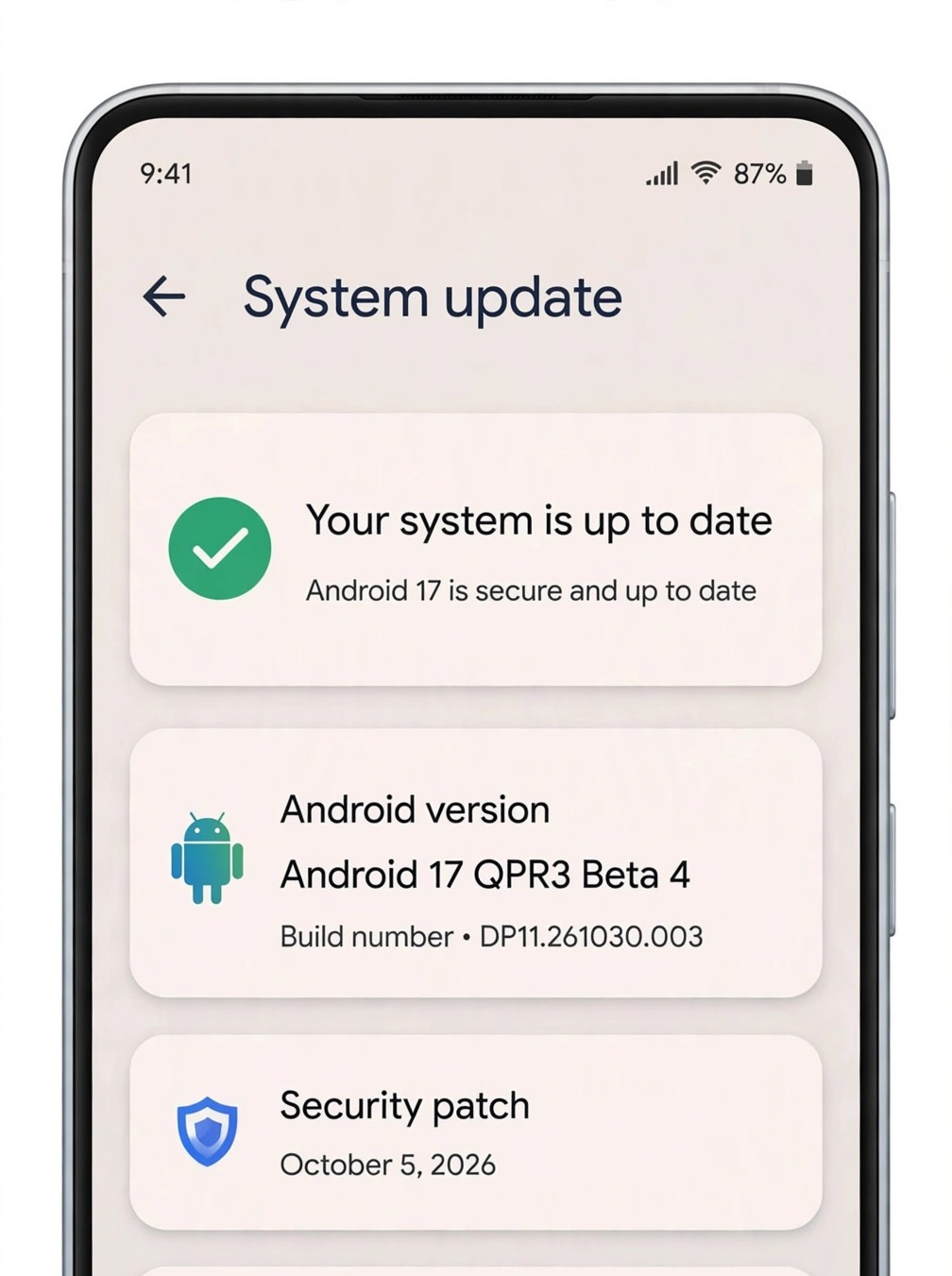
If you are not enrolled in the beta programme yet, enrol first: open the Android Beta Programme page in a browser, sign in with the same Google account that is on your Pixel, find your device in the list, and tap Opt in. The update is usually offered within a few hours of opting in — sometimes within minutes. Then follow the four steps above.
Before you tap anything, read the warning section below. Enrolling in a beta is easy; leaving one is slower, and a beta can introduce new bugs of its own. Android 17 QPR3 Beta 4 fixes the bugs listed above, but no beta is guaranteed bug-free — that is the whole point of a beta.
After the update installs, give the phone a day before judging it. The first hours after any system update are noisy: apps re-optimise in the background, the system re-indexes, and battery use is temporarily higher. Judge the lag fix by how the phone feels on the second day, not the second hour. Check the launcher: open and close the app drawer a few times, switch between apps, and see whether the crashes are gone. Check the battery: Settings → Battery → Battery usage, and look at whether Bluetooth background activity has settled down. And check the keyboard the next time you type a long message — the clipping should be gone.
What the Earlier QPR3 Betas Already Fixed
Android 17 QPR3 Beta 4 is not the first fix in this cycle, and the earlier betas matter — because if you skipped straight from Beta 2 to Beta 4, you are getting their fixes too. Here is the short version of what came before, so you know what is already fixed on your phone and do not waste time troubleshooting problems that are already solved.
Beta 3 (29 October 2026) fixed 26 issues. The most noticeable ones: the inner display on foldable Pixels staying black, crashes on the lock screen, WPA-Enterprise Wi-Fi failing when it used PEAP authentication, and the X app crashing when you opened mentions. Twenty-six fixes in one beta is a lot, and it tells you something useful about this QPR cycle: Google was fixing a wide spread of problems, not just one bug. If your foldable’s inner screen went black on an earlier beta, or your work Wi-Fi stopped connecting, Beta 3 was the fix — and Android 17 QPR3 Beta 4 keeps it.
Beta 2 (20 October 2026) fixed random crashes and reboots during normal use — including reboots during WhatsApp video calls — and a black, unresponsive screen after ending a call. That last one was a nasty bug: finishing a call and being left staring at a dead black screen. If you lived through Beta 2, you will understand why Android 17 QPR3 Beta 4’s restart fix matters so much — this cycle has been fighting stability problems since the start, and each beta has taken a bite out of them.
The pattern is clear. Beta 2 fixed crashes during calls. Beta 3 fixed 26 issues including the foldable display and lock-screen crashes. Android 17 QPR3 Beta 4 fixes the deepest one of all — the system_server memory leak behind the lag, the launcher crashes and the restarts. Each beta has been more stable than the last, which is exactly how a beta cycle is supposed to work. It is also why, if you are on the beta and still hitting problems after Android 17 QPR3 Beta 4, the next step is to report them through the beta feedback channel rather than assuming your phone is faulty: Google is actively fixing what testers report, and the tracker number in the release notes proves it.
One comparison that helps put the fixes in perspective: app crashes are not always the system’s fault. If a single app keeps crashing on your phone — a game, for example — while everything else is fine after Android 17 QPR3 Beta 4, the problem is probably in the app, not in Android. Our guide on how to fix Roblox not opening on Android walks through exactly that kind of app-level crash with seven working fixes, and the same logic applies to other apps: clear the app’s cache, check for an app update, and only then suspect the system. Similarly, if you play heavy games on your Pixel, how to play GTA 5 on Android is worth a read after updating — a phone that was stuttering from a system_server memory leak will feel very different in a demanding game once the leak is fixed. And if you use Google’s AI tools on your phone, the Google Gemini AI app for Android is another app that benefits from a stable system underneath it.
⚠️ Warning: Read This Before You Install Any Beta
This is the part of the article that matters most, so it is not buried at the bottom. Beta builds are test software. They exist so Google can find bugs before millions of people get the stable release — which means the people running them are, by definition, the ones who find the bugs.
Android 17 QPR3 Beta 4 fixes real problems, and it is a late-cycle beta, which usually means it is more stable than the early ones. But “more stable” is not “stable”. A beta can bring new bugs of its own — ones nobody has found yet — and some of those bugs can be worse than the ones it fixed. An app you rely on might refuse to open on a beta build. A banking app might block you. Battery life might behave oddly for a day. In rare cases, a beta can cause data loss.
So here are the rules, plainly:
Do not install a beta on your only daily phone without a backup. If your Pixel is the phone you need for work, for family calls, for payments and for everything else, and you have no second phone to fall back on, think twice. Back up first — Settings → System → Backup, and make sure your photos, chats and important files are backed up too — and only then enrol. A backup is the difference between a bad update and a disaster.
Expect new bugs. If Android 17 QPR3 Beta 4 introduces a problem you did not have before, that is normal beta behaviour, not a sign your phone is broken. Report it through the Android Beta feedback app, and wait for the next beta or the stable release. Do not factory reset your phone in a panic over a beta bug — a reset wipes your data, and the bug is in the software, not in your files.
Banking and payment apps may not work. Some banking, payment and security-sensitive apps check whether the phone is running beta software and refuse to open. If you depend on a banking app daily, check whether it works on the beta before you commit — or do not join the beta at all. This is the single most common regret people have after installing a beta.
Leaving the beta takes time. This is the part people miss. If you enrol in the beta and then change your mind, opting out does not instantly put you back on stable Android. When you leave the beta programme, you normally have to wait for the next stable update to be offered — and if you want to leave immediately, the only route is a factory reset, which erases everything on the phone. So enrol only if you are willing to stay on the beta until the QPR reaches stable, or willing to wipe the phone to get off it. The official way out: go back to the Android Beta Programme page, tap Opt out for your device, and then wait — the next stable update will arrive as an over-the-air update, and installing it takes you off the beta without wiping your data. But the wait can be weeks, and there is no way to hurry it.
If all of that sounds like too much risk, the right answer is simple: do not join the beta. Wait for the stable Feature Drop. The fixes in Android 17 QPR3 Beta 4 will reach your phone then, without any of the beta risk. There is no prize for getting a fix three weeks early if it costs you a working phone.
When Will Regular Users Get These Fixes?
This is the question most Pixel owners are actually asking, and the honest answer is: later, on a date Google has not given. QPR beta fixes reach regular users through Feature Drops — the quarterly stable updates Google ships to all eligible Pixels. The fixes in Android 17 QPR3 Beta 4 should land in a stable build that way. But Google has given no date for it, and this article will not invent one.
What we can say, from how QPR cycles normally work, is that the stable release follows the last beta — it does not arrive at the same time. Android 17 QPR3 Beta 4 landed on 12 November 2026; the stable Feature Drop carrying these fixes will come after that, once Google is satisfied the beta testing is done. If you are not on the beta, there is nothing to do but wait, and keep installing the stable updates your phone offers. Do not sideload the beta build, do not flash it manually unless you genuinely know what you are doing, and do not trust any website or video that claims to have a “stable” download of these fixes — the only safe source is the update your own phone offers. Fake downloads for unreleased software are a known trap — our guide to the fake GTA 6 Android APKs shows exactly how those pages work.
For more on what is happening across the site, including our other Android and gaming guides, the TrickExprt homepage is the starting point.
After the Fix: Check Your Phone Is Actually Better
Installing Android 17 QPR3 Beta 4 is not the end of the job — it is the start of a short check. Spend two minutes on these after a day on Android 17 QPR3 Beta 4:
The lag test. Use the phone normally for a full day without restarting it. Open the app drawer, switch between five or six apps, scroll through a long feed. On the earlier betas, the lag built up over hours; on Android 17 QPR3 Beta 4 it should not. If the phone is still getting slower through the day, something else is wrong — report it, because that is exactly the kind of feedback the beta programme exists for.
The launcher test. The Pixel Launcher should stop crashing. If it still crashes, note when it happens — opening a particular app, or a particular widget — because a repeatable crash is a reportable bug, and a random one might be a different issue entirely.
The restart test. This one is simple: the phone should stop restarting itself. If it restarts again after Android 17 QPR3 Beta 4, write down what you were doing when it happened. Unexpected restarts after this fix are worth reporting with detail.
The battery test. After a full day on Android 17 QPR3 Beta 4, open Settings → Battery → Battery usage and look at Bluetooth. Before the fix, Bluetooth was doing excessive background work; after it, its background activity should be back to normal levels. Remember the caveat from earlier: this fixes one specific Bluetooth bug, not battery life in general. If the battery is still draining fast and Bluetooth looks normal now, the cause is elsewhere.
Frequently Asked Questions
Is Android 17 QPR3 Beta 4 safe to install?
It is a late-cycle beta, which is usually more stable than the early betas — but it is still beta software, and Google tests it on volunteers precisely because new bugs can appear. Back up your phone first, do not install it on your only daily phone unless you accept the risk, and know that leaving the beta programme without a factory reset means waiting for the next stable update. If you want zero risk, wait for the stable Feature Drop instead.
My phone is a Pixel 6 or Pixel 6 Pro. Can I get Android 17 QPR3 Beta 4?
No. Pixel 6 and Pixel 6 Pro are not in the QPR3 beta programme, so the beta will not be offered to them. The fixes should still reach those phones later through a stable Feature Drop, if Google includes them — but there is no date for that, and no beta route to get them sooner.
Will Android 17 QPR3 Beta 4 fix my battery draining fast?
It fixes one specific cause: excessive Bluetooth background activity that was draining the battery faster than normal in the beta. If that was your problem, you should see an improvement within a day or two. If your battery drains fast for another reason — a heavy app, poor signal, an ageing battery — Android 17 QPR3 Beta 4 will not fix it, because that was never what this fix was for.
How do I check if I already have Android 17 QPR3 Beta 4?
Open Settings → System → System update, or Settings → About phone → Build number. If the build number is DP11.261030.003, you are already on Android 17 QPR3 Beta 4. The security patch level should read 2026-10-05, and Google Play services should be on 26.41.31.
I installed Android 17 QPR3 Beta 4 and my phone still lags. What now?
First, give it a full day — the hours right after an update are not representative. Restart the phone once, then use it normally for a day without restarting. If the lag still builds up over hours, report it through the beta feedback channel with details of what you were doing. And check whether the lag is in one app only: if a single app stutters while the rest of the system is smooth, the app is the problem, not Android — our Roblox crash fix guide shows the app-level troubleshooting steps that apply to any misbehaving app.
When will these fixes reach phones that are not on the beta?
Through a stable Feature Drop, on a date Google has not announced. Do not trust any site that gives you a specific date — Google has given none, and this article will not invent one. Keep installing the stable updates your phone offers, and the fixes will arrive with the next Feature Drop that carries them.
What is the “Disable absolute volume” option, and is it really in Beta 4?
It is a setting that separates your phone’s volume from a connected Bluetooth device’s volume, instead of locking them together. Google’s Mishaal Rahman confirmed it is restored in Android 17 QPR3 Beta 4, but Google’s official release notes do not list it, so it is confirmed by Google but not in the official changelog. Check Settings → System → Developer options after updating to see if it is there on your phone.
Conclusion
Android 17 QPR3 Beta 4, released on 12 November 2026, is the fix this beta cycle needed. The memory leaks in system_server behind the severe lag, the Pixel Launcher crashes and the unexpected restarts are fixed. The Bluetooth background activity that was draining batteries faster than normal is fixed. The clipped keyboard and the confusing Conscrypt error are fixed. And Google’s Mishaal Rahman confirmed the “Disable absolute volume” toggle is back, though it is not in Google’s official release notes.
If you are already on the QPR3 beta, install Android 17 QPR3 Beta 4 — build DP11.261030.003 — and give it a day before judging it. If you are not on the beta, wait for the stable Feature Drop; the fixes will reach you then, without the beta risk. And if you do join the beta, back up first, expect the occasional new bug, and remember how leaving works before you opt in. Beta software rewards the careful and punishes the rushed — and after a cycle that started with crashing calls and black screens, Beta 4 is finally the build that makes the QPR3 beta feel like the phone you bought.
Sources
- Google — Android 17 QPR3 Beta 4 release notes (official: release date 12 November 2026, build DP11.261030.003, security patch level 2026-10-05, Google Play services 26.41.31, fixes: system_server memory leaks causing lag, Pixel Launcher crashes and restarts, tracker #440977407 and four related reports; Bluetooth background battery drain; clipped on-screen keyboard; Conscrypt TLSv1/TLSv1.1 error; eligible devices Pixel 6a through Pixel 11 Pro Fold plus Android Emulator; Pixel 6 and Pixel 6 Pro not in the beta programme)
- Pandromeda — “Android 17 QPR3 Beta 4 fixes Pixel lag, battery drain bugs”: https://pandromeda.com/mobile/android-17-qpr3-beta-4-fixes-pixel-lag-battery-drain-bugs
- AndroidPure — “Android 17 QPR3 Beta 4”: https://www.androidpure.com/android-17-qpr3-beta-4/
- Android Authority — Android 17 QPR3 Beta 4 restores the “Disable absolute volume” toggle (12 November 2026; quotes Google’s Mishaal Rahman confirming the toggle is restored in Beta 4 at Settings > System > Developer options > Bluetooth > Disable absolute volume; not in Google’s official release notes)