TrickExprt Android Apps, Games, Software & Tech Guides
How to Create High-Quality Videos Using AI (Step-by-Step Guide 2026)
Creating professional, high-definition videos used to require expensive physical cameras, studio lighting rigs, professional audio microphones, and hours of complex manual timeline editing. In 2026, artificial intelligence has completely streamlined video production.
By combining an AI writing assistant, a voice tool, a video generator and a video editor, one creator can shorten parts of the production process. The time required still depends on the script, number of scenes, generation limits, revisions and export quality. AI tools do not remove the need for planning and editing.
Generating random AI clips and stitching them together can produce an unclear video. A stronger workflow starts with one audience need, a focused script, consistent visuals, clear audio and an edit that supports the story. Always review the latest platform policies before publishing AI-generated or synthetic content.
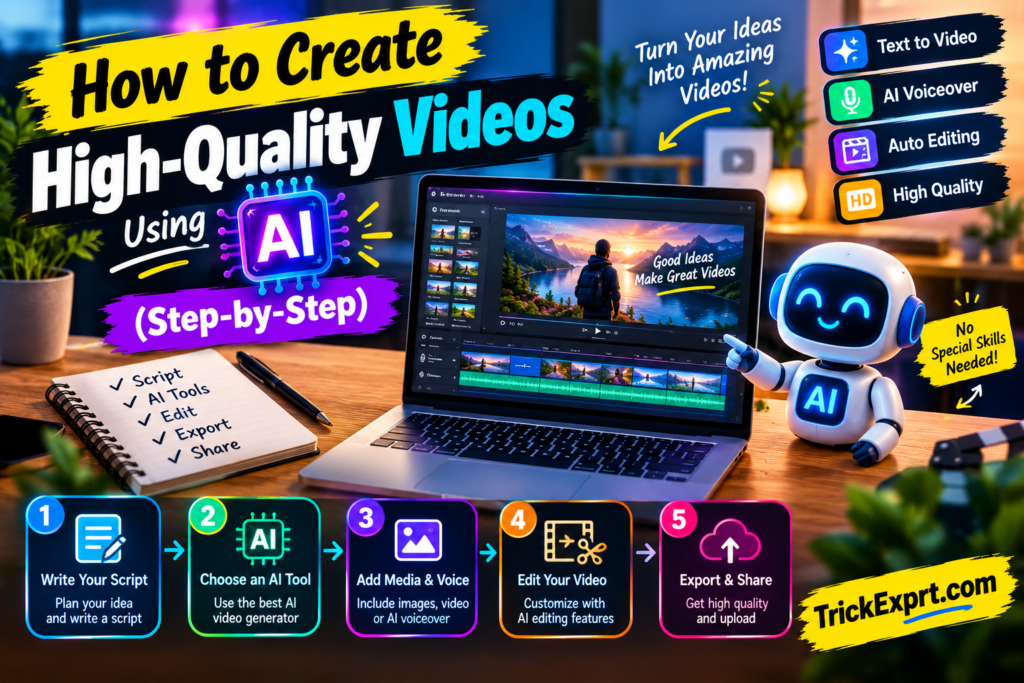
In this guide, you will learn a practical five-stage workflow for planning, scripting, generating visuals, recording or creating narration, and editing an AI-assisted video. If you are still choosing software, see our AI video generator comparison before selecting a tool.
The Modern AI Video Production Workflow at a Glance
Instead of relying on a single tool to do everything, top digital creators use a specialized 5-step production assembly pipeline:
[Step 1: Script Creation] ➔ [Step 2: Voice Generation] ➔ [Step 3: Visual Generation] ➔ [Step 4: Assembly & Captions] ➔ [Step 5: Post-Production]
  (ChatGPT / Claude)          (ElevenLabs)              (Midjourney + Kling)        (CapCut / InVideo)              (SEO & Thumbnail)
Step 1: High-Retention Script Writing with AI
A video is only as good as its underlying script. Even the most stunning 4K visual effects will not save a video if the story is boring or unstructured.
Recommended Tools:
- ChatGPT (GPT-4o) or Claude 3.5 Sonnet
How to Prompt the AI for Video Scripts:
Do not simply ask the AI to “Write a video script about financial habits.” Instead, feed the AI a structural framework with clear retention parameters:
Master Script Prompt Template:
*”Write a 60-second YouTube Short script about ‘5 Morning Habits of Self-Made Millionaires.’ The script must follow this structure:
- 0–3 Seconds (The Hook): A bold, controversial question that stops users from scrolling.
- 3–45 Seconds (The Body): 3 punchy, actionable points written in simple 10-word sentences.
- 45–60 Seconds (Call-to-Action): Ask the audience to subscribe for part two.
Include visual suggestions in brackets [e.g., Visual: Close-up of alarm clock ringing] after every line.”*
Step 2: Generating Hyper-Realistic AI Voiceovers
Monotone, robotic text-to-speech voices immediately turn viewers away and can lead to YouTube monetization rejections. To make your video sound human and professional, use advanced speech synthesis engines that support natural breathing, pitch inflection, and emotional tone.
Recommended Tools:
- ElevenLabs (Industry leader for expressive voice models) or built-in voice models in Fliki / InVideo AI.
Best Practices for AI Audio:
- Punctuate for Pacing: Add commas, dashes (
—), and ellipses (...) into your script text to force the AI narrator to take natural pauses between key ideas. - Select the Right Accent: Choose a narrator tone matching your niche (e.g., an authoritative male voice for documentary history, or an energetic female tone for social media tech news).
- Audio Export Settings: Export your narration file as an uncompressed 24-bit WAV or high-bitrate MP3 file for clean audio mixing.
Step 3: Generating Visual Media (Generative AI vs. Stock B-Roll)
Depending on your video style, you have two primary options for sourcing visual media:
Option A: Generative AI Visuals (For Storytelling, Sci-Fi, & History)
If you want unique, cinematic visuals that do not exist in stock libraries, you can also explore Google Flow. For Android-focused details, see our Google Flow AI video generator guide for Android.
- Generate base images using Midjourney or DALL-E 3.
- Animate static images into 5-second video clips using Kling AI or Runway Gen-3.
Option B: Stock Media Assembly (For Educational, Business, & Explainer Videos)
If you need real-world footage fast:
- Use InVideo AI or Pictory AI to automatically query royalty-free HD stock libraries (such as Getty Images and Storyblocks) based on script keywords.
Pro Tip: Ensure scene cuts happen every 2 to 3 seconds. Keeping visual cuts frequent prevents audience drop-off on platforms like TikTok and YouTube Shorts.
Step 4: Assembly, Editing, & Dynamic Subtitles
Once you have your script, audio voiceover, and visual clips, you need to assemble them into a cohesive timeline.
Recommended Tools:
- CapCut (Desktop / Mobile), InVideo AI, or Adobe Premiere Pro
Key Editing Steps:
- Timeline Alignment: Import your voiceover audio track first, then place your video clips on the layer above it, ensuring visual cuts align with sentence transitions.
- Dynamic Auto-Captions: Over 70% of viewers watch social videos with the sound turned off. Use CapCut’s or InVideo’s Auto-Caption engine to generate word-by-word animated subtitles. Highlight key active words in bright yellow or neon green.
- Sound Effects (SFX): Add subtle sound effects—such as a “whoosh” transition on scene cuts or a “pop” on text pop-ups—to make the video feel dynamic.
- Background Music: Lower background music audio levels to -20dB to -25dB so the narrator’s voice remains clear and easy to understand.
Step 5: Post-Production & SEO Optimization
Before publishing your AI-generated video, optimize it for platform algorithms:
- High-CTR Thumbnails: Create eye-catching thumbnails using Canva or Midjourney. Use bold text with maximum three words and strong color contrast.
- Export Settings: Always render videos in 1080p Full HD or 4K resolution at 60 FPS with a minimum bitrate of 15–20 Mbps.
- Search Engine Optimization: Include your primary focus keyword in the video title, the first two lines of the description, and the native file name before uploading (e.g.,
best-ai-video-tools-2026.mp4).
4 Common AI Video Mistakes & How to Fix Them
Avoid these common pitfalls that derail new creators:
- Mistake 1: Relying 100% on Raw AI Output without Proofreading.
- Fix: Always read the AI script aloud before rendering. Edit out awkward phrasing or repetitive words.
- Mistake 2: Audio Overpowering the Voiceover.
- Fix: Keep background music tracks strictly quiet underneath the main speech.
- Mistake 3: Static, Long Shots.
- Fix: Never leave a single visual shot on screen for more than 4 seconds without adding a zoom-in, pan, or clip transition.
- Mistake 4: Mismatched Visual Context.
- Fix: Manually review auto-matched stock clips in tools like Pictory or InVideo to ensure the video footage directly mirrors the spoken script context.
Frequently Asked Questions (FAQs)
Q1: How long does it take to make a 10-minute AI video using this step-by-step workflow?
Answer: There is no reliable fixed time. A 10-minute video may require several rounds of script editing, voice generation, scene creation, retries and export. Generation queues, clip length limits, credit allowances and the amount of manual editing can make the process take much longer than the render time alone.
Q2: Do I need a high-end computer with a powerful graphics card (GPU) to create AI videos?
Answer: No. Most generative AI video platforms (like Runway, InVideo, and Kling AI) process video renders on cloud servers. You only need a standard web browser and a stable internet connection.
Q3: What is the most important step for making an AI video go viral?
Answer: A clear opening can help viewers understand why they should keep watching, but no single technique guarantees virality. Match the opening to the video’s promise, deliver useful or entertaining content quickly, and review audience retention after publishing.
Conclusion & Next Steps
Creating high-quality videos using artificial intelligence is a repeatable system. By structuring your pipeline—from script generation to voice synthesis, visual generation, and dynamic editing—you can produce professional video content consistently at scale.
To explore different creator workflows, read our AI video generator app comparison, which covers tools for script-to-video creation and faceless-channel workflows.