TrickExprt Android Apps, Games, Software & Tech Guides
Learn how to create a Yalla Ludo account, link your login methods, earn XP, customize your profile, manage privacy settings, unlock badges, recover your account and protect it from hackers and phishing scams.
Quick Answer: How Do You Manage a Yalla Ludo Account?
To manage your Yalla Ludo account, open the game and use the Settings and Profile sections. You can create or bind an account through the available login methods, manage linked accounts from Account Center, edit your profile, control privacy settings, check login devices and recover access through your linked login method.
The most important safety rule is to link your account only to login methods that you personally own. Never share verification codes or enter your account details on unknown websites. If you want to understand the game modes before setting up your profile, read our complete Yalla Ludo gameplay and modes guide.
“I have been playing Yalla Ludo regularly for over four years, testing these account settings, Royal progression, and privacy controls on my Samsung Galaxy Note 20 Ultra. Every step below is based on hands-on experience inside the live app rather than guesswork.”
Table of Contents
- How to Create a Yalla Ludo Account
- Guest Account vs. Bound Account
- Yalla Ludo Account Binding Methods
- Account Growth, XP and Level Up
- How to Edit Your Yalla Ludo Profile
- How to Change Your Profile Picture
- How to Customize Your Profile
- Yalla Ludo Settings Explained
- Account Center and Login Devices
- Yalla Ludo Privacy Settings
- Network Test and CD Key
- Badges and Achievements
- Royal Level: Personal Experience and Advice
- How to Recover Your Yalla Ludo Account
- What Happens If You Lose Access to Your Linked Account?
- How to Remove an Unknown Login Device
- Important Account Security Warnings
- Frequently Asked Questions
1. How to Create a Yalla Ludo Account
Creating a Yalla Ludo account allows you to save your game progress and access your account through supported login methods. If you still need the app, use the official Yalla Ludo Google Play listing to check the current app and developer details.
After installing and opening the game, follow the available sign-in or account creation options displayed on the screen.
If you start playing without linking a login method, you may be using a guest account. A guest account should not be treated as a permanently secured account.
Important: Before changing your phone or uninstalling the game, make sure your account is properly linked to a login method that you personally control.
2. Guest Account vs. Bound Account
Understanding the difference between a guest account and a bound account is important before you start building your profile.
Guest Account
A guest account lets you access the game without first connecting a supported login method.
However, if you uninstall the game or change your device without securing your account, you may lose access to your account and its progress.
Bound Account
A bound account is connected to a supported login method, such as Yalla Chat, a mobile number, Facebook or email.
This gives you a way to log in again if you reinstall the game or move to another phone, provided you still have access to the linked login method. Account Safety Tip: Do not rely on a guest account for long-term progress. Bind it to your own login method before changing devices or uninstalling the game.
3. Yalla Ludo Account Binding Methods
Yalla Ludo provides several account binding options. The available social login option may depend on the options shown in your Account Center.
The methods discussed in this guide include:
- Yalla Chat
- Mobile Number
- Facebook or X (Twitter)
- Email or Gmail
Facebook and X are alternative social login options in the binding methods described here. Check the options currently displayed in your own Account Center. For the latest account-binding and recovery instructions, also consult the official Yalla Ludo FAQ.
Why Should You Bind Your Account?
Binding your account helps you log back in after reinstalling the game or changing your phone.
It is also important to keep control of the linked email address, phone number or social account. If you lose access to the linked service, recovering your Yalla Ludo account may become difficult.
4. Account Growth, XP and Level Up
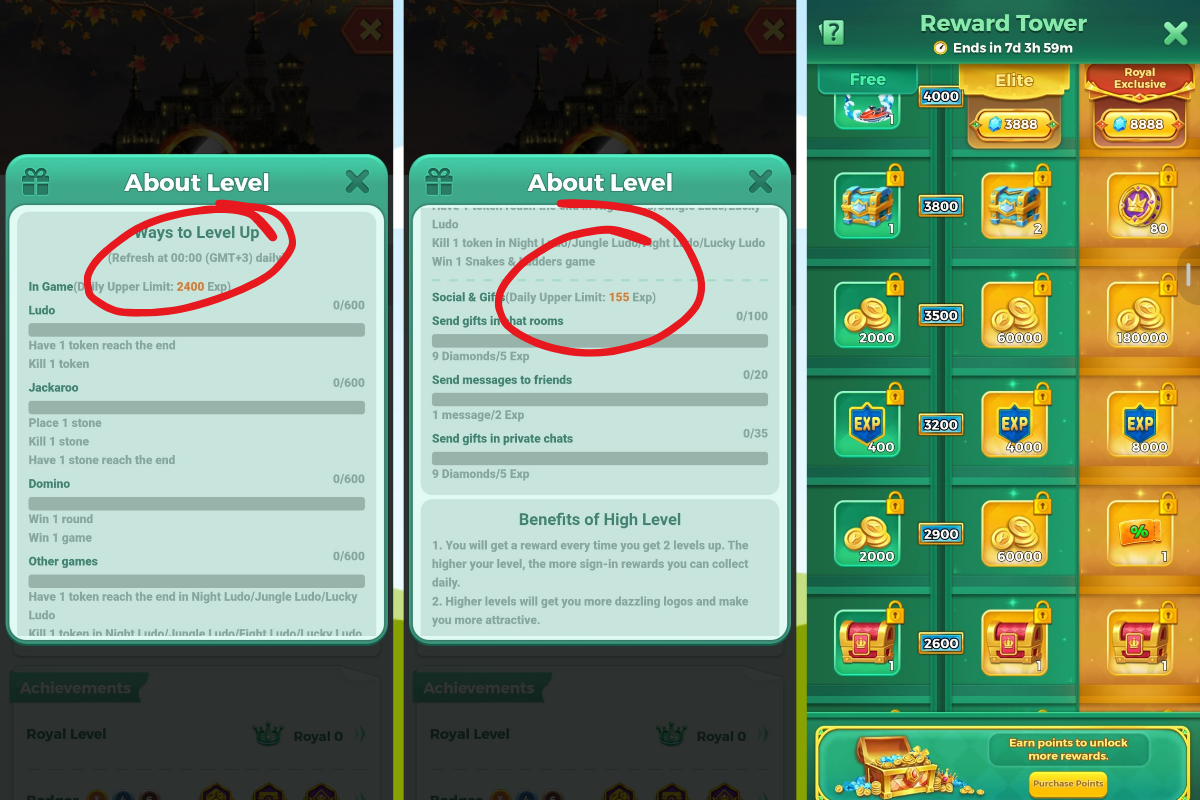
Your Yalla Ludo account develops as you earn experience points (XP). XP contributes to your account level and can be earned through gameplay and certain social activities.
Gameplay XP
The XP information discussed for the game includes these daily gameplay categories:
| Game category | XP amount discussed |
|---|---|
| Ludo | 600 XP |
| Jackaroo | 600 XP |
| Domino | 600 XP |
| Other Games | 600 XP |
| Gameplay XP total | 2,400 XP |
“In my testing on the current Android version of Yalla Ludo, gameplay XP caps out at 2,400 XP per day (600 XP across Ludo, Jackaroo, Domino, and Other Games), alongside up to 155 XP from social tasks and gifts. Because Yalla occasionally adjusts event caps after updates, always verify the daily progress bar inside your profile.”
These figures describe the daily gameplay XP limits discussed during our testing and should be checked against the current in-game display because game rules and rewards can change.
Social Activities and Gift XP
Social activities and eligible gift-related actions can also contribute XP. The previously discussed figure was up to 155 social/gift XP.
The exact total should be checked in the current game version rather than assuming that every activity always gives the same amount.
Does a Higher Bet Help You Earn XP Faster?
In the gameplay experience discussed for this guide, higher-bet games can help players earn XP faster. However, do not spend coins or Diamonds just to increase your level. Always consider the risk of losing your in-game currency.
Reward Tower and Royal Pass XP
Some reward or pass systems may provide additional XP as part of their rewards.
For example, the Reward Tower Elite offer and Royal Pass rewards have been discussed separately. Their prices, duration and reward amounts can change, so check the current in-game offer before purchasing.
Remember: Your account level is not a reason to spend more than you can afford. Enjoy the game and treat paid rewards as optional.
5. How to Edit Your Yalla Ludo Profile
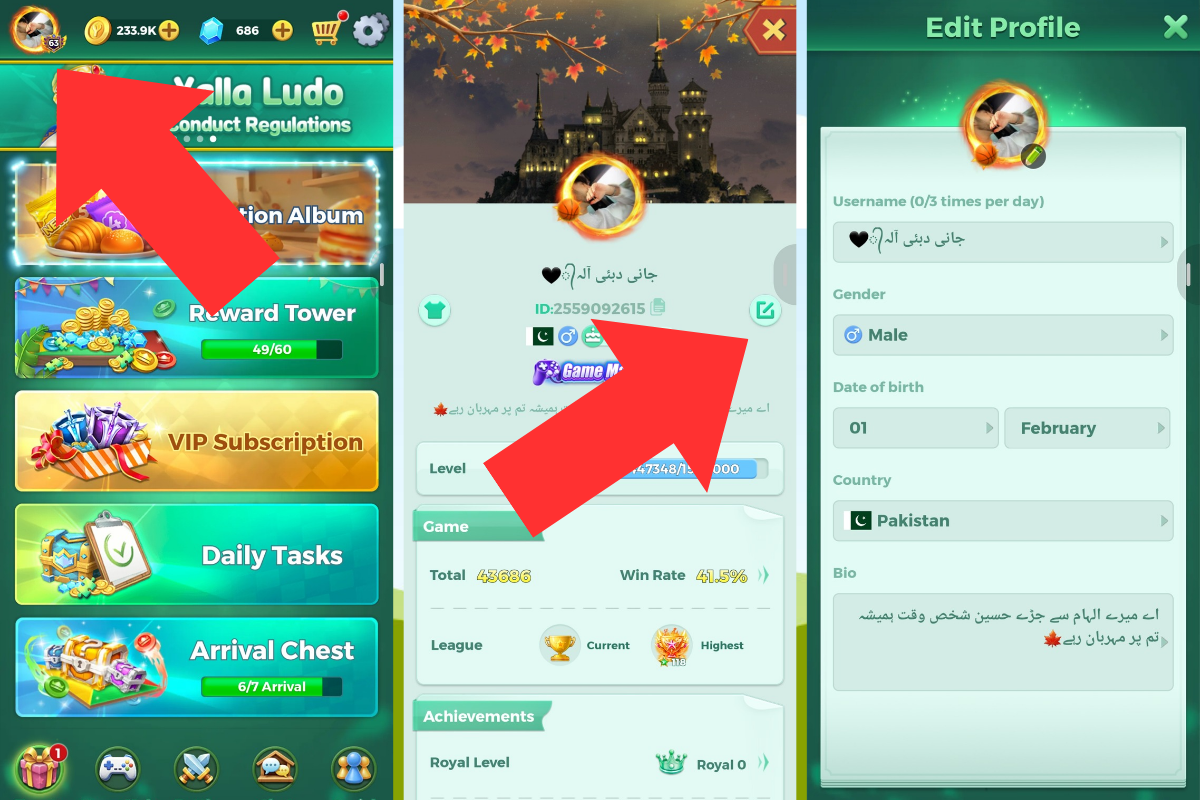
You can update your profile information directly from the Profile Page.
Follow these steps:
- Open the Yalla Ludo main menu.
- Tap your display picture (DP) in the top-left corner.
- Your Profile Page will open.
- Tap the Edit button beside your username.
- Make the changes you want.
- Save your updated information.
How to Change Your Username
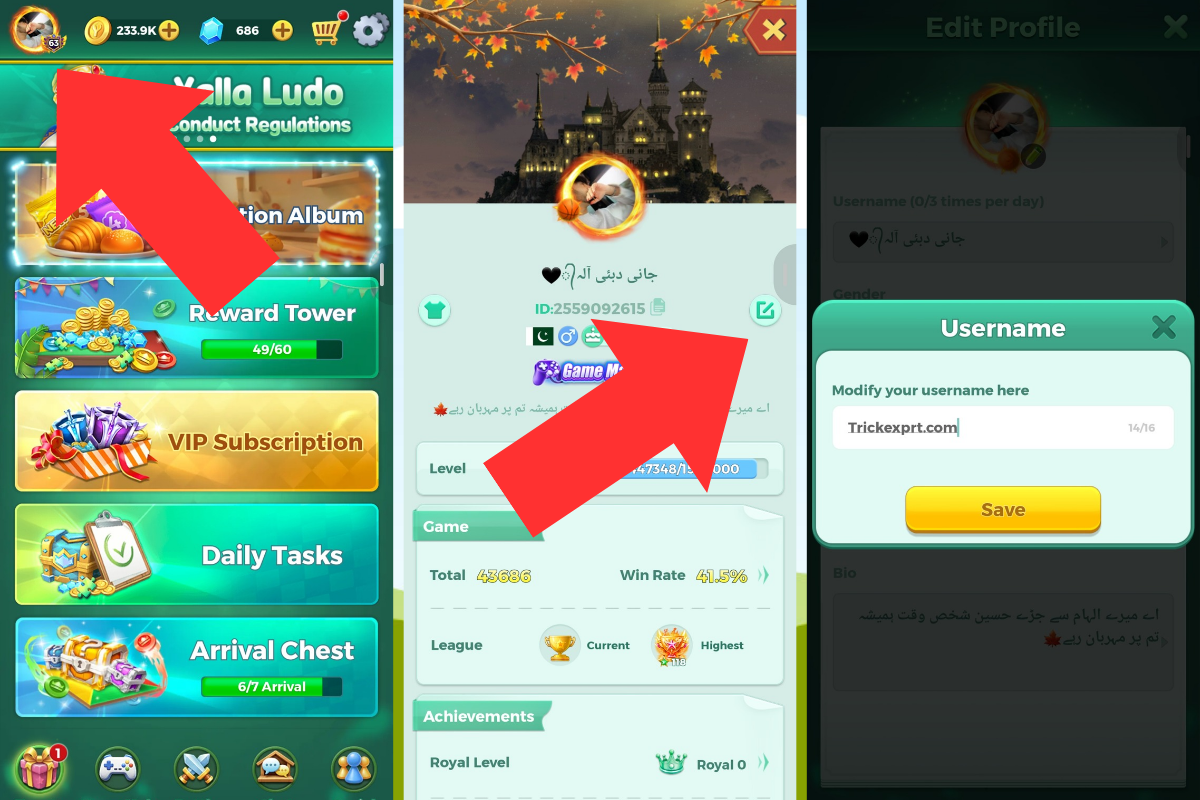
On the edit page, tap your current username and enter a new one.
The limits discussed during our game walkthrough are:
- Maximum username length: 16 characters.
- Username changes: Up to 3 times per day.
- After using all 3 changes, wait 24 hours before making another change.
These limits should be checked in the current app version before publication as final platform-wide rules.
How to Change Your Bio
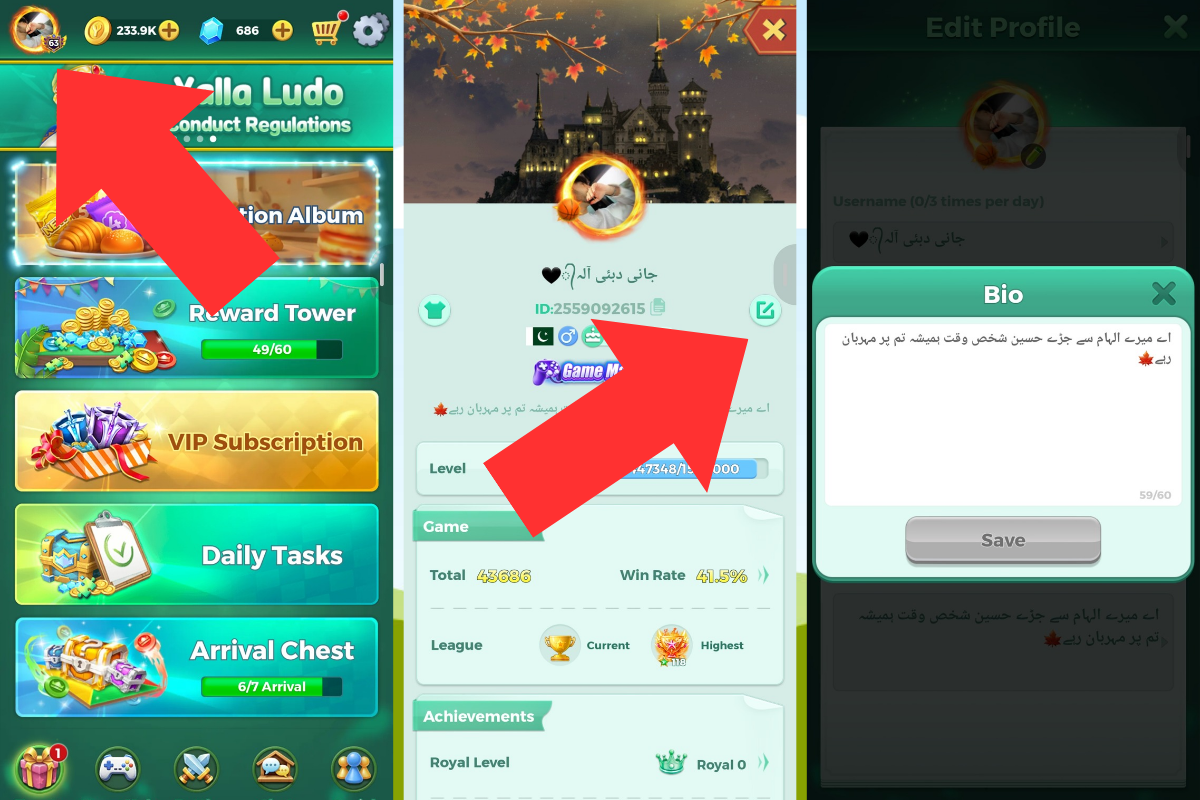
You can also edit your profile bio from the same edit page.
The bio length discussed in our walkthrough is a maximum of 60 characters.
“On the current app build, usernames support up to 16 characters and bios allow up to 60 characters. You can change your username up to 3 times per day—after the third edit, the game applies a 24-hour cooldown.”
Other Personal Information
The same page also provides options to edit:
- Gender
- Date of Birth
- Country or Nationality
The options and restrictions shown by the game may vary depending on the account and app version.
6. How to Change Your Yalla Ludo Profile Picture
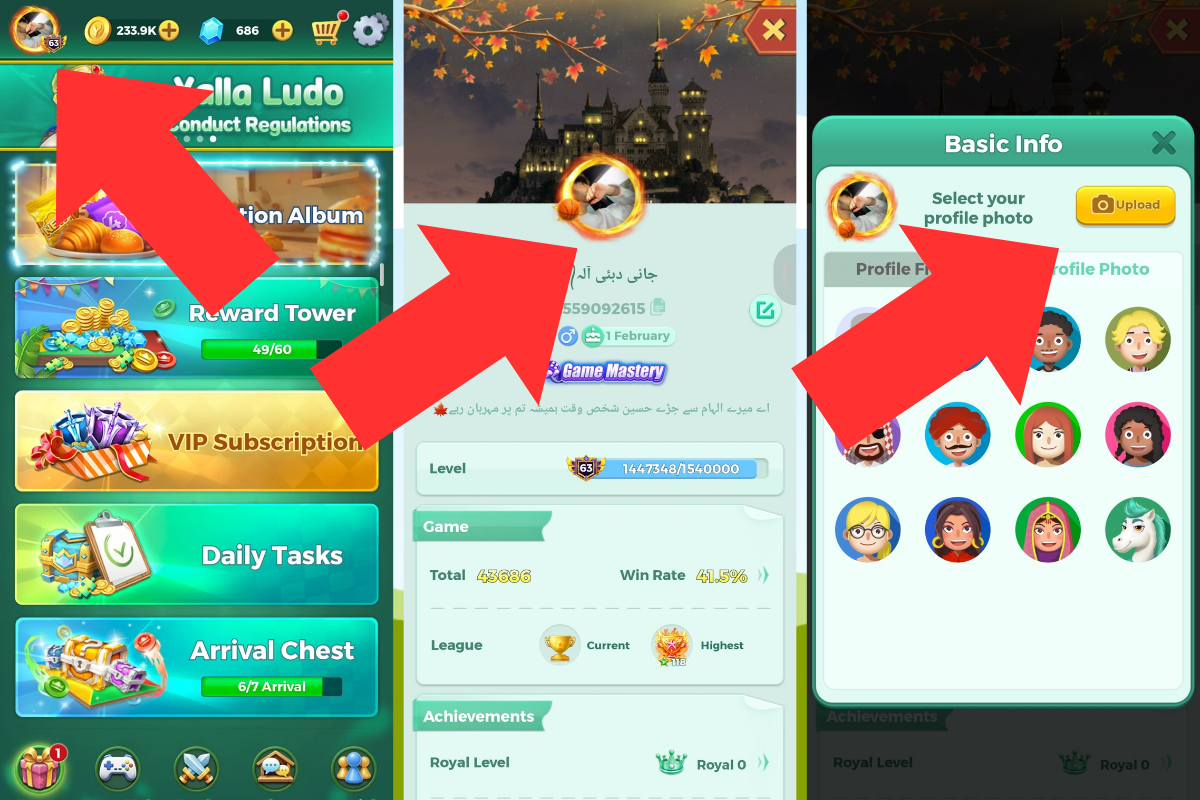
You can upload a picture from your phone gallery or select one of the available Yalla Ludo avatars.
Follow these steps:
- Open your Profile Page.
- Tap your current profile picture.
- A popup window will appear.
- Select the Profile Photo option on the right.
- Tap Upload.
- Choose an image from your phone gallery.
- Follow the on-screen instructions to apply it.
You can also choose from the faces or avatars provided by Yalla Ludo.
7. How to Customize Your Yalla Ludo Profile
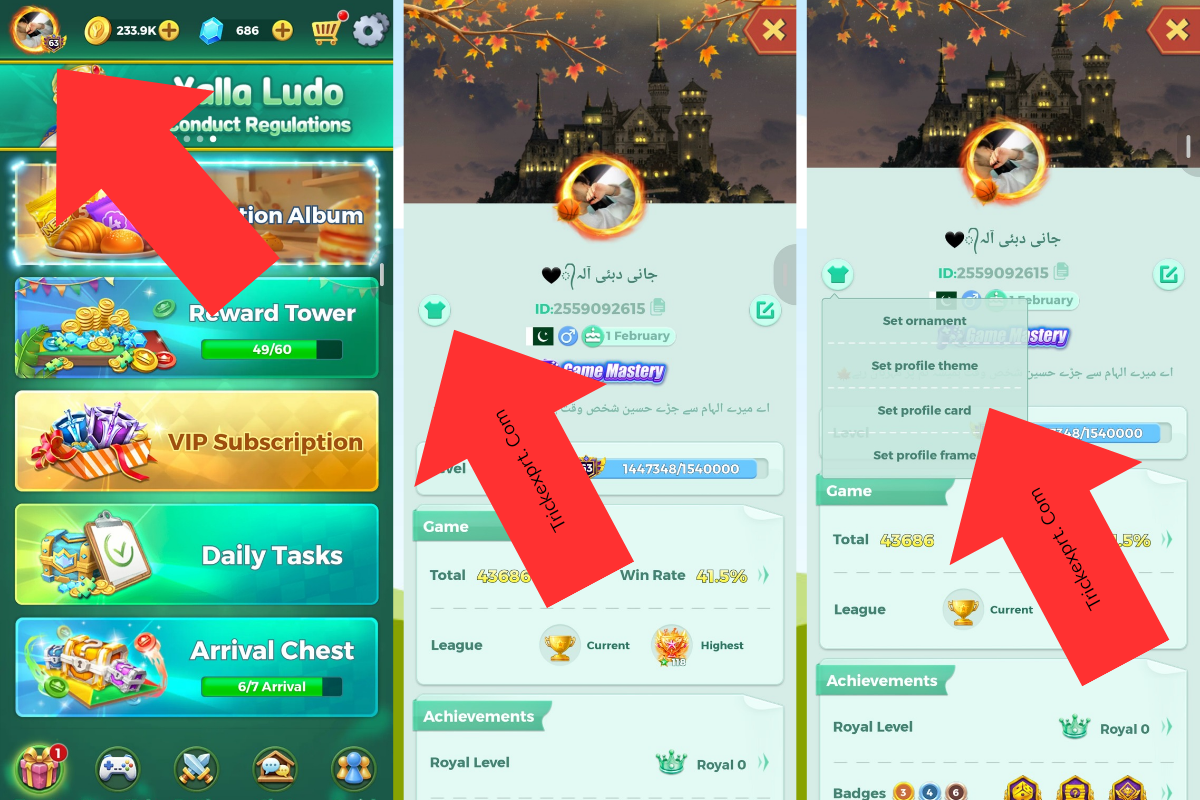
Yalla Ludo provides several profile customization options.
To access them:
- Open the main menu.
- Tap your DP in the top-left corner.
- Open your Profile Page.
- Tap the T-shirt icon on the left side.
You will find four customization categories:
7.1 Set Ornament
Choose an available ornament to personalize your profile.
7.2 Set Profile Theme
Select a profile theme from the items available to your account.
7.3 Set Profile Card
Choose a profile card to change the appearance of your profile.
7.4 Set Profile Frame
Apply an available profile frame around your profile picture.
Some items may be free, earned through activities or purchased using Diamonds. The available options depend on your account and the items you have collected.
8. Yalla Ludo Settings Explained
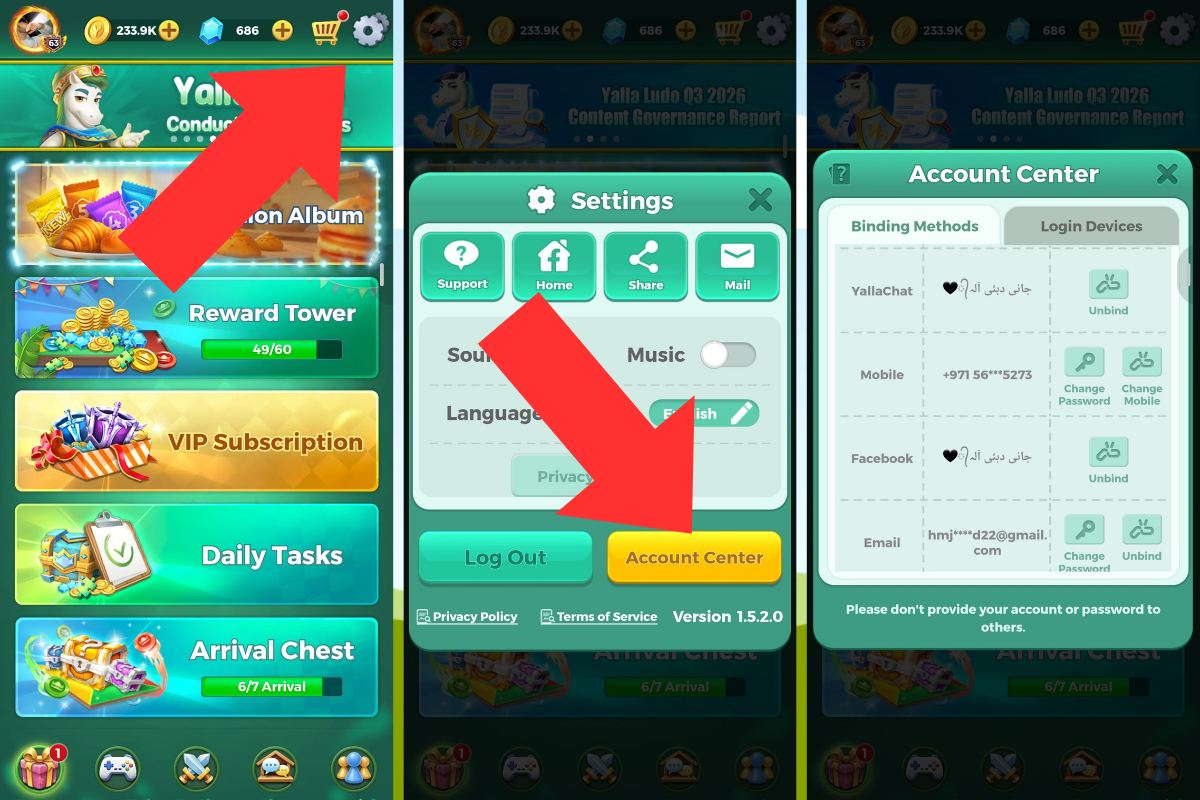
The Settings menu gives you access to account management, privacy controls, sound options and other features.
To open it, tap the gear icon in the top-right corner of the main page.
The menu includes the following options:
- Support
- Home
- Share
- Sound
- Music
- Language
- Account Center
- Privacy Settings
- Network Test
- CD Key
- Delete Account
The Mail section is where you can check messages and notifications sent by the Yalla Ludo team.
Sound and Music
Use these controls to turn game sound effects and background music on or off.
Language
Choose from the languages available in the game.
Support
Use the Support option when you need help with an account or game-related issue.
9. Account Center and Login Devices
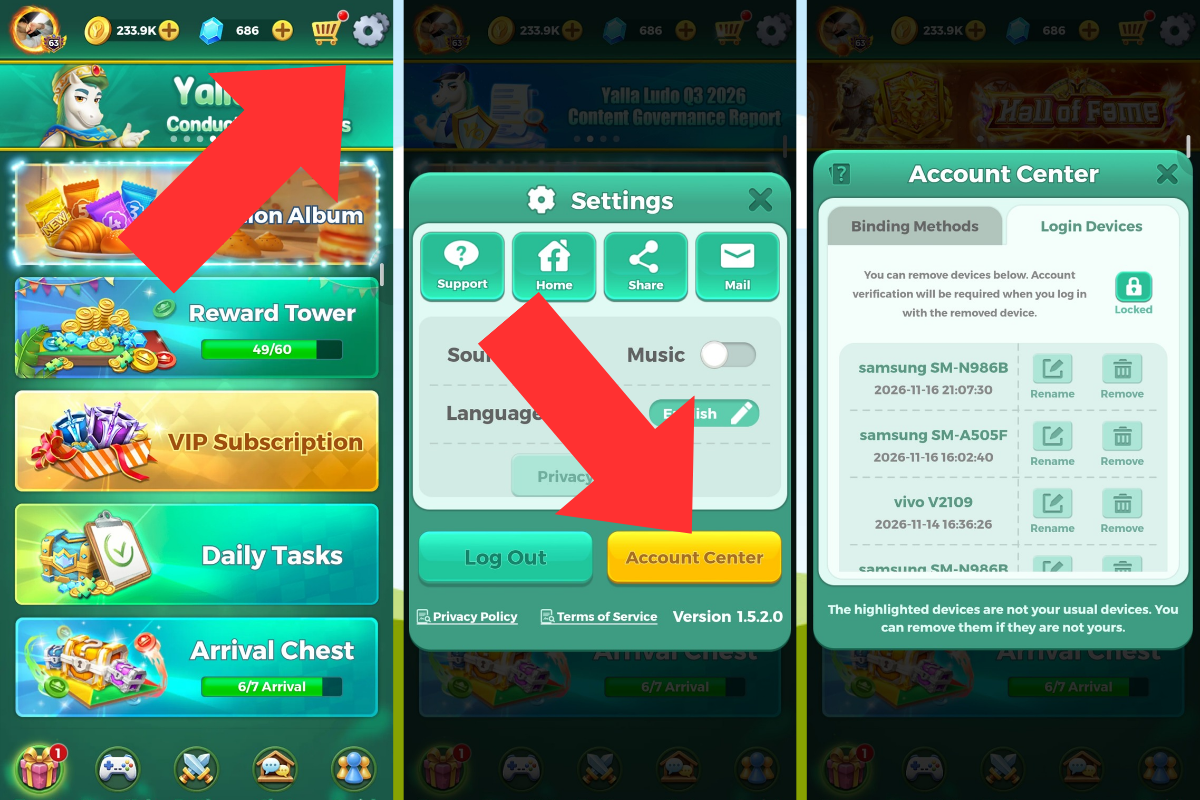
The Account Center is one of the most important sections for managing your account security.
Open:
Settings → Account Center
Two important areas are available.
9.1 Binding Methods
This section lets you view the login methods connected to your Yalla Ludo account.
Depending on the available options, you may be able to add another binding method or manage an existing one.
Be careful when changing or removing a binding. Make sure you still have a working login method that belongs to you.
9.2 Login Devices
The Login Devices section shows devices that have accessed your account.
You can check the device information and remove a device you do not recognize or no longer use.
For stronger protection, enable Device Lock if it is available in your account. Yalla Ludo’s official security guidance recommends this feature because a new device will require verification when trying to access the account.
10. Yalla Ludo Privacy Settings
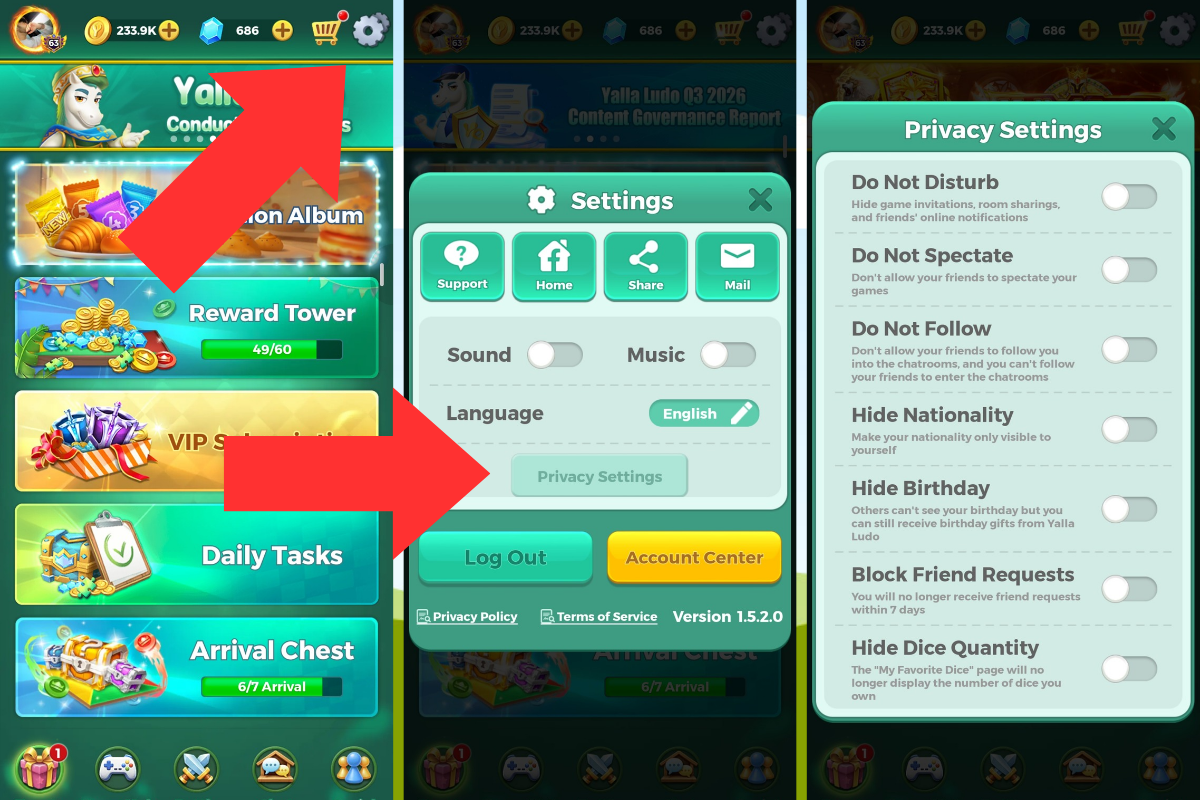
Privacy Settings allow you to control how other players interact with you and what information they can see.
Open:
Settings → Privacy Settings
The options discussed in our walkthrough include:
Do Not Disturb
This option helps prevent game invitations, room sharing and online notifications from friends.
Do Not Spectate
Use this option to prevent other players from spectating your gameplay.
Do Not Follow
This setting prevents someone from following you into a chat room.
Hide Nationality
This option hides your country flag from your profile.
Hide Birthday
Use this option to hide your birthday information from your profile.
Block Friend Request
This setting blocks incoming friend requests for 7 days, after which it automatically turns off according to the behavior observed in our walkthrough.
Hide Dice Quantity
This option hides the total dice quantity displayed on your profile.
Tip: Review your privacy settings regularly and choose the options that match your preferences.
11. Network Test and CD Key
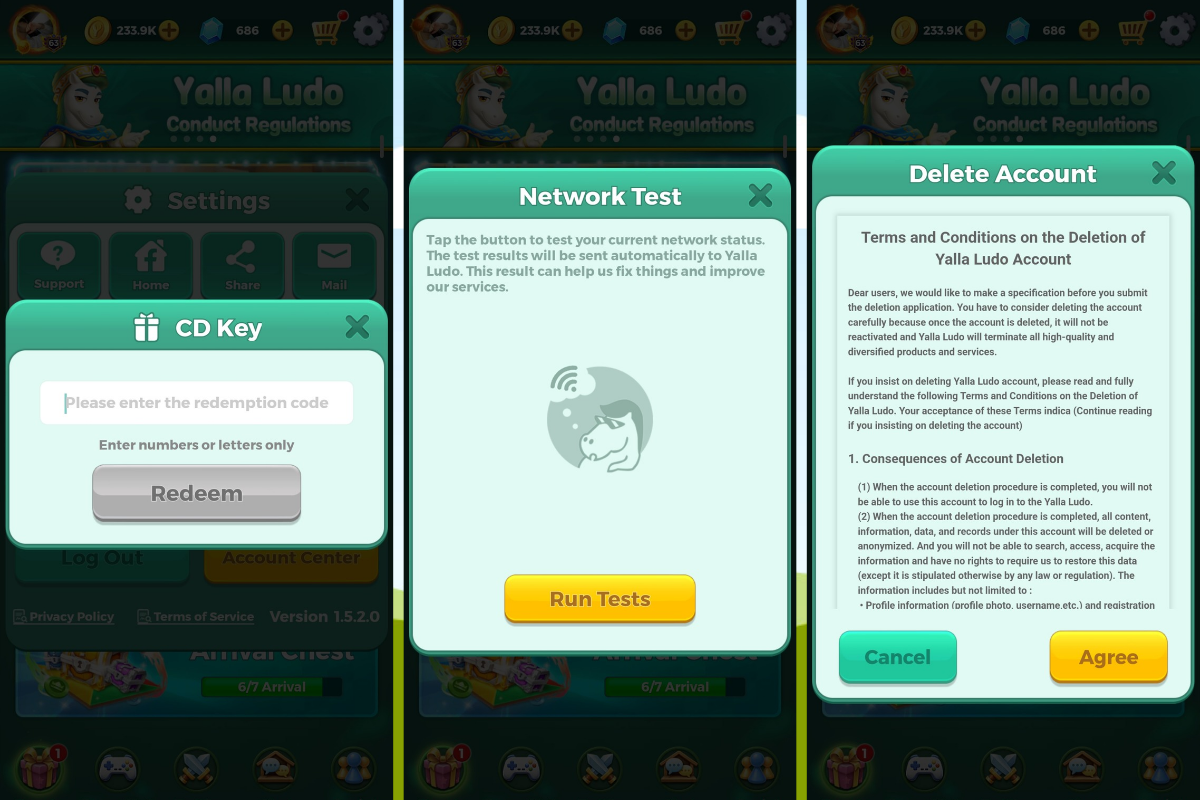
11.1 Network Test
The Network Test option checks your connection and can help when the game is lagging, disconnecting or repeatedly reconnecting.
To access it:
- Open Settings.
- Select Network Test.
- Run the test.
- Review the displayed connection results.
11.2 CD Key
The CD Key section is used to enter a code and redeem the reward associated with it.
Yalla Ludo may distribute promotional codes through eligible activities or official channels. Another person may also share a code with you.
To redeem a code:
- Open Settings.
- Tap CD Key.
- Enter the code.
- Follow the instructions shown by the game.
Only use codes from sources you trust. Never enter your account password on an external website to claim a CD Key.
11.3 Delete Account
The Delete Account option is available through Settings.
Be careful before using it. Account deletion may result in losing access to your account and its associated progress. Read the confirmation and deletion information displayed by the game before proceeding. You can also review the official Yalla Ludo Terms of Service for the platform’s account-related terms.
12. Yalla Ludo Badges and Achievements
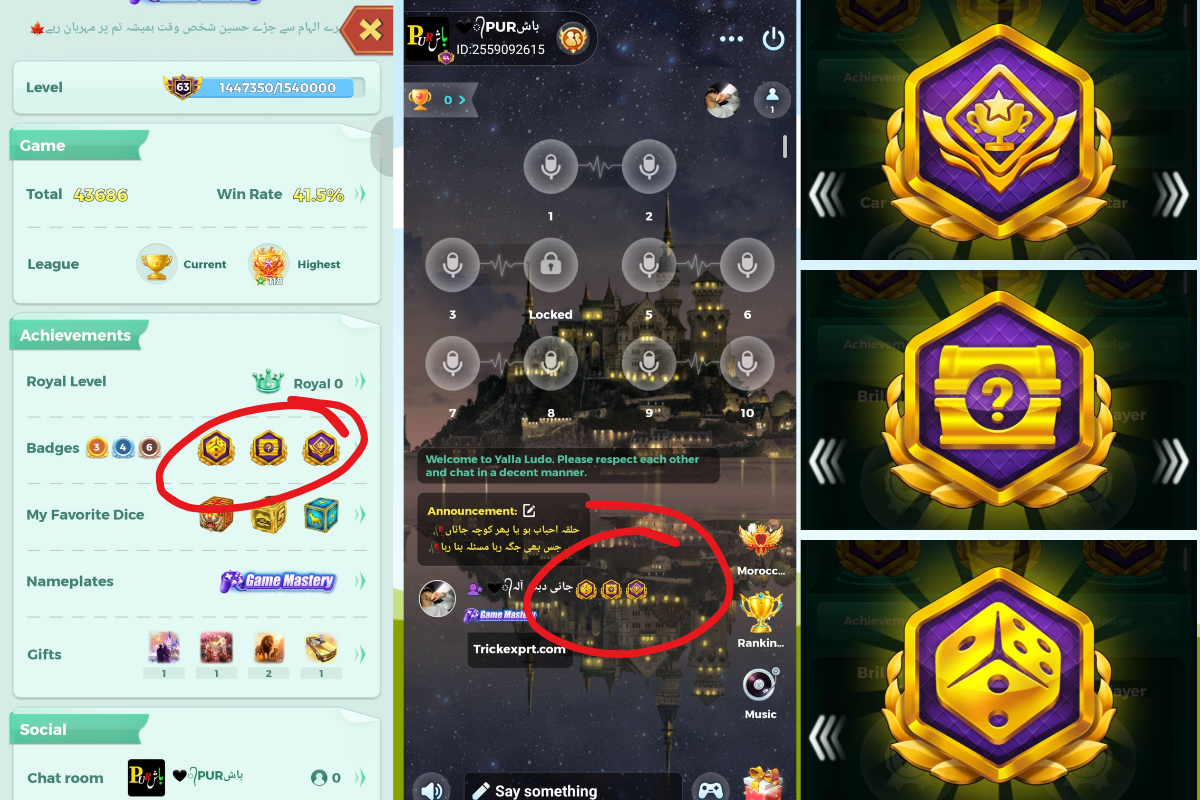
Badges are profile achievements that show different accomplishments in Yalla Ludo.
Some badges are associated with gameplay, while others may require specific activities, gifts or other achievements.
Gameplay-Related Badges
In the gameplay experience shared for this guide, the following winning milestones were discussed:
- Ludo: 12,000 winnings
- Domino: 12,000 winnings
- Jackaroo: 12,000 winnings
These figures refer to winnings, not the number of games played. Check the badge description in the game to confirm the current requirement.
Gift-Related Badges
Some gift-related badges may require sending or receiving a large number of particular gifts.
These achievements can involve significant spending, depending on the gift and the requirement.
Arrival Chest and Other Badges
Arrival Chest is another badge mentioned by players. Its exact unlocking requirement should be checked in the game before relying on a particular number or method.
How Many Badges Can You Display?
The profile display discussed in our walkthrough allows up to 3 badges to be shown at one time.
Which Badges Should You Focus On?
If you do not want to spend money on gifts, focus on achievements you can earn through normal gameplay and activities.
There is no need to spend large amounts simply to display a badge.
“Badge requirements can shift slightly between seasonal updates, so always tap the specific badge inside your profile to check your exact remaining target before grinding.”
13. Royal Level: Personal Experience and Advice
Royal status is a separate progression and spending-related feature. The following section describes personal gameplay experience, not a guaranteed rule for every player.
Personal Experience with Royal 1
In my own experience, I unlocked Royal 1 after purchasing and sending gifts and reaching approximately 7,000 points.
After unlocking Royal 1, I found that maintaining the status required further activity or spending over time. When I stopped maintaining it, my Royal 1 progress reset.
The maintenance period and requirements may change, so players should check the current rules displayed in the game.
My Advice to Ordinary Players
I personally do not recommend spending money only to maintain a status.
Yalla Ludo can be enjoyed through normal gameplay with friends and family. Spending on gifts or Royal status is a personal choice, but it should always remain within your budget.
14. How to Recover Through Official In-Game Support (If Gmail, SIM, or Facebook Is Lost)
If your linked Gmail is deleted, your SIM card is no longer active, or your Facebook account was disabled, you cannot fix the login from the Account Center alone. Your only legitimate option is Yalla Ludo’s official Support (open Settings → Support, or tap the Support icon on the login screen).
Before submitting a ticket, prepare these four ownership proofs:
- Your Exact User ID (UID): The numerical ID displayed beneath your profile avatar (save a screenshot of your profile page now while you still have access).
- Account History: Your exact nickname, country/region, approximate registration year, and the device model(s) you played on.
- Diamond / VIP Purchase Receipts: Screenshots of your Google Play Order ID (GPA.xxxx-xxxx-xxxx) or Apple App Store invoice. If you have ever made a purchase, this is the strongest proof of ownership.
- Previous Binding Details: The exact Gmail, phone number, or social profile that was linked before you lost access.
Important: Yalla Ludo does not provide any official WhatsApp or phone number for account recovery. Never pay third-party “recovery agents” or share OTP codes.
15. What Happens If You Lose Access to Your Linked Account?
Your Yalla Ludo account depends on the login method connected to it.
If You Lose Access to Facebook
If your Yalla Ludo account is linked to Facebook but you can no longer access that Facebook account, you may not be able to use it to log in.
According to the account behavior described in this guide, changing or removing that binding can become difficult if you cannot access the linked Facebook account.
If You Lose Access to Gmail
If your account uses email verification, you need access to the linked email address to receive the login code.
For example, if the email belongs to a friend and that person does not provide the verification code, you may be unable to log in through that email.
Safety advice: Always use your own email address, phone number and social accounts for binding. Keep them active and secure.
16. How to Remove an Unknown Login Device
If someone else has accessed your Yalla Ludo account on their device, check your Login Devices section.
Follow these steps:
- Log in to your own Yalla Ludo account.
- Open Settings.
- Select Account Center.
- Open Login Devices.
- Review the listed devices.
- Identify the device you do not recognize.
- Select Remove for that device.
- Enable Device Lock if it is available.
Removing a device logs out the account on that device. With Device Lock enabled, a future login from a new device requires verification. Yalla Ludo explains this protection in its official account security guidance.
Also secure the email, phone number or social account connected to your Yalla Ludo ID. Never share verification codes.
17. Important Account Security Warnings
The following warnings are especially important. Many account problems happen because players share login information, trust strangers or use unsafe links.
Warning 1: Never Link Someone Else’s Login Method to Your Personal ID
⚠️ IMPORTANT ACCOUNT SECURITY WARNING
Never link another person’s mobile number, Gmail address, Facebook account or other login method to your personal Yalla Ludo ID.
If you connect someone else’s login method to your account, that person may retain a way to access your account. Removing or replacing that binding may require their cooperation.
They could potentially log in, spend your Diamonds, change your username or make other changes to your profile.Always use login methods that belong to you and that you personally control.
Even if the other person is a close friend, avoid linking their account to your personal Yalla Ludo ID.
Warning 2: Beware of Fake Links and Phishing Scams
⚠️ WARNING: FAKE LOGIN PAGES CAN STEAL YOUR ACCOUNT
Some scammers create fake websites and phishing pages to steal players’ login information.
They may share links in chat rooms or private messages and promise rewards such as:
- “Log in here to receive $5,000.”
- “Open this link to claim free Diamonds.”
- “Enter your account details to receive special gifts.”
These offers may be designed to trick you into entering your account details on a fake login page. The information you submit can then reach the scammer, who may use it to access your account. Yalla Ludo also warns players about phishing and fake login pages in its official FAQ and security advice. Never enter your login details or verification codes on unknown websites. Use the official game and trusted login process only.
Warning 3: Never Share Your Password or Verification Code
🔒 KEEP YOUR LOGIN INFORMATION PRIVATE
Never share your password, SMS verification code or email verification code with another player.
Someone pretending to be an official team member may ask you for these details. Do not trust such requests.Protect your login information, even when someone promises to recover your account or give you free rewards.
Warning 4: Do Not Give Your Account to Other People
Your Yalla Ludo account contains your progress, profile and virtual items. Allowing someone else to operate your account can put your information and items at risk.
Keep your account under your own control and use official support if you have a security problem.
18. Frequently Asked Questions
Can I recover my Yalla Ludo account after changing my phone?
Yes, if your account is linked to a login method that you can still access. Sign in using the same linked method.
Can I recover a Yalla Ludo guest account after uninstalling the game?
If the guest account was not linked to a supported login method, recovery may not be possible after uninstalling the game or changing devices.
Can I link my friend’s Gmail to my Yalla Ludo account?
It is not recommended. Use your own email address or another login method that you personally control.
How can I check which devices are logged in to my account?
Go to Settings, open Account Center and select Login Devices.
How can I protect my account from hackers?
Use your own login methods, keep your credentials private, avoid unknown links, check your login devices and enable Device Lock if available.
Can someone steal my account through a fake link?
Yes. A phishing page can collect information you enter, such as your password or verification code. Never log in through suspicious links.
How many badges can I display on my profile?
The profile display discussed in this guide allows up to three badges at a time. Check the current profile screen for any changes.
Can I change my Yalla Ludo username?
Yes. Open your Profile Page, tap Edit beside your username and follow the available options and limits.
How do I hide my birthday or nationality?
Open Settings, select Privacy Settings and enable Hide Birthday or Hide Nationality.
Should I spend money to maintain Royal status?
That is a personal choice. Consider your budget carefully. You can enjoy normal gameplay without spending money to maintain a status.
Related Yalla Ludo and Ludo Game Guides
Want to explore more games? Read our Yalla Ludo gameplay and modes guide, compare it with Ludo King for Android, or check our guide to Ludo STAR APK. For the complete in-game walkthrough, return to our Yalla Ludo Master Guide.
Final Thoughts
Your Yalla Ludo account is more than a game profile. It contains your progress, achievements, linked login methods and virtual items.
The best way to protect it is to use your own login details, keep your linked accounts accessible, check your login devices and avoid suspicious links or unrealistic reward offers.
Whether you are a new player or someone who has been playing for years, understanding account settings, recovery options and security practices can help you avoid unnecessary problems.
Play safely, protect your account and enjoy Yalla Ludo!