TrickExprt Android Apps, Games, Software & Tech Guides
Yalla Ludo is a multiplayer gaming app featuring different board games and playing modes. Its main games include Ludo, Jackaroo, Domino, Jungle Ludo, Lucky Ludo, Snakes and Ladders, Fight Ludo, and Night Ludo.
I have played Yalla Ludo for more than four years. This guide explains its four Ludo modes—Classic, Master, Quick, and Arrow—along with the optional Magic tools, Domino formats, Jackaroo modes, and practical match strategies based on hands-on experience.
Players can enjoy different match types, including 1 vs 1, four-player matches, team play, tournaments, private rooms, and VIP rooms, depending on the game.
The app uses Coins and Diamonds as in-game currencies. Players can also explore different dice designs and VIP memberships, including VIP Knight and VIP Baron, which offer additional features and privileges.
Table of Contents
1. Introduction to Yalla Ludo
Yalla Ludo is a multiplayer gaming app that brings several popular board games together in one platform. It allows players to enjoy different games with friends and other players online.
The app offers multiple gameplay options, room types, betting ranges, and special features. Players can choose between individual matches, team-based games, tournaments, private rooms, and VIP rooms where available.
Yalla Ludo also includes in-game currencies, collectible dice designs, social features, and VIP memberships.
This guide explains the main games, their gameplay modes, important features, and VIP membership benefits based on firsthand gameplay experience. If you also need help creating, securing or recovering your player profile, read our Yalla Ludo Account Guide for account settings, login methods, privacy and security tips.
1.1 How to Play Yalla Ludo
Getting started in Yalla Ludo takes only a few steps. The exact options may vary depending on the game you choose.
- Choose a game: Select Ludo, Jackaroo, Domino, or one of the special games such as Jungle Ludo or Lucky Ludo.
- Pick a playing option: Choose 1 vs 1, four players, team play, tournament, private or local play, or a VIP room, depending on the game.
- Select a mode: In the main Ludo game, choose between Classic, Arrow, Quick, and Master.
- Set your entry bet: Coins are mainly used for the entry bet, and the available amounts depend on the room. In the main Ludo game, the reported betting range starts from 500 Coins.
- Roll the dice and move your tokens: Tokens move according to the dice result, and capturing an opponent’s token can earn points or an extra turn, depending on the mode.
- Use special features carefully: Features such as Undo may require Diamonds, so check the required currency before using them.
Beginners may find it easier to start with Classic Mode and a low entry bet before trying Arrow, Quick, or Master Mode.
2. Coins and Diamonds in Yalla Ludo
Yalla Ludo uses two main in-game currencies: Coins and Diamonds.
2.1 Coins
Coins are mainly used to participate in games that require an entry bet. The required amount depends on the game, room, and selected betting level.
Players can collect Coins through different in-game rewards and activities, including:
- Daily rewards and allowances.
- Daily tasks.
- Other available in-game rewards.
The number of Coins required to join a match varies across different games.
2.2 Diamonds
Diamonds are another in-game currency used for selected features, items, and activities.
Depending on the available game options, Diamonds can be used for certain special features, including some Undo actions in Ludo.
Coins and Diamonds have different purposes, so players should check the required currency before using a particular feature.
3. Dice Collection and Dice Categories
Yalla Ludo offers a wide collection of dice designs. Players can select different dice appearances instead of always using the standard dice.
Based on the available collection observed in the game, there are more than 150 dice designs. The exact number may change as new dice are introduced.
Dice can be obtained through different methods, including free rewards, keys, Diamonds, and special activities.
3.1 Free Dice
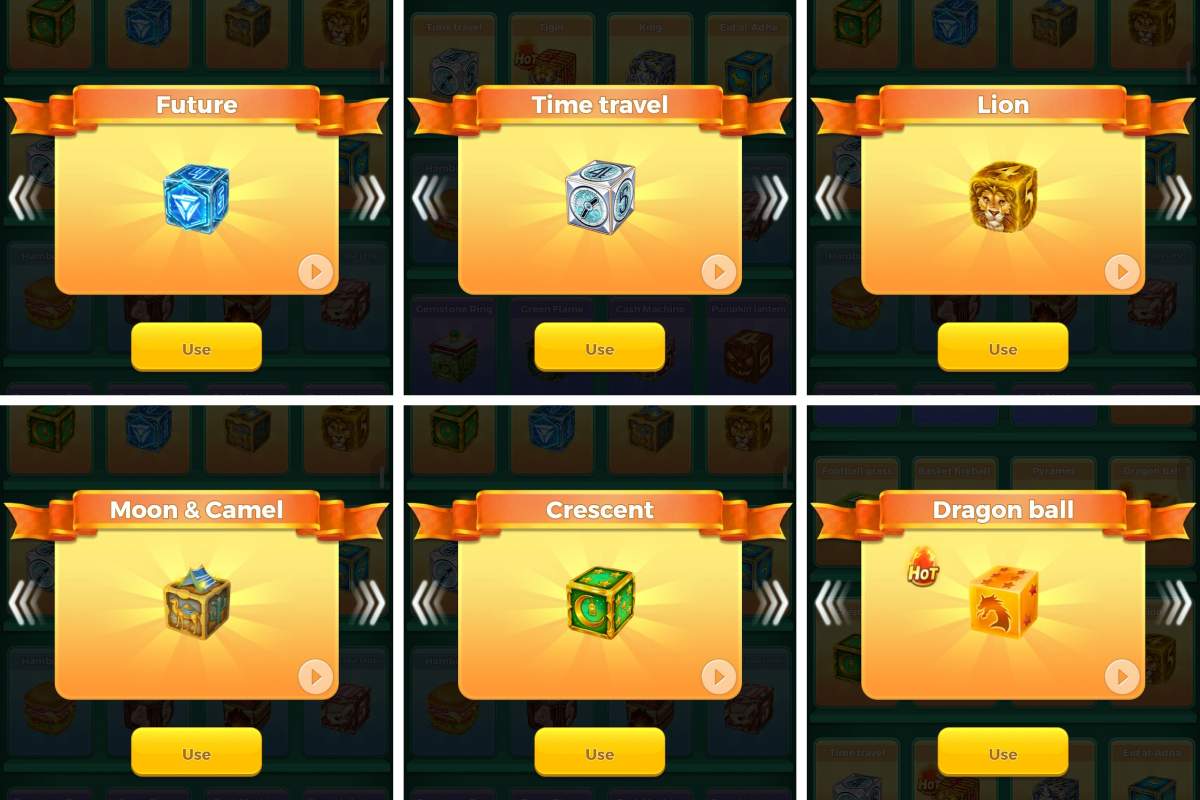
Some dice can be unlocked using keys or through available rewards.
Based on observed in-game options, approximately 20 keys may be required to unlock certain dice. Daily rewards may also provide one or two keys.
Examples of free dice designs include:
- Time Travel
- Lion
- Dragon Ball
- Moon and Camel
- Future
- Crescent
Availability and unlocking requirements may vary.
3.2 Diamond Dice
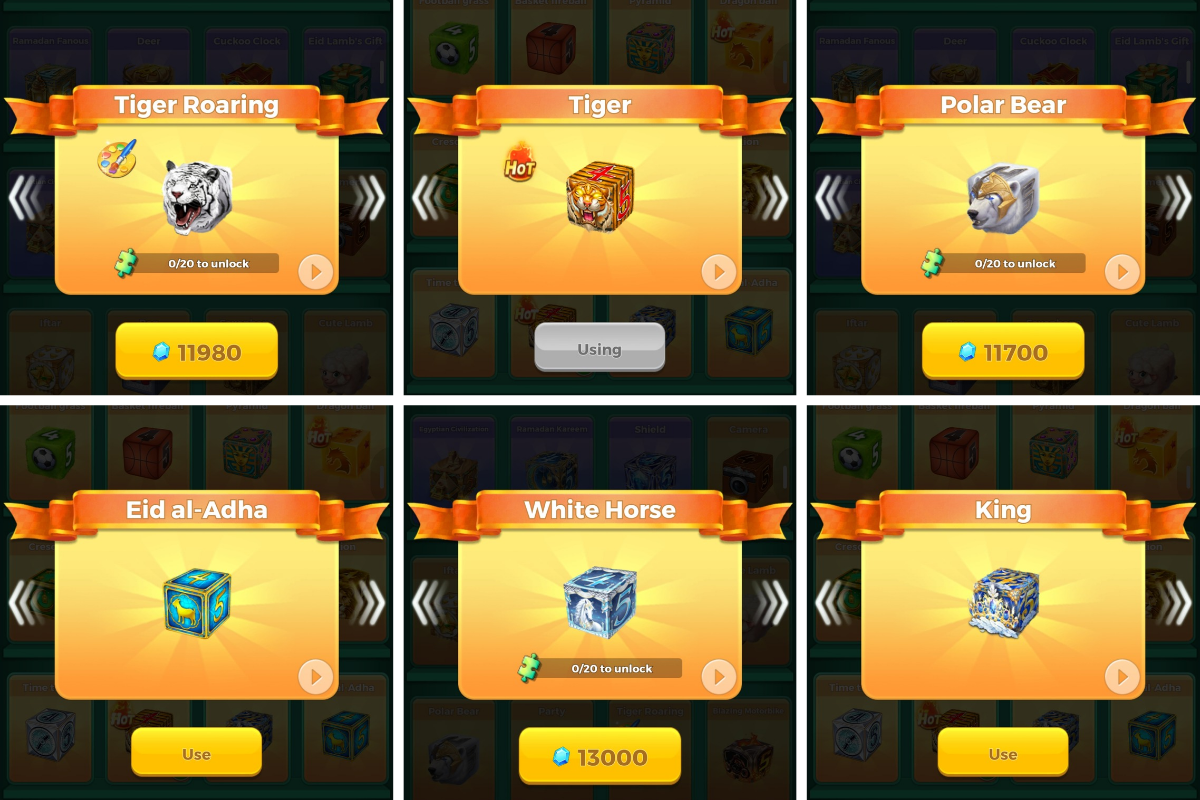
Some dice designs are available through Diamond-based options.
Examples include:
- Tiger
- King
- Eid al-Adha
- Tiger Roaring
- Polar Bear
- White Horse
3.3 Activity Dice

Yalla Ludo also introduces special dice through limited-time activities.
Examples include:
- Wolf King
- Warrior
- Firework
- Sky Conqueror
- Knight
- Firebird
Some activity-based dice may only be available for a limited period, such as 7 days, 15 days, or one month, depending on the activity.
4. Main Ludo Game
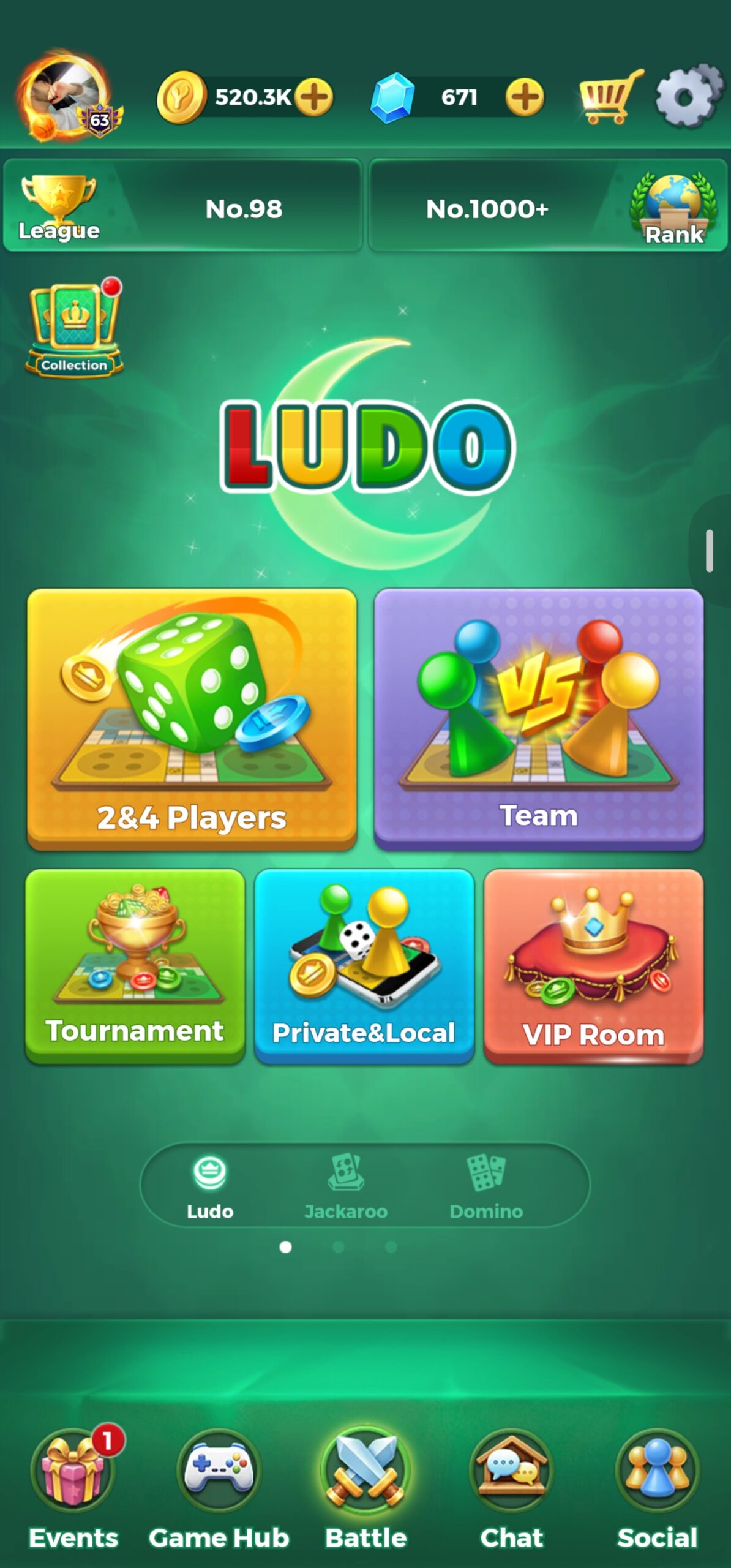
The main Ludo game is one of the central features of Yalla Ludo. It offers different playing modes and room options, allowing players to choose how they want to compete.
4.1 Available Playing Options

The main Ludo game includes several playing options:
- 1 vs 1: Two players compete against each other.
- Four Players: Four players participate in an individual match.
- Team Play: Players can join with a friend and play as a team. Coordinate moves with your partner instead of treating the match like two separate solo games.
- Tournament: Players participate in tournament-based matches.
- Private or Local Play: Options for playing in private or local settings, where available.
- VIP Room: A special room option with VIP access requirements.
VIP Room Access
Players with an eligible active VIP Knight or VIP Baron membership can join as players in VIP rooms. Other players may be able to enter as spectators, depending on the room rules.
4.2 Main Ludo Gameplay Modes
The official Yalla Ludo listing identifies four Ludo gameplay modes. Magic is an optional tool setting, not a fifth gameplay mode.
| Gameplay | What it means |
|---|---|
| Classic | Traditional Ludo-style movement, captures, and token finishing. |
| Master | A stricter Ludo variant with its own capture and finishing conditions. |
| Quick | A faster variant with a different token-entry condition; the app listing names it as a separate gameplay. |
| Arrow | A board variant that uses arrow spaces to create additional movement routes. |
| Magic tools | An optional feature that can be enabled with a selected gameplay; it is not a fifth mode. |
Choose Classic, Master, Quick, or Arrow first. If you want the extra random effects, enable Magic tools before starting the match. The official Google Play and Apple App Store descriptions use the same four-mode structure and list Magic tools separately.
Core Ludo Rules to Know Before Playing
- Rolling a six: A six normally gives the player another dice roll and can be used to bring a token out of its yard, subject to the selected mode’s entry conditions.
- Three consecutive sixes: If a player rolls three sixes consecutively, the third six cancels the turn under the standard rule described for this guide. Do not treat it as a free third move.
- Bonus roll after a capture: Capturing an opponent’s token gives an extra roll in the standard gameplay described here.
- Bonus roll for reaching home: Moving a token safely to its home/finish destination also gives an extra roll.
- No token stacking or blockades: Two tokens of the same colour do not combine to create a wall that blocks the track. Do not rely on a double-token blockade to stop opponents.
Yalla Ludo can apply mode-specific conditions. Check the rule prompt shown before a match, especially in Master and Quick, rather than assuming every mode uses identical entry and finishing rules.
Magic Option: Rockets and Golden Dice
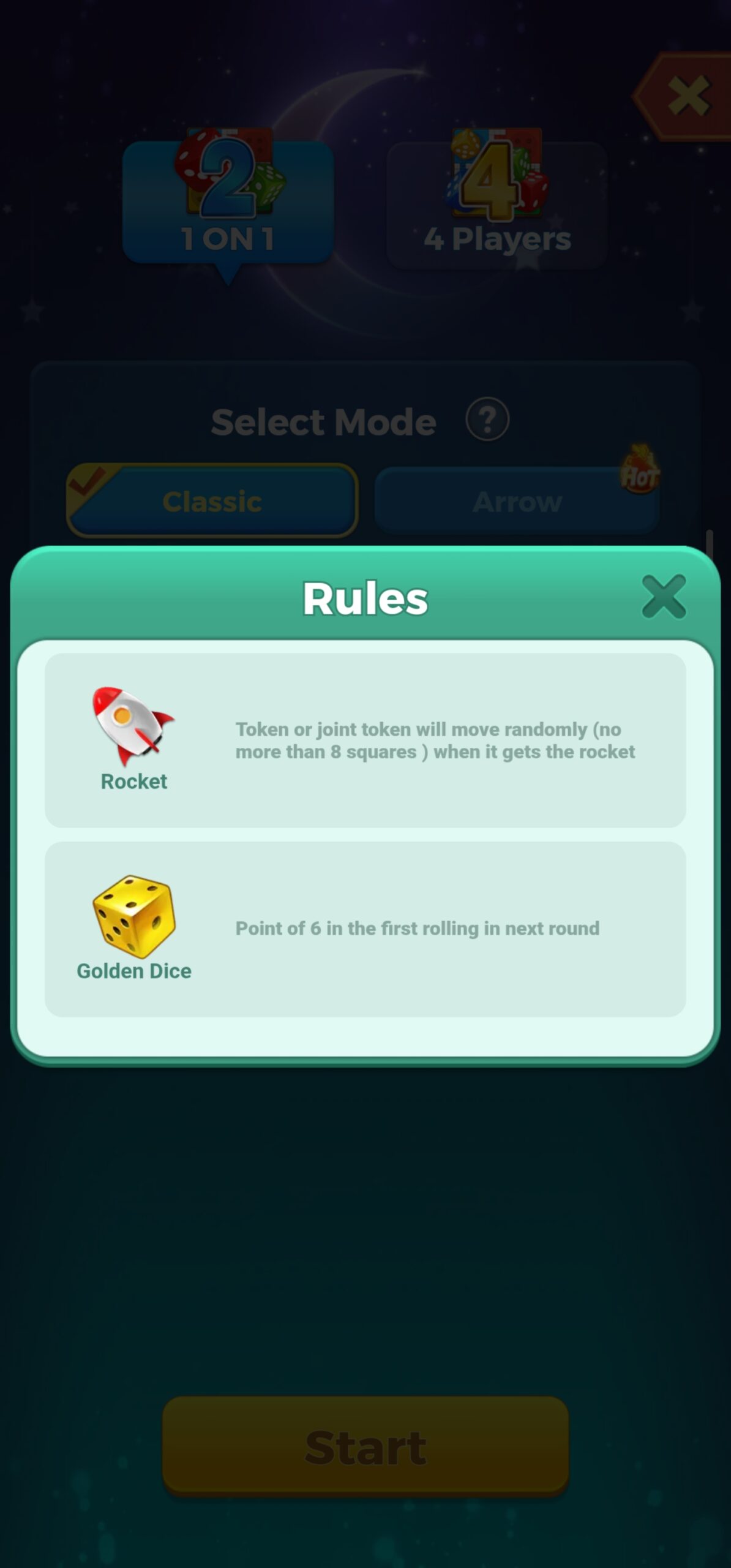
To play with Magic features, select your preferred Ludo mode, tap the Magic option, choose your bet, and then tap Start.
When Magic is enabled, special items can appear at random positions on the board:
- Rocket: When your token lands on a Rocket, it can move forward by up to 8 rows. The movement is random, and the Rocket may sometimes kill another token, so be careful when using it.
- Golden Dice: A Golden Dice can also appear at a random position. When you collect it, your next turn will give you a 6 directly.
These Magic items add an extra element of chance to the match. Their positions and effects can influence your next moves, so pay attention to them while playing.
4.2.1 Classic Mode
Classic Mode follows the traditional Ludo gameplay style.
Important features include:
- Players move their tokens according to the dice result.
- Capturing an opponent’s token earns points.
- Players can use the Undo feature in eligible situations.
- Special Undo conditions may apply after rolling three consecutive sixes.
4.2.2 Arrow Mode
Arrow Mode includes additional movement opportunities through arrows on the board.
Important features include:
- Landing on an arrow can provide an extra turn.
- Capturing an opponent’s token can provide an extra turn.
- Winning can also provide an extra turn, according to the mode’s gameplay rules.
- The Undo feature is available.
4.2.3 Quick Mode
Quick Mode has a different token-entry condition.
Players must capture an opponent’s token before they can enter their own token, according to the mode’s rules.
The objective is to complete the match using one token.
4.2.4 Master Mode
Master Mode is one of Yalla Ludo’s four official Ludo gameplays. It uses stricter capture-related conditions than a casual Classic match, so players should read the in-game rule prompt before the first roll.
- Capture requirement: A player must satisfy the mode’s required opponent capture before the relevant token can be brought into play or completed, as specified by the current match rules.
- No double-token wall: Do not assume that placing two same-colour tokens together creates a blocking wall. The track should not be treated as blocked by a stacked pair.
- Plan the finish: Keep a safe route and enough movement options available. A token close to home is not automatically safe if the required capture condition has not been met.
Master Mode rewards players who track the capture requirement and avoid committing every token to a risky position too early. A token’s route into the home/finish area should be planned around the required capture condition shown by the current match rules.
Practical Ludo Strategy: 1v1, Four Players, Safe Stars and Arrows
- In 1v1: You only need to track one opponent, so count their dice possibilities and avoid leaving a token within an easy capture range when they have a six or a likely landing roll.
- In four-player matches: Three opponents can threaten your tokens. A square that looks safe from one player may still be reachable by another, so check all three opponents before moving a token out of shelter.
- Use Safe Stars as staging points: A Safe Star is a protected place to pause and plan the next move. Do not rush off it unless the next landing square is worth the risk; watch the opponents’ positions around the exit.
- Use Arrow routes deliberately: Treat marked arrows as route shortcuts, not as a reason to move blindly. Before taking an arrow, check where it sends your token and whether the new position leaves it exposed to a capture.
- In Master: Track the capture requirement before planning a finish. Do not assume a token can enter the final home path just because the dice number fits.
These are practical risk-management tips from long-term play, not guarantees of a win. Dice outcomes remain random, and the current room’s on-screen rules should always take priority.
4.3 Betting Range in Main Ludo
The reported betting range in the main Ludo game starts from 500 Coins and can go up to 10,000,000 Coins.
Available betting amounts may depend on the selected room and game settings.
4.4 Undo Feature
The Undo feature allows players to reverse certain moves in eligible situations.
Based on observed gameplay, an Undo action may cost approximately 400 Diamonds per use.
The reported usage limits are:
- Up to 10 Undo actions per dice.
- Up to 3 Undo actions per turn.
The availability, cost, and limits should be checked in the current game interface because they may change.
5. Jackaroo Game
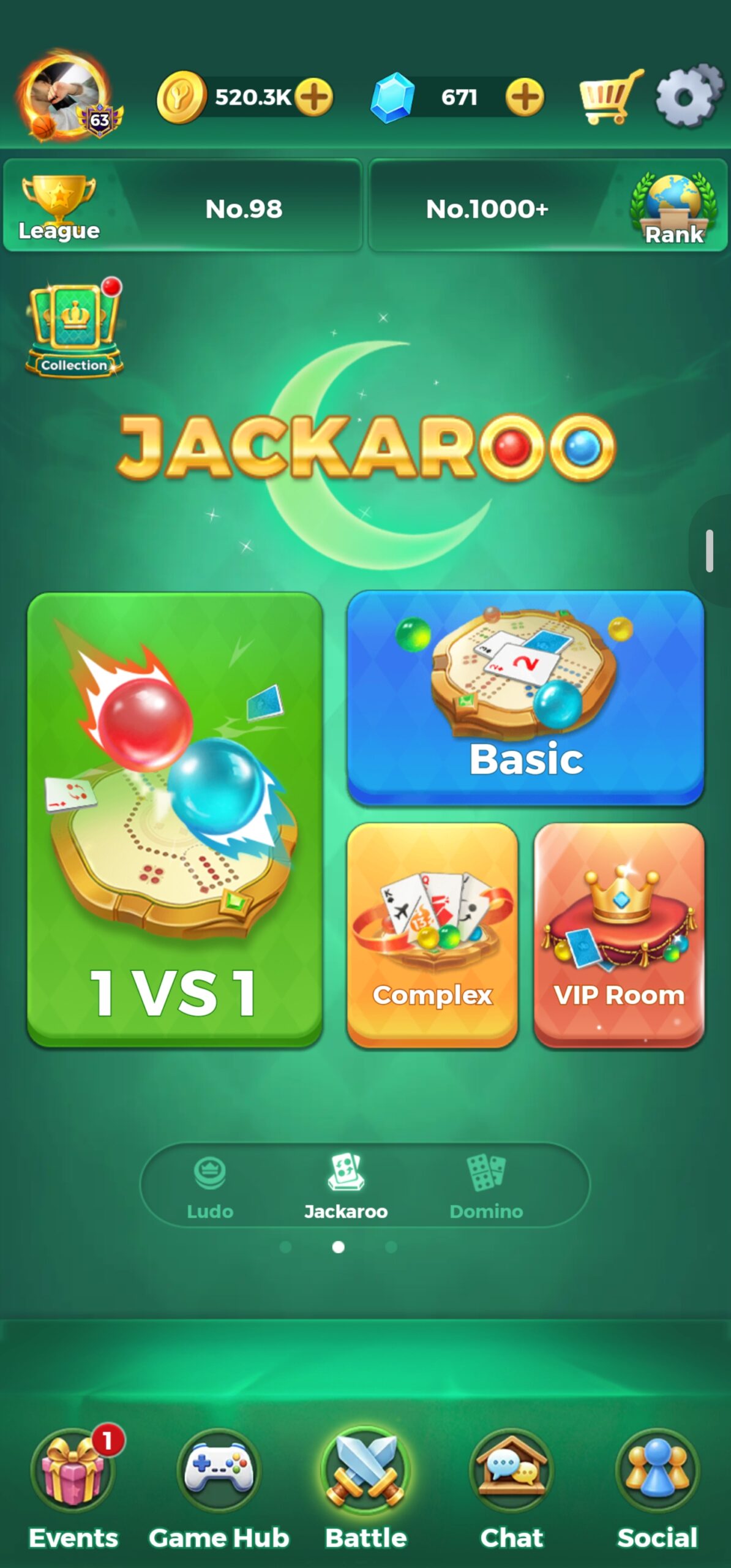
Jackaroo is another board game available in Yalla Ludo. It has its own gameplay style and room options.
5.1 Jackaroo Game Modes
The current official Yalla Ludo store listing names three Jackaroo modes:
- Basic: The standard Jackaroo gameplay option and a sensible starting point for learning the card-and-token flow.
- Complex: A more involved ruleset. Read the mode instructions in the room before joining because its conditions differ from Basic.
- Quick: A faster Jackaroo option designed for shorter matches.
These are game modes, not room types. Player count, team arrangement, betting, and VIP access are separate room settings and may vary by the available lobby.
5.2 Jackaroo Betting Range
The reported standard betting range is:
- Minimum bet: 2,000 Coins.
- Maximum bet: 50,000 Coins.
VIP rooms may offer higher custom betting amounts. Reported examples include 1,000,000 or 10,000,000 Coins, depending on the room.
5.3 Jackaroo VIP Room
Players with an eligible active VIP Knight or VIP Baron membership can join VIP rooms as players.
Other users may be able to enter as spectators, depending on the room settings.
6. Domino Game
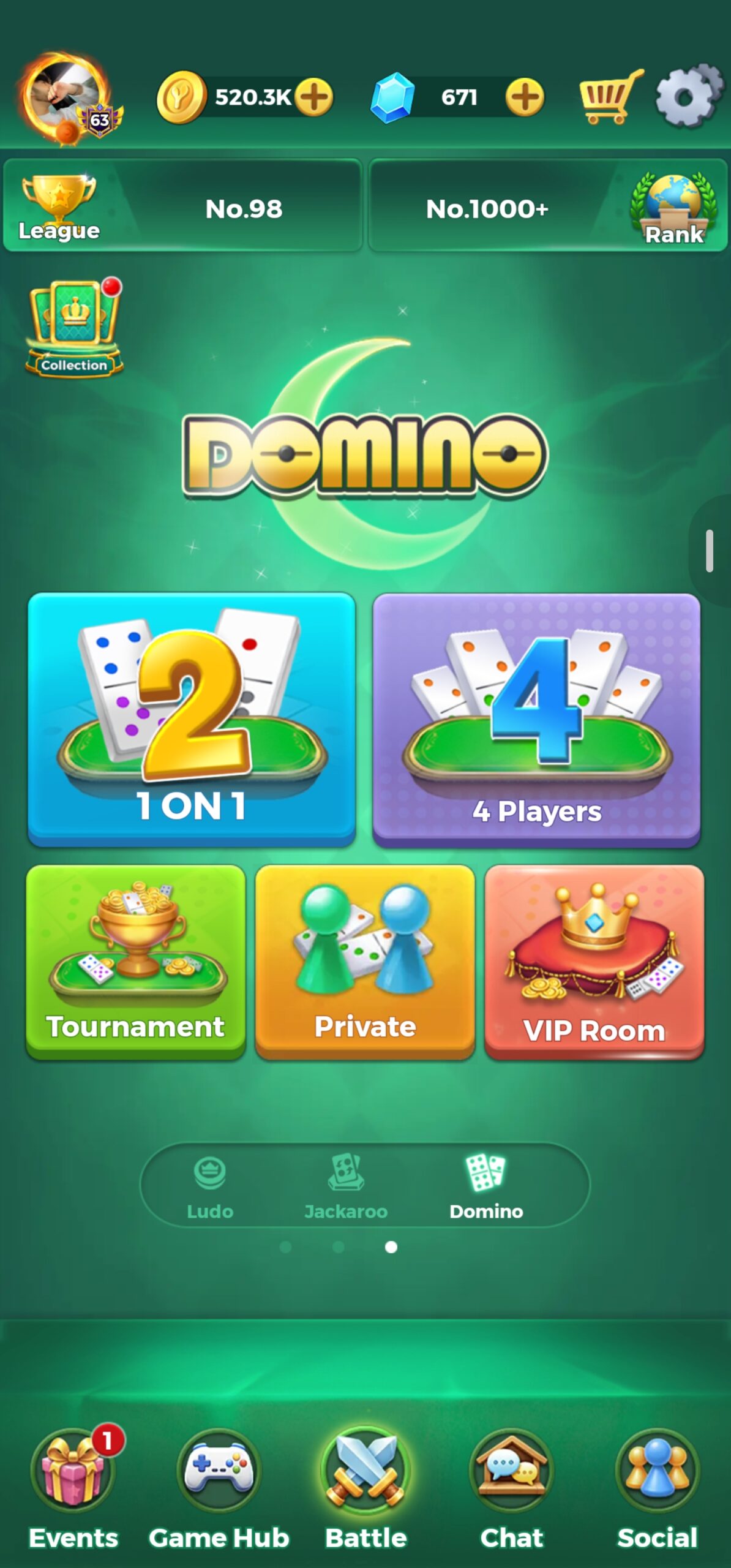
Domino is a separate game in Yalla Ludo. It is not the same as Carrom or Jackaroo.
The game offers different room types and gameplay options.
6.1 Domino Playing Options
Domino includes five main room options:
- 1 vs 1: Two players compete against each other.
- 4 Players: Four players participate individually. There is no team mode in this option.
- Tournament: Players participate in tournament matches.
- Private Room: Players can create or join private rooms to play with friends.
- VIP Room: An exclusive room with VIP access requirements.
VIP Room Access
An eligible active VIP Knight or VIP Baron membership is required to join a Domino VIP room as a player. Other users may be able to spectate.
6.2 Domino Betting Range
The reported betting range is:
- Minimum bet: 500 Coins.
- Maximum bet: 1,000,000,000 Coins.
The available betting amount depends on the room and match settings.
6.3 Domino Game Types
The official Yalla Ludo listing identifies two Domino gameplays: Draw Game and All Fives. Choose the format shown in the room before you join.
Draw Game
In Draw Domino, players take turns matching one end of a tile to an open end of the layout. If a player has no playable tile, they draw from the boneyard when tiles remain. The round continues until a player empties their hand or the game reaches a blocked position; the app’s score panel determines the result.
All Fives
All Fives adds a scoring target to the normal tile-matching process. When the exposed ends of the layout add up to a multiple of five, the player scores those points. This makes tile placement important: a move can extend the chain while also changing the open-end total.
Both formats are available in Yalla Ludo’s Domino section. The exact scoring display and match-end calculation should be checked in the current in-game rules panel.
6.4 Domino Tournaments
Domino also offers tournament-based gameplay.
The reported tournament structure includes six rounds.
Available tournament categories include:
- All Fives
- Quick Draw
- Draw
Reported entry fees include 20,000 Coins and 6,000 Coins. The exact entry fee depends on the tournament option.
7. Other Games in Yalla Ludo
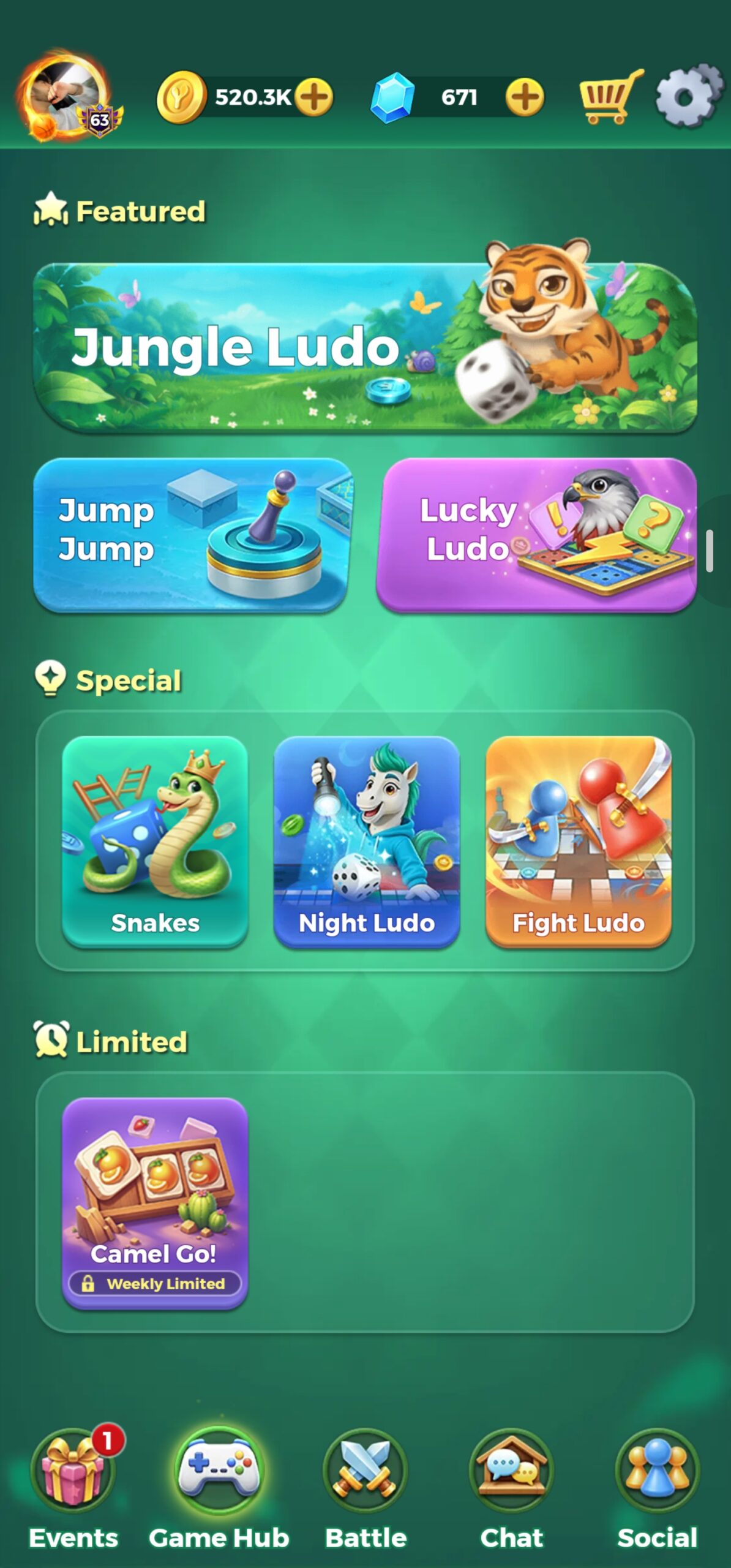
Apart from the main Ludo, Jackaroo, and Domino games, Yalla Ludo includes several additional games.
These games have different rules, betting ranges, and gameplay features.
7.1 Jungle Ludo
Jungle Ludo is a special Ludo variation that includes different environmental effects and obstacles.
Playing Options
- 1 vs 1
- Four-player individual mode (1 vs 3)
There is no team mode in Jungle Ludo.
Betting Range
- Minimum bet: 2,000 Coins.
- Maximum bet: 50,000 Coins.
Special Gameplay Features
Tiger
A Tiger can appear randomly on the board.
When a token lands on the Tiger, it can move forward by 15 rows. Tokens within the affected 15-row range can be killed.
A Shield can protect a token from the Tiger.
Thunderstorm and Lightning
Thunderstorms or lightning effects can appear at random positions on the board.
When a token is struck, it becomes stuck until the player’s next turn. The player can move it again when the next turn arrives.
Wind
Jungle Ludo includes two types of wind:
- Forward Wind
- Backward Wind
Landing on a wind position can move a token randomly forward or backward.
Observed movement examples include 2, 4, and 5 spaces. These are examples, not necessarily the complete range.
7.2 Lucky Ludo
Lucky Ludo is another special Ludo variation. It includes Mystery Spins that can appear when a player rolls certain numbers.
Playing Options
- 1 vs 1
- Four-player individual mode (1 vs 3)
There is no team mode in Lucky Ludo.
Betting Range
- Minimum bet: 2,000 Coins.
- Maximum bet: 50,000 Coins.
Mystery Spin on Number 4
Rolling a 4 can activate one of four possible effects:
1. Evacuation
Random positions on the board can be affected by a blast. Any token located at an affected position can be killed.
2. Freeze
The Freeze effect can stop an affected token at its current position.
3. Random Swap
A player’s token may randomly swap positions with another token.
4. Portal
A Portal can move the player’s token to another random position on the board.
Mystery Spin on Number 5
Rolling a 5 can activate one of five possible effects:
1. Falcon
Falcon sends one of the player’s tokens around the full Ludo track until it reaches the player’s home-entry point.
2. Super Takeoff
Super Takeoff opens all eligible unopened tokens at once.
3. Remote Dice
Remote Dice allows the player to select a desired dice number instead of relying on a normal random roll.
Observed examples include 2, 4, 6, 10, 11, and 12.
4. Super Shield
Super Shield protects all of the player’s opened tokens from opponent captures while the effect is active.
5. Whirlwind
Whirlwind can kill one opponent token located ahead of the player, provided the target token is not on a safe space.
7.3 Snakes and Ladders
Snakes and Ladders is a well-known board game available in Yalla Ludo.
Betting Range
- Minimum bet: 500 Coins.
- Maximum bet: 10,000 Coins.
How to Play
- Players must roll a 1 to open or start moving their token.
- The objective is to reach square 100 and win the game.
Snakes
If a player lands on a snake, the token moves down to the lower end of that snake.
The board includes both short and long snakes.
Ladders
If a player lands on a ladder, the token automatically moves upward to the ladder’s upper end.
Snakes and Ladders combines simple movement with the unpredictable effects of snakes and ladders.
7.4 Fight Ludo
Fight Ludo is a time-based Ludo variation in which players compete to capture as many opponent tokens as possible.
Playing Options
- 1 vs 1
- Four-player individual mode (1 vs 3)
Player Colours
In 1 vs 1 mode:
- Red
- Blue
In four-player mode:
- Red
- Blue
- Green
- Yellow
Betting Range
- Minimum bet: 2,000 Coins.
- Maximum bet: 10,000 Coins.
Match Duration and Winning Condition
Each match lasts 4 minutes and 30 seconds.
The player who captures the highest number of opponent tokens during the match wins.
7.5 Night Ludo
Night Ludo is a special Ludo mode with limited visibility. It creates a different gameplay experience because most of the board remains dark.
Playing Options
Night Ludo includes:
- Team Play
- Four-player individual mode
Betting Range
- Minimum bet: 2,000 Coins.
- Maximum bet: 10,000 Coins.
How Night Ludo Works
In Night Ludo, the area around a player’s token is illuminated, while the remaining board stays dark.
This means players cannot see every opponent token clearly.
Spotlight Feature
A Spotlight appears in one of the four sections of the board.
When a token reaches the Spotlight area, the light turns on. When the token moves away, the light turns off.
Hidden Opponent Tokens
Opponent tokens can remain hidden in the darkness.
Players may need to estimate where an opponent’s token is located.
For example, if a player believes an opponent’s hidden token is three spaces ahead and rolls a 3, the move may capture that token. However, the exact position may not be visible before the move.
Night Ludo adds uncertainty and excitement to the traditional Ludo experience.
7.6 Jump Jump
Jump Jump is another game available in Yalla Ludo following a recent update. The objective is to jump from one platform to another and successfully cross the gap.
The distance between platforms changes randomly in each attempt, so the required jump is not always the same. To control the jump, press and hold for as long as you think is needed to reach the next platform:
- Press for too long: Your character may jump beyond the target platform.
- Release too early: Your character may fall short and fail to reach the target.
Pay attention to the distance each time and adjust how long you hold the control before releasing it. The timing of your press determines how far the character jumps.
8. VIP Memberships in Yalla Ludo
Yalla Ludo offers VIP memberships that provide additional features and privileges.
The two VIP memberships covered in this guide are:
- VIP Knight
- VIP Baron
These memberships include daily rewards, profile features, VIP room access, and other social privileges.
8.1 VIP Knight

VIP Knight is one of the available VIP membership options.
Reported Monthly Price
Daily Rewards
VIP Knight reportedly provides:
- 5,770 Coins
- 20 Diamonds
- 1 Mystery Box
VIP Knight Benefits
The reported benefits include:
- Blue VIP Badge: A blue VIP badge appears on the player’s profile.
- Create VIP Rooms: Eligible members can create VIP rooms.
- VIP Room Access: Members can join eligible VIP rooms as players.
- Friends List Priority: The member can stay near the top of the friends list.
- Social Room Priority: VIP members receive priority in social room user lists.
- VIP Profile Frame: Members can use a special VIP profile frame.
VIP room access and participation are subject to the room’s eligibility requirements.
8.2 VIP Baron

VIP Baron is another VIP membership option with additional privileges.
Reported Monthly Price
Daily Rewards
VIP Baron reportedly provides:
- 28,000 Coins
- 60 Diamonds
- 1 Mystery Box
VIP Baron Benefits
The reported benefits include:
- Dark Purple VIP Badge: A dark purple or plum-coloured VIP badge appears on the profile.
- Create VIP Rooms: Members can create VIP rooms.
- Daily Rewards: Members receive the reported daily Coins, Diamonds, and Mystery Box.
- Friends List Priority: Members can stay near the top of the friends list.
- Social Room Priority: Members receive priority in social room user lists.
- VIP Profile Frame: Members can use a special profile frame.
- Image Sharing in Chats: Members can share images in supported chats.
- Special Room Entry Effect: A special visual effect appears when entering a room.
- Exclusive Chat Bubbles: Members can use special chat bubble designs.
- Special Profile Card: Members receive access to a special profile card for one month.
- Increased Friend Limit: The reported friend limit increases from 300 to 400.
- Send Gifts: Members can send gifts in social rooms and private chats.
- Custom Dice Skin in Social Rooms: Members can use a custom dice appearance instead of the default white dice.
Some VIP Baron privileges may depend on the current membership package and app version.
9. Final Overview
Yalla Ludo offers a variety of multiplayer games and social features in one app.
The main Ludo game includes four modes: Classic, Arrow, Quick, and Master. Players can also explore Jackaroo, Domino, Jungle Ludo, Lucky Ludo, Snakes and Ladders, Fight Ludo, and Night Ludo.
Each game has its own gameplay style, room options, and betting limits. Some games offer team play, while others are based on individual competition.
Coins and Diamonds are the main in-game currencies. Players can also collect different dice designs through free rewards, keys, Diamonds, and limited-time activities.
For users who want additional privileges, VIP Knight and VIP Baron provide benefits such as daily rewards, VIP room access, profile features, and social options.
This guide focuses on the games, gameplay modes, in-game features, and VIP memberships available in Yalla Ludo. Royal Pass levels, Royal Pass benefits, purchasing methods, and detailed gift-sending instructions are covered separately rather than being included in this game guide.
Read more: For account creation, login methods, security, linking and recovery, read our Yalla Ludo Account Guide (Setup, Link & Recovery). If you enjoy other online Ludo games, read our Ludo STAR APK guide as well.
Official resources: Install or update the game through the official Yalla Ludo Google Play listing on Android or the official Yalla Ludo Apple App Store listing on iPhone and iPad. For support and account-related questions, visit the official Yalla Games FAQ.
Frequently Asked Questions About Yalla Ludo
What happens if you roll three 6s in Yalla Ludo?
Under the three-sixes rule described in this guide, rolling three consecutive sixes cancels the player’s turn. The third six does not provide another move. Check the rule prompt in the selected room because mode-specific rules can change.
What is the difference between Classic and Master mode in Yalla Ludo?
Classic follows the traditional Ludo flow. Master adds a capture requirement that affects when a token can reach the home or finish area. Read the current Master Mode rule prompt before the match, and do not assume that two same-colour tokens form a blocking wall.
When do you get an extra dice roll in Yalla Ludo?
The standard bonus-roll situations covered in this guide are rolling a six, capturing an opponent’s token, and moving a token safely into its home or finish destination. The selected gameplay may add or change conditions, so check its in-game rules.
Can two tokens block the path in Yalla Ludo?
No. Do not rely on stacking two same-colour tokens to create a blockade. Plan your route around the board’s marked safe spaces and the actual rules shown for the selected mode.
Which Domino and Jackaroo modes are available in Yalla Ludo?
The official store listings identify Draw Game and All Fives for Domino, and Basic, Complex, and Quick for Jackaroo. The options available can depend on the current app version and room.